On this page
Odoo ChatGPT Integration: 3 Ways to Connect ChatGPT with Odoo

WebbyCrown Solutions-
September 8, 2026-17 min read
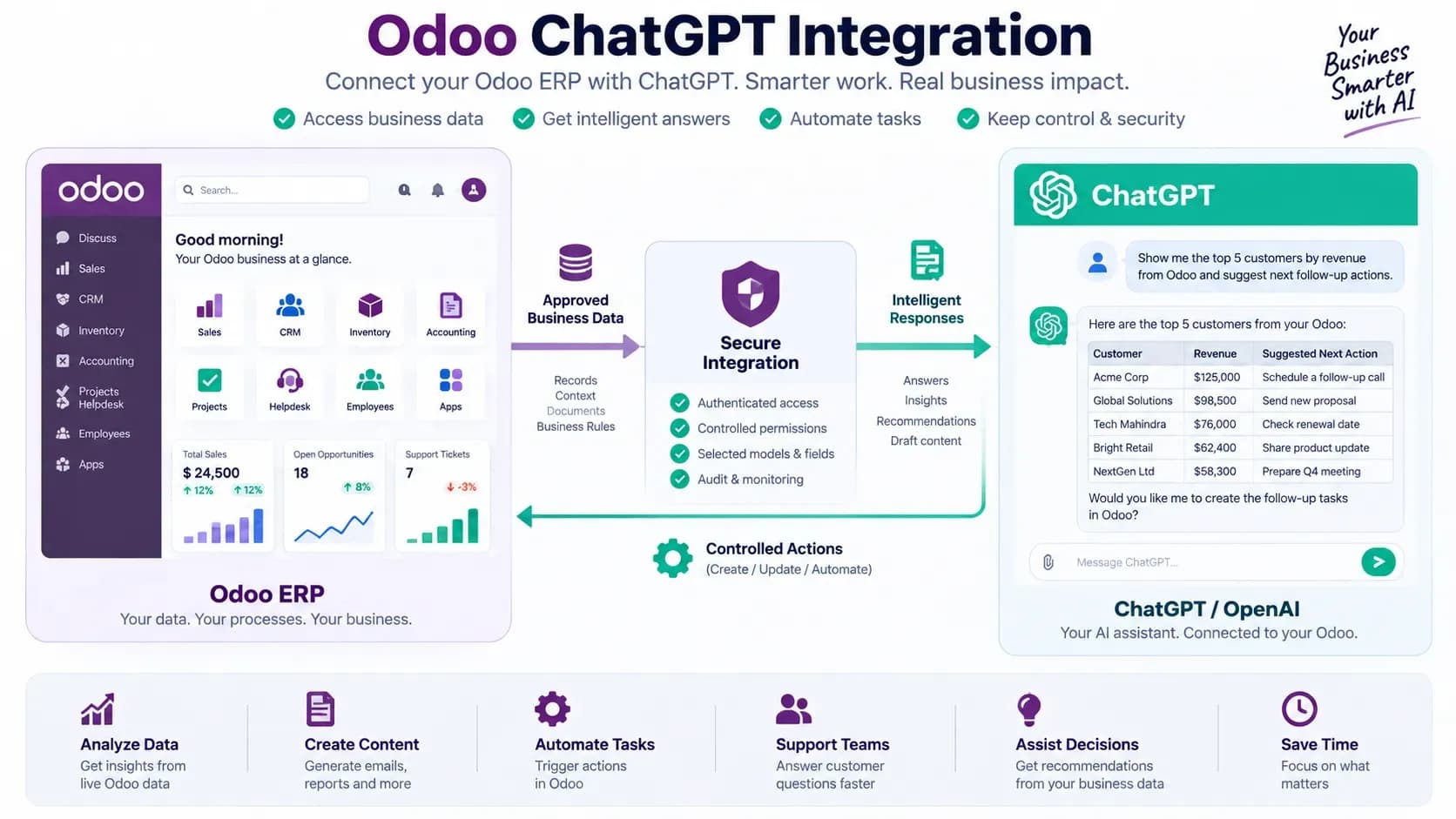
Odoo ChatGPT integration can connect approved ERP context with ChatGPT while keeping authentication, permissions and write actions under business control.
Odoo ChatGPT Integration means connecting Odoo with ChatGPT or OpenAI so users can generate content, analyze approved ERP context or invoke controlled business actions. In 2026 there are three practical routes: use ChatGPT as a model inside Odoo 19 native AI, connect an in-Odoo assistant or custom workflow to the OpenAI API, or let a compatible external ChatGPT environment access approved Odoo tools through MCP. The right route depends on where users work, which Odoo version you run, what data may leave Odoo and whether the AI needs read-only context or permission-controlled actions.
ChatGPT can be useful around Odoo, but "connect ChatGPT to Odoo" is not one technical architecture. The same phrase can describe a native Odoo AI model choice, a custom API integration, an installed communication assistant, or an external AI client using governed Odoo tools. Treating those approaches as interchangeable creates confusion about credentials, data flow, permissions and write access.
For the broader architecture decision - native AI, in-Odoo assistants, MCP and automation - read our Odoo AI Integration guide. This article owns the narrower search intent: how ChatGPT specifically can work with Odoo and which integration route fits each use case.
Editorial disclosure
WebbyTemplate publishes this guide and lists Odoo AI and MCP products referenced below. Product statements are based on current live product pages and supplied first-party source-audit material. This article separates verified capabilities from assumptions and includes important limitations where relevant.
Key Takeaways
- Odoo ChatGPT Integration is an umbrella term; the integration can run inside Odoo, through the OpenAI API, or through an external AI client using MCP.
- Odoo 19 official documentation says its AI agents support multiple versions of ChatGPT and Gemini.
- Native Odoo AI is the simplest starting point when the required workflow already exists inside the installed Odoo version.
- An in-Odoo OpenAI assistant is useful for controlled drafting, rewriting, summarization and record-aware communication without moving users to a separate chat interface.
- A custom OpenAI API integration is appropriate when developers need tailored prompts, context selection, business logic or outputs beyond a packaged assistant.
- MCP is appropriate when ChatGPT or another compatible external AI environment needs live Odoo data or approved Odoo actions.
- MCP does not make access safe automatically; authentication, Odoo ACLs, record rules, tool scope and write controls still matter.
- Do not send the full Odoo database to ChatGPT by default. Select only the models, records, fields and context needed for the task.
- High-impact write actions should be controlled by deterministic business logic and human approval where appropriate.
- OpenAI states that business and API inputs and outputs are not used to train its models by default; review the exact workspace, API retention settings and provider policies used in your deployment.
What Is Odoo ChatGPT Integration?
Odoo ChatGPT Integration is the process of connecting Odoo business data or workflows with ChatGPT/OpenAI capabilities so users can ask questions, generate content, analyze selected context or trigger approved actions.
The critical word is approved. A useful business integration should not give an AI model unrestricted access to Odoo. The integration layer should determine which Odoo identity is used, which models and fields are visible, which operations are exposed and whether a person must review the result before a write action occurs.
Odoo 19 has its own AI layer. The official Odoo 19 AI Agents documentation states that Odoo supports multiple versions of both ChatGPT and Gemini as LLM model choices for agents. Odoo also documents Ask AI, AI server actions and AI-assisted automation.
Can ChatGPT Connect Directly to Odoo?
Yes, but not through one universal "Connect ChatGPT" button that works identically across every Odoo version, hosting plan and ChatGPT workspace. The connection method depends on the architecture.
- Inside Odoo 19: configure native Odoo AI and select an available ChatGPT/OpenAI-backed model where supported.
- Inside Odoo 17-19 or a custom workflow: use an installed assistant or custom module that calls the OpenAI API with selected Odoo context.
- From an external AI environment: use MCP or another controlled API layer so a compatible ChatGPT client can discover and call approved Odoo capabilities.
If your requirement is simply email drafting or chatter assistance inside Odoo, a full external ChatGPT-to-ERP tool layer may be unnecessary. If your requirement is live record analysis or approved actions from an external AI workspace, a communication-only assistant will be too limited.
3 Ways to Integrate ChatGPT with Odoo
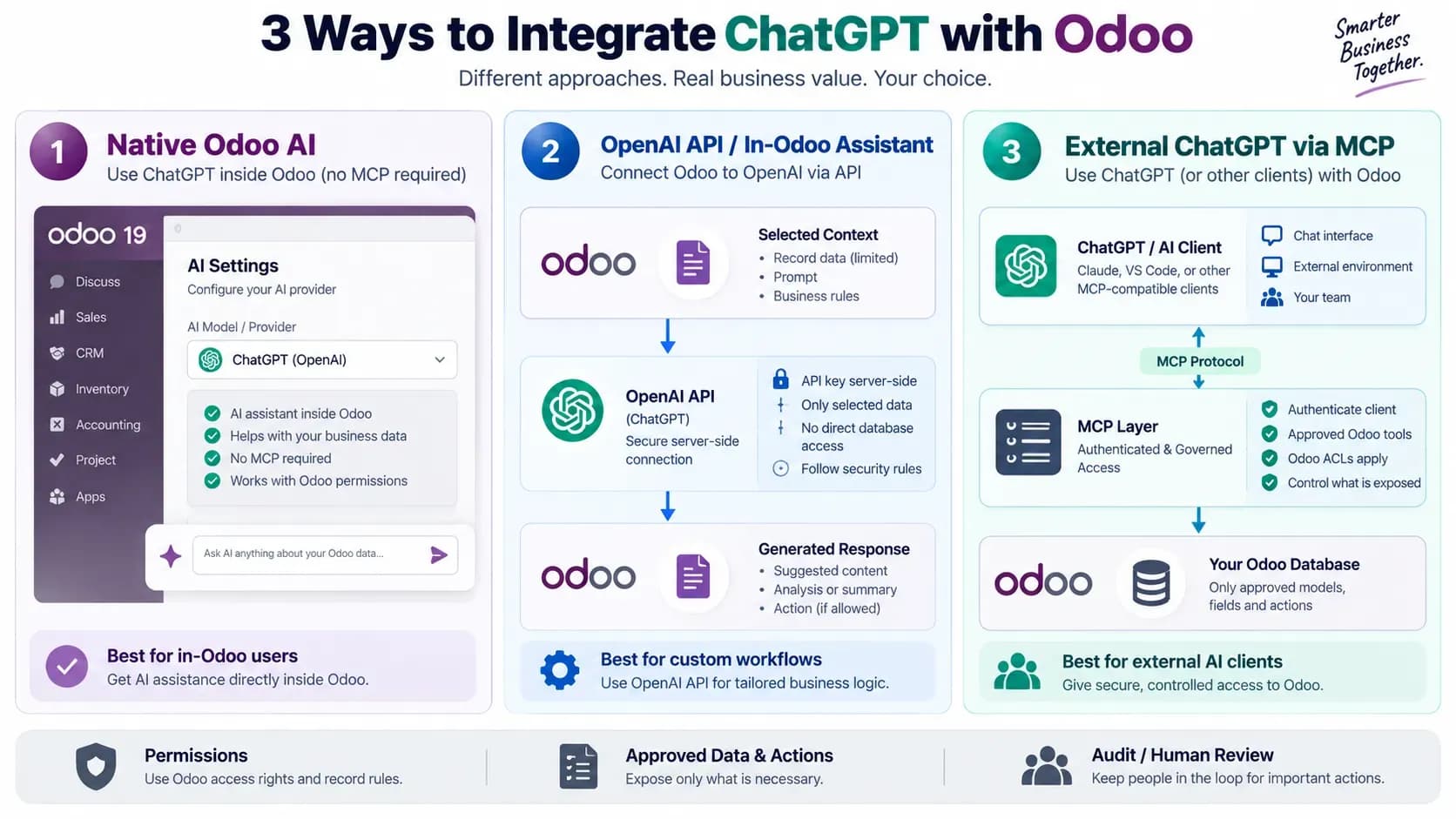
Three practical Odoo ChatGPT integration routes: native Odoo AI, OpenAI API or an in-Odoo assistant, and external ChatGPT access through MCP.
| Route | Best for | Where users work | Odoo access path | Main trade-off |
|---|---|---|---|---|
| 1. Native Odoo AI | Odoo 19 users who need AI inside Odoo | Odoo | Native AI agents/tools/context | Depends on installed Odoo version and native capabilities |
| 2. OpenAI API / in-Odoo assistant | Custom workflows, email, chatter, selected record context | Odoo or custom app | Odoo module/middleware → OpenAI API | You own prompt, data-scope and integration design |
| 3. External ChatGPT via MCP | External AI needs live Odoo tools or actions | ChatGPT/AI client | AI client → authenticated MCP → Odoo | Requires connector compatibility and careful tool governance |
Route 1: Use ChatGPT Through Native Odoo AI
For Odoo 19, native AI should be the first route to evaluate when the user experience belongs inside Odoo. Odoo documents AI agents, Ask AI, AI fields and AI server actions, and its agent setup supports ChatGPT and Gemini model choices.
An Odoo AI agent has a defined purpose, prompt, Topics/Skills, Tools and Sources. The exact terminology can vary across Odoo documentation revisions, but the architecture separates instructions, knowledge and executable capabilities.
This route is a good fit when users already work inside Odoo and need contextual help such as summarizing, drafting, retrieving approved information or using native Tools. It avoids adding MCP merely because an AI model is involved.
Important boundary
Using ChatGPT as the model behind a native Odoo AI feature is not the same as giving a personal ChatGPT conversation direct login access to your Odoo database. Odoo remains the application layer that decides what context and Tools are available.
Route 2: Connect Odoo to the OpenAI API or Use an In-Odoo Assistant
A second route is to keep the user inside Odoo while a module or custom service sends selected context to the OpenAI API and returns the generated result to Odoo. This is useful when the requirement is narrower or more customized than the native Odoo AI feature set.
Typical use cases include email drafting, chatter replies, summarization, subject lines, reusable prompts, field-specific analysis or a custom workflow where developers decide exactly which Odoo fields are sent to the model.
WebbyTemplate lists Odoo AI Email & Chatter Assistant, an in-Odoo communication addon for Odoo 17, 18 and 19. The current product material documents OpenAI along with Azure OpenAI, Anthropic Claude, Google Vertex AI, OpenRouter, Cohere and custom endpoints. It is a communication assistant - not an MCP server and not a vector-RAG platform.
For a product-specific explanation, see Odoo AI Assistant: How Email & Chatter AI Works.
When a Custom OpenAI API Integration Makes More Sense
- You need a custom prompt pipeline or structured output that a packaged assistant does not provide.
- You need to choose exactly which models, records and fields are sent to OpenAI.
- You need a middleware service that combines Odoo data with another internal system.
- You need business-specific validation before generated output is written back to Odoo.
- You need your own usage logging, caching, retry logic, rate controls or provider-routing logic.
For Odoo 19 external integrations, the official External JSON-2 API exposes part of the Models API over HTTP and uses API-key authentication. Odoo notes that external API access is tied to Custom pricing plans and recommends dedicated bot users with minimum required permissions for long-running integrations.
A custom ChatGPT/OpenAI integration should keep provider secrets server-side. Do not embed OpenAI API keys in browser JavaScript or expose Odoo credentials to the model.
Route 3: Connect an External ChatGPT Environment to Odoo Through MCP
MCP fits a different user experience: the person works in ChatGPT or another compatible external AI environment, while Odoo exposes a controlled set of tools through an MCP server.
The basic flow is: User -> ChatGPT/AI client -> authenticated MCP server -> approved Odoo Tool -> Odoo -> result back to the client.
Odoo now documents an AI MCP server in its current master documentation. Availability and setup should be checked against the exact Odoo release you run. The documentation describes an Odoo database acting as a remote MCP server that can expose approved server actions/tools to an external AI client.
If MCP is new to your team, read What Is an Odoo MCP Server? before choosing a connector.
Odoo MCP Connection for ChatGPT and Other Compatible Clients
WebbyTemplate's Odoo MCP Connection is positioned for broader governed external access. Its current product page documents Odoo 10-19 support, Community and Enterprise compatibility, testing with Claude, ChatGPT and Cursor, read/analytics tools, controlled create/update/delete operations, model and field controls, OAuth/Bearer authentication, audit logging, rate limits and IP controls.
Delete is documented as disabled by default. The product also states that AI-provider keys are not stored in the Odoo module and that the MCP data path is direct between the AI client and the customer's Odoo environment rather than through a WebbyCrown relay server.
What About the RAG Odoo MCP Server?
The RAG Odoo MCP Server provides a smaller tool surface for live Odoo record access, controlled record creation and configurable knowledge guidance.
Do not mislabel this product as classic vector RAG
The reviewed implementation does not provide vector embeddings, a vector database, semantic similarity search, automatic document indexing or document chunking. Choose it for its actual MCP and knowledge-guidance capabilities, not because the product name contains the word RAG.
Which Odoo ChatGPT Integration Route Should You Choose?
| Business requirement | Recommended starting route | Why |
|---|---|---|
| Draft or rewrite email/chatter inside Odoo | Native/in-Odoo assistant | Keeps the employee in the current Odoo workflow |
| Use Odoo 19 AI agents with ChatGPT as the model | Native Odoo AI | Uses Odoo-managed agent context, Topics/Skills and Tools |
| Build a custom ChatGPT feature with selected Odoo fields | OpenAI API/custom module | Maximum control over prompts, context and application logic |
| Let external ChatGPT inspect approved live Odoo records | MCP | External client can use a defined, authenticated Tool surface |
| Let external AI run analytics and controlled CRUD | Governed MCP connector | Tool, model, field, domain and operation controls matter |
| Run a fixed trigger-condition-action workflow | Ordinary Odoo automation | AI is unnecessary when deterministic logic is enough |
| Classify text before selecting a controlled action | AI server action + Tool | AI handles interpretation; business logic handles execution |
What Can ChatGPT Do With Odoo?
What ChatGPT can do depends on the integration route and the permissions you expose. Practical use cases include:
- Draft sales follow-up emails using selected CRM context.
- Summarize chatter, helpdesk tickets or project discussions.
- Rewrite customer-facing messages in a required tone.
- Analyze approved sales records and explain trends in plain language.
- Generate first-draft reports or management summaries from selected data.
- Classify incoming support requests before a controlled routing action.
- Retrieve approved customer, order, inventory or project information.
- Create an activity, task or other record when the integration exposes that action and permissions allow it.
- Suggest next steps while leaving final approval with a user.
- Support internal Q&A using approved Odoo context or knowledge sources.
Do not promise that ChatGPT can "manage all of Odoo" unless you have deliberately implemented and tested that scope. Broad autonomous access is usually the wrong default for an ERP.
How to Set Up Odoo ChatGPT Integration Safely
1. Define one business task before choosing the technology.
2. Choose the route: native Odoo AI, OpenAI API/in-Odoo assistant, or external ChatGPT through MCP.
3. Create a dedicated least-privilege Odoo identity where the architecture supports it.
4. Define exactly which models, records and fields the AI may receive.
5. Configure provider credentials or connector authentication in the appropriate server-side environment.
6. Start with read-only or drafting workflows before enabling write operations.
7. Add deterministic validation and approval for high-impact actions.
8. Test both allowed and denied requests.
9. Log usage, Tool calls and important actions where possible.
10. Re-test after model changes, Odoo upgrades, permission changes or new Tools.
Security and Data Governance for Odoo ChatGPT Integration
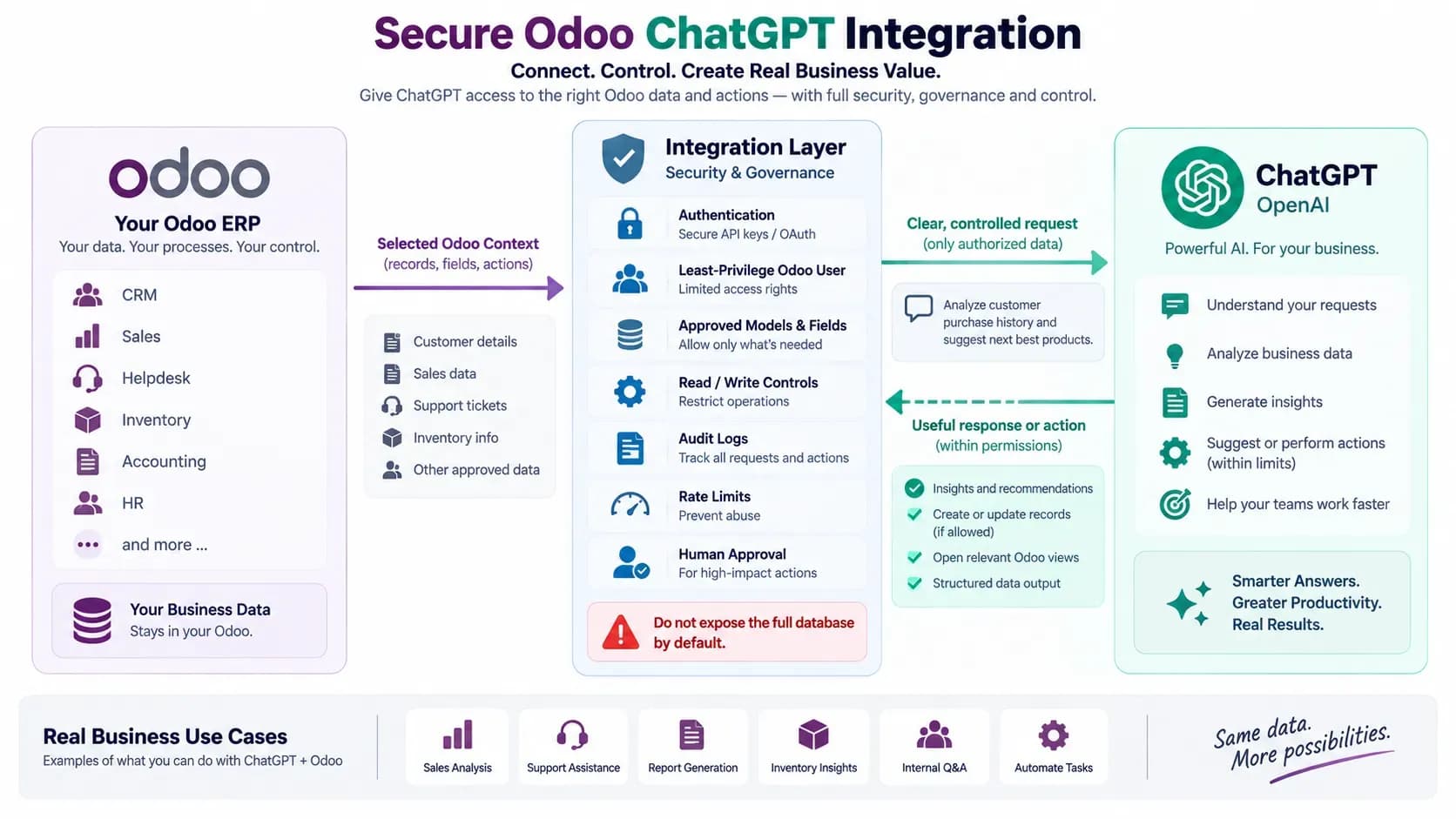
A secure Odoo ChatGPT integration limits access to approved records, fields and actions and adds authentication, auditability and human review where required.
1. Use Least-Privilege Odoo Access
Do not connect ChatGPT using an unrestricted administrator account unless a narrowly defined administrative workflow genuinely requires it. Odoo's JSON-2 API documentation recommends dedicated bot users for automated integrations so only minimum required permissions need to be granted and auditing remains clear.
2. Select Context Instead of Sending Everything
A support reply may need the ticket, customer name and recent messages. It probably does not need payroll records, unrelated accounting fields or the entire customer database. Context minimization improves privacy, reduces prompt noise and makes the integration easier to reason about.
3. Separate AI Judgment From Business Enforcement
Odoo's AI server actions documentation explicitly separates the AI decision-maker from the Tool that performs the operation. The AI interprets context and chooses a Tool; the Tool is responsible for actual business logic.
That is a strong pattern for ChatGPT integrations too. Let the model classify or recommend, while deterministic application code verifies permissions, values and business constraints before a record is changed.
4. Review OpenAI Data Controls for the Exact Product You Use
OpenAI states on its Business data privacy page that inputs and outputs from its API platform and business offerings are not used to train models by default. OpenAI also documents retention controls for qualifying API organizations. Consumer ChatGPT workspaces can have different data-control behavior, so do not assume one privacy policy applies to every ChatGPT account or integration route.
Your organization should still review provider retention, data residency, contract terms, sensitive-data policies and whether the selected Odoo fields are appropriate to send to an external provider.
5. Require Human Approval for High-Impact Actions
- payments or financial posting
- record deletion
- employee or HR decisions
- legal or compliance communications
- large pricing changes
- mass customer communication
- sensitive account changes
- any action that is costly or difficult to reverse
Odoo ChatGPT Integration vs Odoo AI Agents
These are related but not identical search intents. Odoo ChatGPT Integration asks how ChatGPT/OpenAI connects to Odoo. Odoo AI Agents asks how Odoo's native agent architecture works, including prompts, Topics/Skills, Tools and Sources.
A native Odoo AI agent can use ChatGPT as its model provider, so the topics overlap at that point. But ChatGPT can also be integrated through a custom API or an external MCP client, which is why this article should remain a separate page instead of being replaced by an AI-agent-only guide.
Odoo ChatGPT Integration vs MCP
ChatGPT is an AI product/model environment; MCP is a protocol for connecting AI clients to external tools and data. They are not alternatives at the same layer.
Simple distinction
ChatGPT answers or reasons. MCP exposes controlled Odoo capabilities to a compatible AI client. You can use ChatGPT without MCP inside Odoo, or use ChatGPT with MCP when the ChatGPT environment is external and needs governed Odoo tools.
For the protocol-level explanation, use What Is an Odoo MCP Server?. For a client-specific implementation example, see How to Connect Claude to Odoo Using MCP. The Claude article owns the Claude-specific setup intent and should not be duplicated here.
Common Odoo ChatGPT Integration Mistakes
- Using an Odoo administrator account when a restricted service user would work.
- Sending every field from a record because it is easier than defining context.
- Putting OpenAI or Odoo secrets in front-end code.
- Allowing write or delete actions before read-only behavior is tested.
- Assuming prompt instructions are a substitute for Odoo permissions and business validation.
- Using AI for deterministic workflows that ordinary Odoo automation can handle more reliably.
- Calling any retrieval feature "vector RAG" without verifying embeddings, indexing and retrieval architecture.
- Assuming every ChatGPT workspace supports the same external Tool or MCP capabilities.
- Ignoring provider data handling because the integration is "only AI."
- Publishing generated customer, HR, legal or financial content without appropriate review.
Recommended Odoo ChatGPT Integration Architecture by Use Case
| Use case | Architecture | Human review? |
|---|---|---|
| Draft a sales email | In-Odoo assistant / native AI | Yes before sending |
| Summarize a support ticket | Native AI / OpenAI API | Recommended |
| Analyze approved sales data from external ChatGPT | MCP or controlled API | Yes for decisions/actions |
| Create a follow-up activity from external AI | MCP with create Tool | Recommended |
| Update a high-impact financial record | Controlled Tool + business validation | Required in most deployments |
| Classify a ticket and assign a team | AI server action + deterministic action | Review during testing; monitor production |
| Semantic search across a large document corpus | Separate evaluated RAG architecture | Depends on downstream action |
Methodology and Limitations
This guide was prepared on September 7, 2026 using current official Odoo documentation for AI, AI agents, AI server actions, the External JSON-2 API and Odoo's current MCP documentation; OpenAI business-data guidance; current WebbyTemplate Odoo AI/MCP product pages; and the live WebbyTemplate Odoo article cluster.
The review is an architecture and capability analysis, not an independent penetration test, load test, compliance certification, OpenAI model benchmark or production evaluation across every Odoo database. Odoo AI features, ChatGPT client capabilities, provider models, MCP support and third-party product implementations can change. Recheck exact version, hosting, authentication, Tool and data-flow compatibility before production rollout.
This article intentionally does not claim that the RAG Odoo MCP Server provides classic vector RAG, because the reviewed implementation does not include vector embeddings, a vector database, semantic search, automatic indexing or document chunking.
FAQs
Q1.
Can ChatGPT integrate with Odoo?
Q2.
Does Odoo 19 support ChatGPT natively?
Q3.
Does Odoo ChatGPT Integration require MCP?
Q4.
Can ChatGPT read live Odoo records?
Q5.
Can ChatGPT create or update Odoo records?
Q6.
What is the best way to use ChatGPT with Odoo 17 or 18?
Q7.
Is an OpenAI API integration the same as a ChatGPT subscription?
Q8.
Does OpenAI train on Odoo data sent through the API?
Q9.
Is MCP safer than a direct API integration?
Q10.
Which WebbyTemplate product fits Odoo ChatGPT Integration?
Final Takeaway
A good Odoo ChatGPT Integration starts with one business task and the smallest architecture that solves it.
- Use native Odoo AI when users need ChatGPT-powered assistance inside a supported Odoo environment.
- Use an OpenAI API or in-Odoo assistant when you need a focused or customized workflow inside Odoo.
- Use MCP when a compatible external ChatGPT environment needs live, permission-controlled Odoo Tools.
- Use ordinary automation instead of AI when the same trigger should always produce the same deterministic action.
Whichever route you choose, keep Odoo permissions narrow, send only necessary context, separate AI judgment from business enforcement, test denied access as well as successful access, and add human review before high-impact actions. The goal is not to give ChatGPT the largest possible ERP access. The goal is to give it exactly enough controlled context and capability to improve a real business workflow.
Sources and Related Resources
- Odoo 19 AI documentation
- Odoo 19 AI Agents
- Odoo 19 AI Server Actions
- Odoo 19 External JSON-2 API
- Odoo current AI MCP Server documentation
- OpenAI Business Data Privacy
- WebbyTemplate - Odoo AI Integration
- WebbyTemplate - What Is an Odoo MCP Server?
- WebbyTemplate - How to Connect Claude to Odoo Using MCP
- WebbyTemplate - Odoo AI Assistant
- Odoo AI Email & Chatter Assistant product
- Odoo MCP Connection product
- RAG Odoo MCP Server product