On this page
Odoo AI Assistant for Email & Chatter: How It Works in Odoo 17–19

WebbyCrown Solutions-
April 27, 2026-12 min read
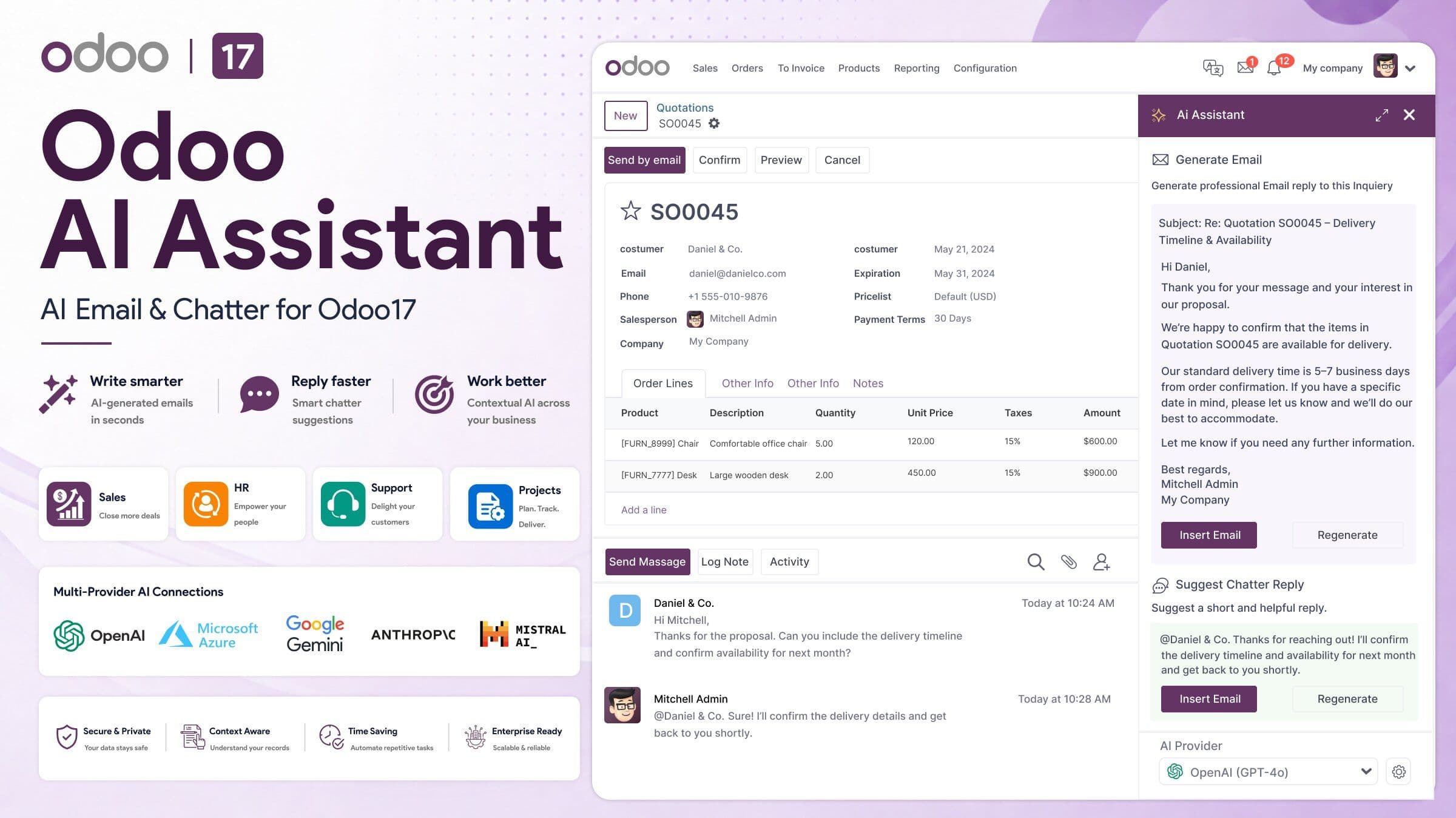
Odoo AI Assistant is an in-Odoo communication assistant that helps users draft, rewrite and summarize email or chatter content, generate subject lines, reuse prompts and create email-template content without leaving their normal Odoo workflow. The current WebbyTemplate product family is available for Odoo 17, 18 and 19; the source audit used for this update directly reviewed the Odoo 19 build.
The important distinction is scope: this is a communication-focused AI module, not a general database chatbot, not an MCP server and not a vector-based RAG system. It is designed for teams that want AI help where Odoo communication already happens — inside record-level email and chatter workflows.
Editorial disclosure: WebbyTemplate publishes this guide and sells the related Odoo AI Email & Chatter Assistant product through its marketplace. Product details below are based on current product documentation, source review and buyer-trust information, with limitations included where relevant.
Key Takeaways
- Odoo AI Assistant focuses on email, chatter and record-aware business communication inside Odoo.
- The current product family is available for Odoo 17, 18 and 19; the audited source package directly verified the Odoo 19 build.
- The source includes integrations for OpenAI, Azure OpenAI, Google Vertex AI, Anthropic Claude, Cohere, OpenRouter and custom AI endpoints.
- Depending on configuration, selected Odoo record, partner and chatter context may be sent to the customer-selected AI provider.
- The audited source did not identify a separate WebbyTemplate or WebbyCrown AI relay server.
- The module includes prompt templates, quick prompts, usage logging, configurable limits, caching, user roles and field-scope controls.
- This product is not an MCP server and does not provide vector-based RAG or semantic document retrieval.
What Is Odoo AI Assistant?
Odoo AI Assistant is a communication-focused addon that brings AI-assisted writing into Odoo records. Instead of copying a lead, ticket, employee record or project discussion into a separate AI tool, a user can work from the Odoo email composer or chatter workflow and generate or improve content using the context configured for that record.
This fits Odoo’s existing communication model. Odoo documents that chatter appears on records across the database and supports messages, internal notes, attachments and activities. Email replies can also return to the related chatter thread, which makes record-level AI assistance especially useful for communication-heavy workflows.
If you want to review the product itself, see Odoo AI Email & Chatter Assistant on WebbyTemplate.
How Does Odoo AI Assistant Work?
The exact interface can vary by Odoo version and screen, but the source-audited workflow follows a simple pattern:
1. A user opens an Odoo record that contains email or chatter communication.
2. The user chooses an AI action such as draft reply, rewrite, summarize, generate subject or run a custom prompt.
3. The module assembles the configured context, which can include selected record data, partner information, recent messages or chatter and prompt settings.
4. Odoo sends the request to the AI provider configured by the customer.
5. The provider returns generated content to Odoo.
6. The user reviews, edits and decides whether to send or use the result.
Human review still matters. The product helps create a first draft or suggestion; it does not remove the need to check customer details, commitments, pricing, legal language or other business-sensitive content before sending.
What Problems Does Odoo AI Assistant Solve?
The strongest use case is not “AI everywhere in ERP.” It is repetitive business writing that already happens inside Odoo.
- Slow sales follow-up emails
- Repeated customer-support replies
- Inconsistent HR or onboarding communication
- Manual rewriting of internal or client-facing messages
- Repeated subject-line and email-template creation
- Context switching between Odoo and a separate AI writing tool
- Teams using different prompts with no reusable internal pattern
For these workflows, AI assistance can reduce blank-page work while keeping the employee inside the ERP record they are already handling.
Product Overview: Odoo AI Email & Chatter Assistant
The following snapshot is based on current WebbyTemplate product material and the audited addon package. It is included to help readers distinguish verified capabilities from generic “AI assistant” claims.
| Area | Current Verified Position |
|---|---|
| Product family | Odoo 17, 18 and 19 |
| Source-audited build | Odoo 19.0; manifest version 19.0.0.0.0 |
| Main purpose | AI-assisted email, chatter and business communication inside Odoo |
| Core actions | Draft, rewrite, summarize, subject generation, custom prompt, email-template generation |
| AI providers | OpenAI, Azure OpenAI, Google Vertex AI, Anthropic Claude, Cohere, OpenRouter, custom endpoint |
| Context | Selected record, partner/customer and communication context depending on configuration |
| Roles | AI Mail User and AI Mail Manager |
| Usage controls | Usage logs, configurable limits, rate-window settings and caching |
| Provider credentials | Configured inside the customer’s Odoo environment |
| Vendor AI relay | None identified in the audited source |
| MCP server | No |
| Vector RAG | No |
View Odoo AI Email & Chatter Assistant on WebbyTemplate
What Can Odoo AI Assistant Do?
Draft Email and Chatter Replies
Generate a first draft using the selected business context and prompt configuration. This can help with lead follow-ups, support responses, project updates and other repeatable communication.
Rewrite Existing Content
Improve an existing message according to the selected instruction, tone or business purpose instead of starting over.
Summarize Communication
Condense message or conversation content so users can review the important points faster before responding.
Generate Subject Lines
Create subject-line suggestions for business emails when users want a faster starting point.
Run Custom Prompts
Use reusable instructions for repeatable communication scenarios rather than retyping the same prompting approach each time.
Generate Email-Template Content
Create HTML email-template content for Odoo communication workflows.
Use Quick Prompts
Launch recurring AI actions more quickly; the source also tracks usage count and last-used information for quick prompts.
Which AI Providers Does Odoo AI Assistant Support?
The audited Odoo 19 source includes server-side integrations for the following provider options:
- OpenAI
- Azure OpenAI
- Google Vertex AI
- Anthropic Claude
- Cohere
- OpenRouter
- Custom AI endpoint
Provider flexibility matters because organizations may choose different models or endpoints based on cost, internal policy, availability, regional requirements or existing cloud agreements. The article does not assume that every provider offers the same model capabilities, price or data-processing terms.
Why Context-Aware AI Matters in Odoo
A generic writing tool can produce text, but the user normally has to paste the relevant customer, ticket or project details into it manually. Odoo AI Assistant is designed to use selected Odoo context so the generated draft can better reflect the record being handled.
Depending on configuration and workflow, context can include record fields, partner or customer information, recent messages or chatter, the current model and reusable prompt settings. This can reduce manual copying, but it also makes data-scope configuration important because some of that context may be sent to the chosen AI provider.
How Do Data Flow, Privacy and AI Provider Credentials Work?
This is one of the most important areas to understand before deployment.
Data flow: Odoo sends the configured prompt and selected context to the AI provider chosen by the customer. The provider returns generated content to Odoo. The audited source did not identify a separate WebbyTemplate or WebbyCrown AI relay server in this processing path.
Provider credentials: AI provider credentials and model settings are configured inside the customer’s Odoo environment. Buyers should protect access to these settings and follow the provider’s own credential-management guidance.
Context scope: The source includes Standard, Strict and Custom whitelist field-inclusion modes to help control which record fields can enter AI context.
PII handling: A PII-redaction helper exists for patterns such as email addresses, phone numbers and some ID-style values, but the source review does not support a claim that every context path is universally redacted. Administrators should therefore configure field scope deliberately instead of assuming all sensitive data is automatically removed.
What Usage and Governance Controls Are Included?
The source contains several controls that make the module more suitable for managed team use than a simple one-button AI integration.
User roles
AI Mail User and AI Mail Manager roles separate ordinary use from management responsibilities.
Usage logging
Logs can record details such as user, action, provider, model, related record, duration, estimated token usage and success status.
Usage limits
The audited source includes a default daily limit of 500 requests per user and configurable rate-window settings; the default rate window is 60 seconds.
Caching
Response caching is implemented with a default TTL of 300 seconds.
Optional debug logging
Debug-level request or response information can be enabled, which should be handled carefully in production because business context may appear in logs.
Where Can Odoo AI Assistant Be Used?
The product is not tied to one department. It is most relevant on Odoo models where email or chatter communication is part of day-to-day work.
Sales and CRM
Draft follow-ups, meeting recaps, nurture messages and customer-facing replies using selected CRM context.
HR and Internal Communication
Prepare interview messages, onboarding instructions or other record-linked communication while keeping human review in place.
Helpdesk and Support
Generate a first response or rewrite an existing reply using the available ticket and conversation context.
Projects and Account Management
Create clearer stakeholder updates, project summaries and client communication from the record being handled.
Marketing and Events
Generate structured email copy or reusable email-template content where Odoo communication workflows are used.
Which Odoo Versions Are Available?
The current product family is available for Odoo 17, 18 and 19. The source audit used for this article directly verified the Odoo 19 package.
After purchase, contact WebbyTemplate with the Odoo version you need so the matching compatible package can be provided. Buyers should keep the package aligned with the Odoo series used in their production database.
Odoo AI Assistant vs an Odoo MCP Connection: What Is the Difference?
These are different product types and should not compete for the same use case.
| Decision Area | Odoo AI Email & Chatter Assistant | Odoo MCP Connection |
|---|---|---|
| Where the user works | Inside Odoo email/chatter workflows | Inside an external compatible AI client or agent workflow |
| Main job | Draft, rewrite, summarize and improve business communication | Expose approved Odoo tools, data and actions through MCP |
| AI provider/API handling | Odoo calls the customer-selected AI provider | AI-provider keys stay on the AI-client side |
| Best fit | Communication assistance inside Odoo | System connectivity and tool-driven Odoo access |
| MCP product | No | Yes |
If your requirement is external AI-client connectivity to live Odoo tools and approved actions rather than email/chatter writing, review Odoo MCP Connection instead.
What Should You Check Before Using an AI Assistant in Odoo?
7. Confirm the Odoo version and package you will deploy.
8. Choose the AI provider and review its current pricing, data-processing terms and regional requirements.
9. Decide which record fields and chatter context are actually necessary for the workflow.
10. Restrict access to AI configuration and provider credentials.
11. Test prompts with non-sensitive data before production use.
12. Review output before sending customer, HR, legal or commercial communication.
13. Review usage logs and limits so unexpected volume or provider costs are easier to spot.
14. Recheck field scope, logging and provider configuration after major Odoo or module updates.
Is Odoo AI Assistant Right for Your Business?
This product is a better fit when the problem is repetitive communication inside Odoo rather than general AI automation across every ERP process.
| Good Fit When You Need | Look for Another Approach When You Need |
|---|---|
| Email and chatter drafting inside Odoo | A general chat interface for querying the entire database |
| Rewrite, summarize and subject-generation assistance | MCP-based access from Claude, ChatGPT or Cursor to Odoo tools |
| Reusable prompts for business communication | Vector embeddings, semantic document retrieval or classic RAG |
| Multiple AI-provider options | Fully autonomous actions without human review |
| Usage logs and configurable limits | A workflow that must never send selected context to an external AI provider |
Methodology and Limitations
This update was prepared on August 22, 2026 using the live search landscape for Odoo AI Assistant queries, official Odoo documentation for chatter and email communication, the current WebbyTemplate product materials, the supplied Odoo AI Assistant source package and buyer-trust information.
The source review directly verified the Odoo 19 package. Odoo 17 and 18 availability is based on the current product family and seller-provided package availability. The article does not claim independent benchmarking of response quality, model accuracy, latency, provider cost, penetration testing or compliance certification.
The source contains data-scope and PII-handling helpers, but this article deliberately does not claim universal automatic redaction or universal record-level security across every possible context path. Production deployments should review permissions, field scope, provider policies and logs for their own environment.
FAQs
Q1.
What is Odoo AI Assistant?
Q2.
Which Odoo versions are available?
Q3.
Which AI providers does Odoo AI Assistant support?
Q4.
Can Odoo AI Assistant draft email replies?
Q5.
Can it use Odoo chatter and record context?
Q6.
Where are AI provider credentials configured?
Q7.
Does data pass through a WebbyTemplate AI server?
Q8.
Is Odoo AI Assistant an MCP server?
Q9.
Is Odoo AI Assistant a vector-based RAG product?
Q10.
Does the module include usage controls?
Final Takeaway
Odoo AI Assistant is strongest when it is evaluated for the job it actually performs: helping teams write and respond inside Odoo with selected business context. Its value is not a claim that AI can run the entire ERP. It is the ability to bring drafting, rewriting, summarization, prompt reuse and multi-provider AI support into communication workflows that already exist in Odoo.
For buyers, the practical questions are which Odoo version you use, which AI provider you want, what context is allowed to leave Odoo, which users can access the assistant and how much human review your communication requires.
When that use case matches your workflow, Odoo AI Email & Chatter Assistant on WebbyTemplate provides a product path for Odoo 17–19. If the requirement is instead MCP-based system access from external AI clients, use an Odoo MCP solution rather than forcing this communication assistant into a different role.