On this page
What Is an Odoo MCP Server? How It Connects AI Assistants to Odoo

WebbyCrown Solutions-
August 22, 2026-15 min read
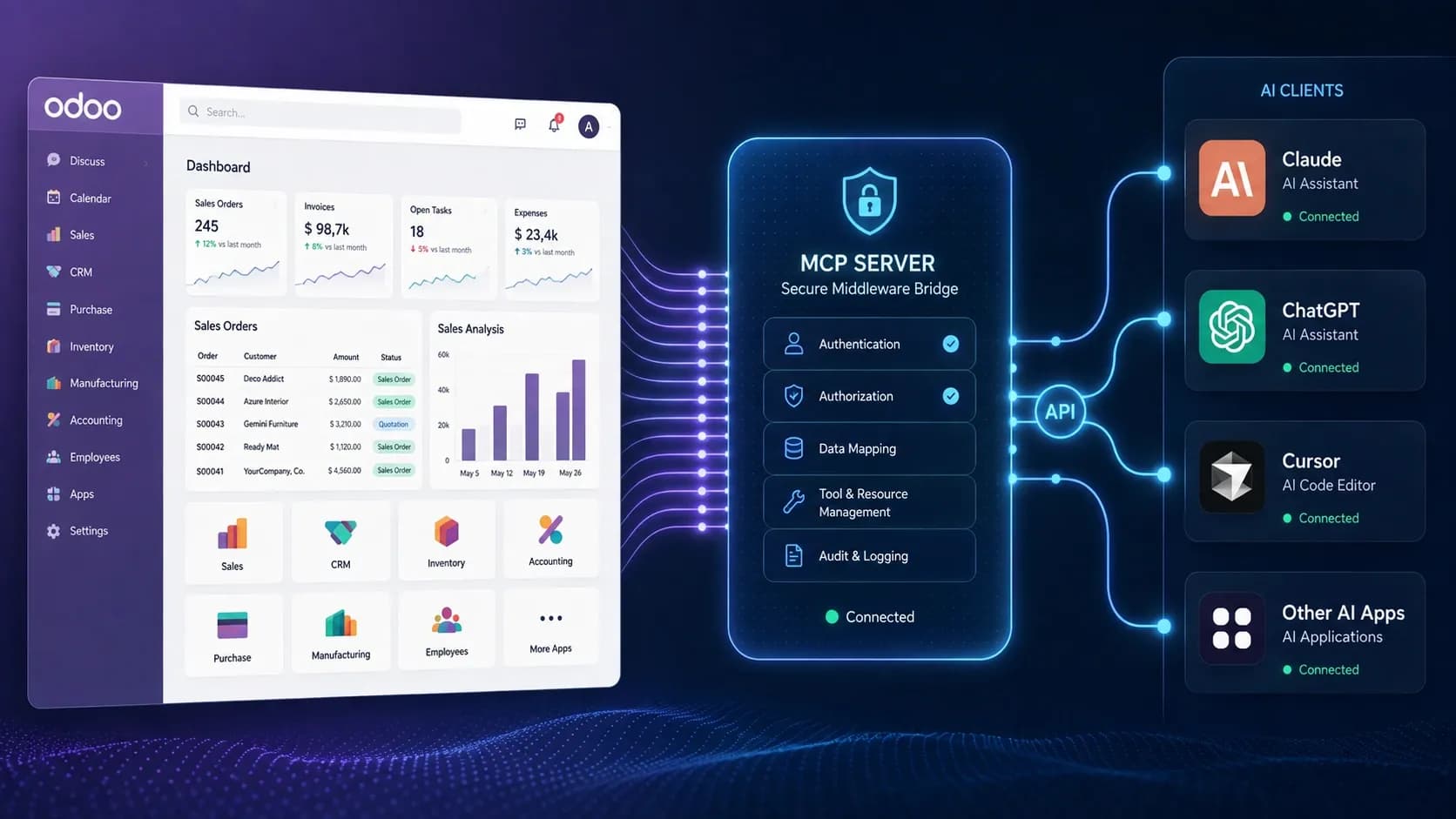
An Odoo MCP server is a controlled connection layer that lets compatible AI applications use approved Odoo data and actions through the Model Context Protocol (MCP). Instead of giving an AI assistant unrestricted database access, the server exposes defined tools, authenticates the connection, applies Odoo and connector-level permissions, runs the approved operation, and returns the result to the AI client.
For a business, that can mean asking an AI assistant to find customers, summarize sales activity, inspect a permitted model, run an aggregate query, or create an approved record - without building a completely separate integration for every AI client.
The important part is that 'Odoo MCP server' describes an integration pattern, not one fixed feature set. Transport, authentication, supported clients, tools, write access, deployment and security controls vary between implementations.
Editorial disclosure: WebbyTemplate publishes this guide and offers Odoo MCP products through its marketplace. Product examples below are based on current first-party product specifications, source review and buyer-trust documentation; limitations are included where relevant.
Key Takeaways
- MCP is an open standard for connecting AI applications with external systems and tools.
- An Odoo MCP server exposes selected Odoo capabilities as tools that compatible AI clients can invoke.
- Odoo should remain the system of record; the MCP layer should not bypass user permissions or expose more data than the workflow requires.
- MCP is not the same as RAG. Vector databases, embeddings and semantic search are not required for MCP.
- Buyers should compare exact tools, write permissions, authentication, transport, deployment and audit controls - not the product name alone.
- The current MCP specification is 2026-07-28, but real products may implement earlier protocol revisions, so protocol compatibility should be checked before purchase or deployment.
What Is the Model Context Protocol?
The Model Context Protocol (MCP) is an open standard for connecting AI applications with external data sources, tools and workflows through a consistent interface. A compatible client can discover or invoke capabilities exposed by a server instead of relying on a one-off integration for every AI application.
A simple architecture looks like this:
AI application -> MCP client -> Odoo MCP server -> approved Odoo models, tools and business operations
MCP is evolving quickly. The 2026-07-28 specification introduced a stateless protocol core, routing changes, authorization hardening and a formal extensions framework. That matters to buyers because an older MCP server can still be useful, but its protocol revision and transport may not match every modern client.
What Does an Odoo MCP Server Do?
An Odoo MCP server translates an AI client's structured tool request into an approved Odoo operation. The exact flow depends on the implementation, but a controlled request commonly follows these steps:
1.The user asks a question or requests an action inside an AI client.
2.The AI client selects an available Odoo MCP tool.
3.The client sends a structured request to the MCP endpoint.
4.The server authenticates the token, OAuth session or connected identity.
5.The connector checks the allowed Odoo user, model, fields, records and operation scope.
6.Odoo executes the permitted request.
7.The server returns the result to the AI client.
8.The request may be recorded in an audit log for review.
Example: a sales manager asks, "Show the ten largest confirmed sales orders created this month." A capable connector could call a permitted analytics or search tool, query only the records the connected identity may access, and return structured results to the AI client.
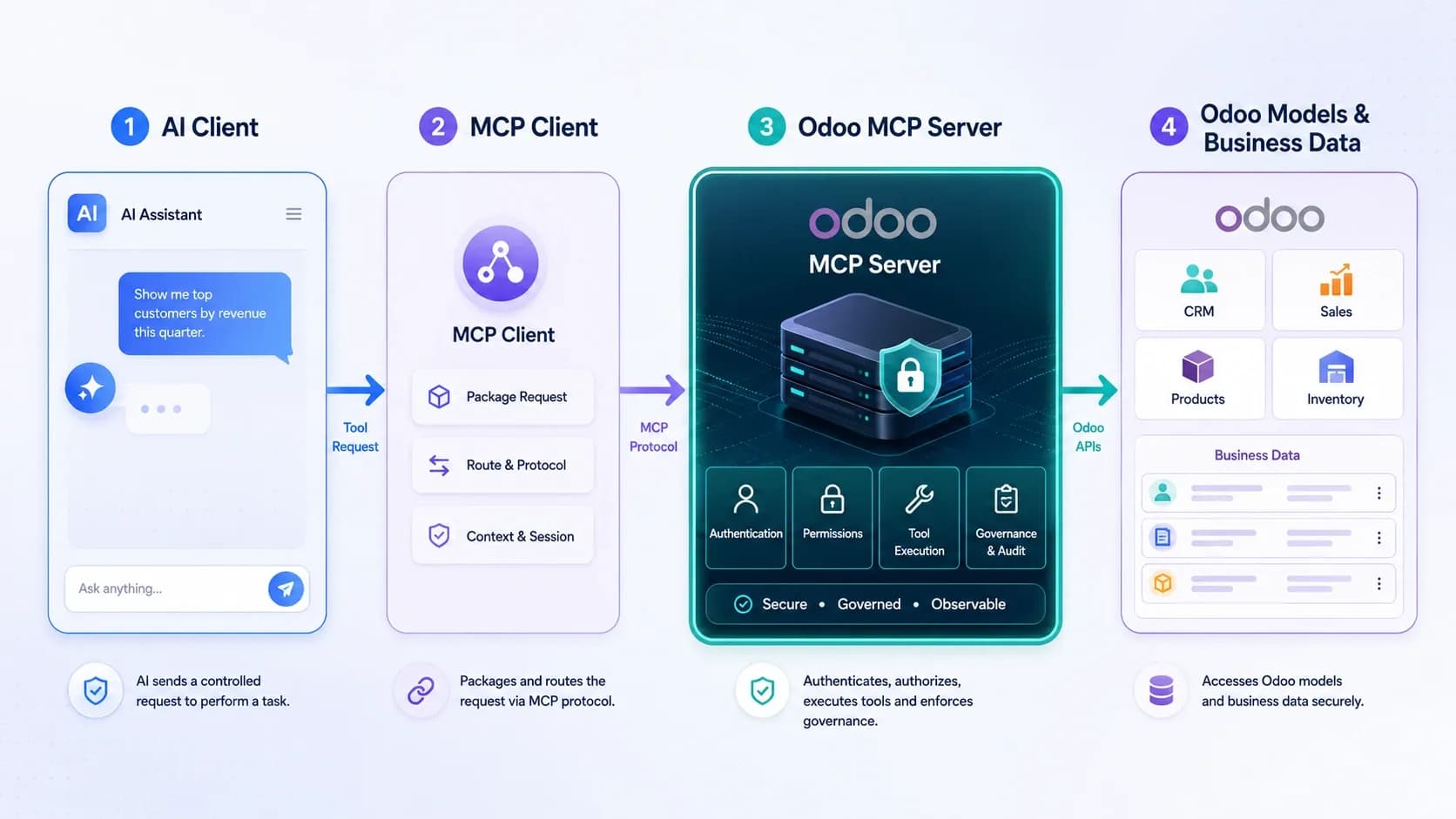
Typical flow: AI client -> authenticated MCP request -> approved Odoo tool -> result.
What Can an Odoo MCP Server Access?
There is no universal Odoo MCP tool list. One implementation may provide only record search and retrieval, while another may add analytics, batch operations or controlled writes. The tool list and permission model should therefore be verified product by product.
Model and Field Discovery
Some connectors let an AI client discover permitted Odoo models and inspect available fields. This can help an AI client work with custom modules and database-specific structures without assuming that every Odoo installation has the same schema.
Record Search and Retrieval
A connector may search approved records using Odoo domains, retrieve a record by ID, or return selected fields. Depending on the user and configuration, this can cover CRM, contacts, sales, inventory, purchasing, projects, helpdesk, HR or custom models.
Business Analytics
More advanced Odoo MCP implementations can expose aggregation, pivot-style summaries, time-series analysis, funnels, cohorts or top-N queries. Performing these operations as server-side tools can be more efficient than retrieving thousands of raw records and asking the AI client to calculate everything itself.
Create, Update and Delete Operations
Write access is not automatic. A product can contain create, update or delete permission flags without exposing all three as MCP tools. Buyers should inspect the actual tool list and confirm whether destructive operations are disabled by default, require approval, or are not implemented at all.
Why Use MCP Instead of a Separate Odoo AI Integration?
A traditional integration usually connects one application to Odoo through a specific API workflow. That can be the right choice for deterministic automation, but it may become repetitive if several AI clients need the same business capabilities.
MCP provides a shared tool interface that compatible clients can understand. It does not remove implementation or security work, but it can reduce client-specific integration logic when the same approved Odoo capabilities need to be used by Claude, ChatGPT, Cursor or internal agents.
| Decision area | Odoo MCP server | Direct Odoo API integration |
|---|---|---|
| Primary fit | AI assistants, copilots and agent workflows | Fixed integrations and deterministic workflows |
| Interface | MCP tools and protocol | Odoo API or custom endpoint |
| Tool discovery | Can be discoverable to compatible MCP clients | Usually coded directly into the application |
| Client portability | Potentially reusable across several compatible AI clients | Often application-specific |
| Permissions | Odoo rights plus connector controls where available | Odoo/API rights plus custom integration controls |
| Best reason to choose it | Several AI clients need controlled access to reusable Odoo capabilities | One application needs a narrow, predictable integration |
Odoo 19 introduced the External JSON-2 API, and Odoo documents that API operations are validated against the access rights, record rules and field access of the user. That principle remains relevant for MCP: an AI connector should not become a shortcut around the ERP's authorization model.
Is an Odoo MCP Server the Same as RAG?
No. MCP and retrieval-augmented generation (RAG) solve different problems. MCP connects AI applications with external systems and tools. RAG is an information-retrieval architecture used to supply relevant context before an answer is generated.
| Area | MCP | RAG |
|---|---|---|
| Primary role | Tool invocation and system access | Retrieval and answer grounding |
| Typical data access | Live applications, APIs and business operations | Indexed text, documents or other retrievable knowledge |
| Write actions | Possible when a server exposes and authorizes them | Not a defining RAG capability |
| Vector database | Not required | Common in classic embedding-based RAG, but not universal |
| Relationship | An MCP tool can expose a RAG system | RAG does not automatically provide an MCP interface |
A product name containing "RAG" does not prove that the product uses embeddings, vector similarity, automatic document chunking or semantic search. Those features have to be confirmed from the technical implementation.
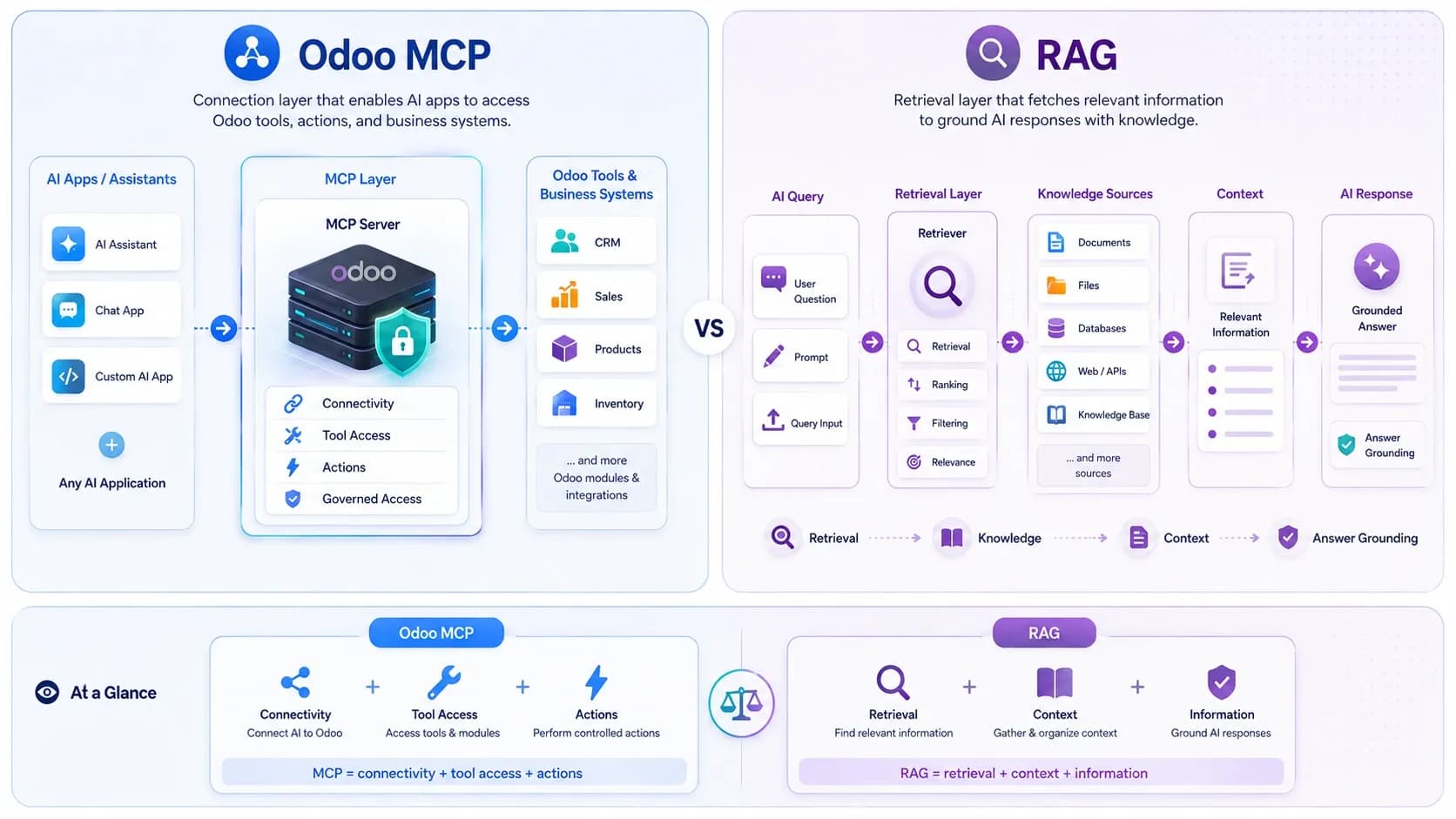
MCP connects AI applications with systems and tools; RAG focuses on retrieval and answer grounding.
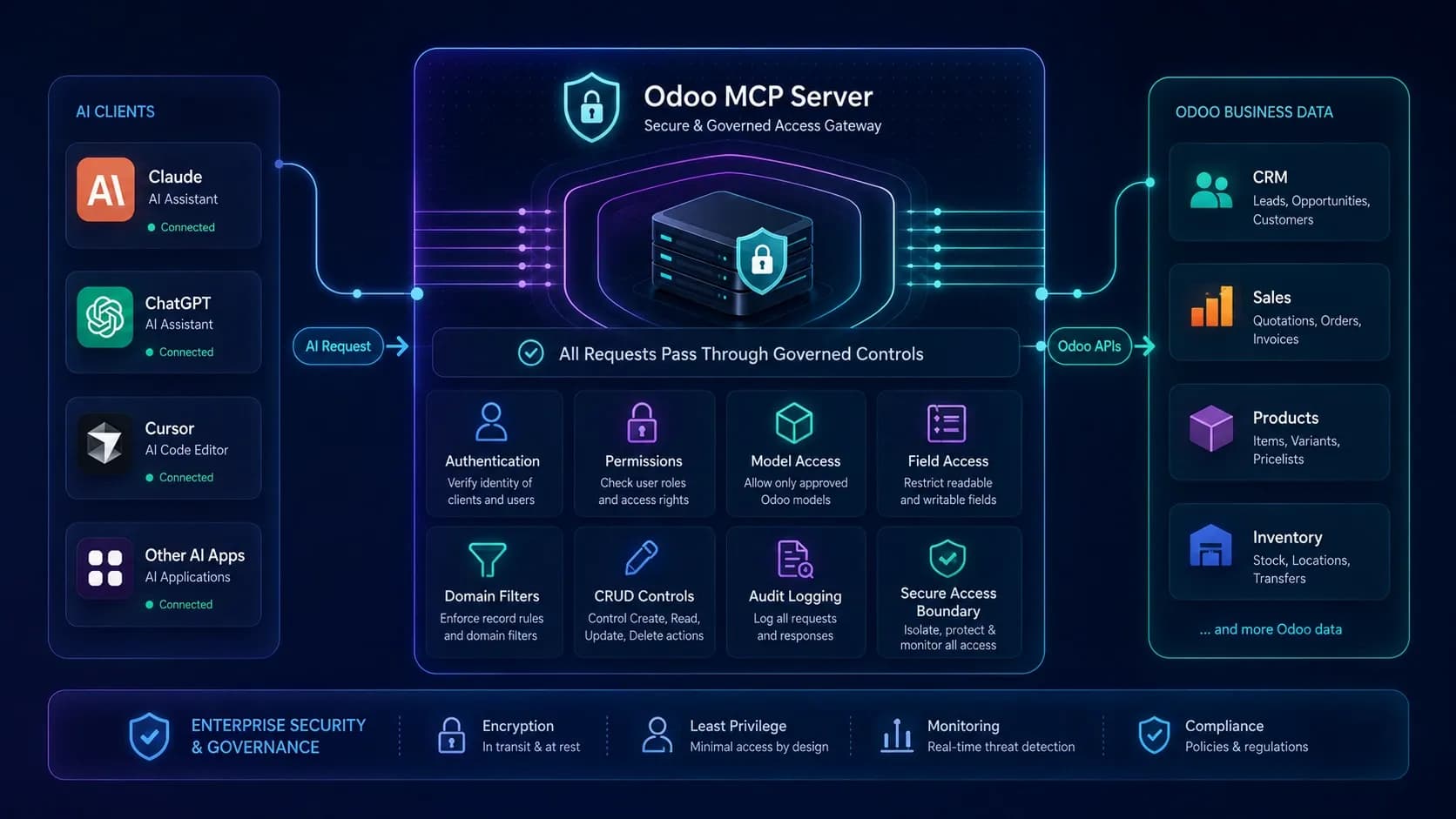
Production Odoo MCP deployments should combine Odoo permissions with connector-level authentication, scoping and audit controls.
What Security Controls Should an Odoo MCP Server Have?
An Odoo MCP server can expose sensitive ERP data and, in some cases, write operations. Security therefore needs to be part of the design from the first connection, not added after deployment.
The official MCP security guidance emphasizes authenticated requests, authorization boundaries and protection of sensitive actions. Odoo also provides user-level access rights, record rules and field access controls that should remain part of the authorization model.
Use a Dedicated Odoo User
Avoid connecting an AI client through a broad administrator account. Create a dedicated user or service identity with only the groups required for the intended workflow.
Use a Dedicated Odoo User
Avoid connecting an AI client through a broad administrator account. Create a dedicated user or service identity with only the groups required for the intended workflow.
Apply Least-Privilege Access
Restrict applications, models, fields, record domains and operations. If an AI workflow only needs CRM and selected sales data, it should not automatically gain access to HR, payroll or unrestricted accounting records.
Start Read-Only Where Possible
Search and retrieval are easier to validate than writes. Enable create or update only after permitted and denied cases have both been tested. Delete should remain unavailable or disabled unless there is a clear business requirement and approval boundary.
Protect Tokens and OAuth Credentials
Use HTTPS for remotely accessible MCP endpoints, store credentials outside prompts and public repositories, rotate secrets when necessary, and use separate credentials per integration when the implementation supports it.
Keep Audit Records
Audit logs can help answer who invoked a tool, when it ran, whether it succeeded and what operation was attempted. For write-enabled connectors, this becomes especially useful during testing and incident review.
Limit Scope and Load
Record limits, timeouts, field allowlists, domain filters, rate limits and IP restrictions can reduce accidental overuse. Not every connector includes all of these controls, so they should be checked before production rollout.
How Should You Evaluate an Odoo MCP Server?
Do not choose an Odoo MCP connector only because it mentions Claude, ChatGPT or MCP. Use the same technical questions for every option:
9.Which Odoo versions and editions are supported?
10.Which AI clients were actually tested?
11.Which MCP protocol revision and transport are implemented?
12.What exact tools are exposed?
13.Are create, update and delete available, restricted or disabled by default?
14. Do Odoo ACLs, record rules and field access remain active?
15.Can connector access be restricted by app, model, field or domain?
16.Which authentication methods are supported?
17.Are tool calls audited?
18.Does data travel directly between the AI client and Odoo or through a vendor relay?
19.Does the connector require Redis, a sidecar server, a vector database or an embedding provider?
20.Which MCP capabilities are not implemented?
21.Which deployment types are supported?
22. Is the source code included?
23.When was the product last tested, and what support period is included?
Odoo MCP Solutions on WebbyTemplate
If you are ready to move from research to product evaluation, WebbyTemplate currently lists two Odoo MCP products with different tool scopes and governance models. Use this overview to open the product page that best matches your workflow.
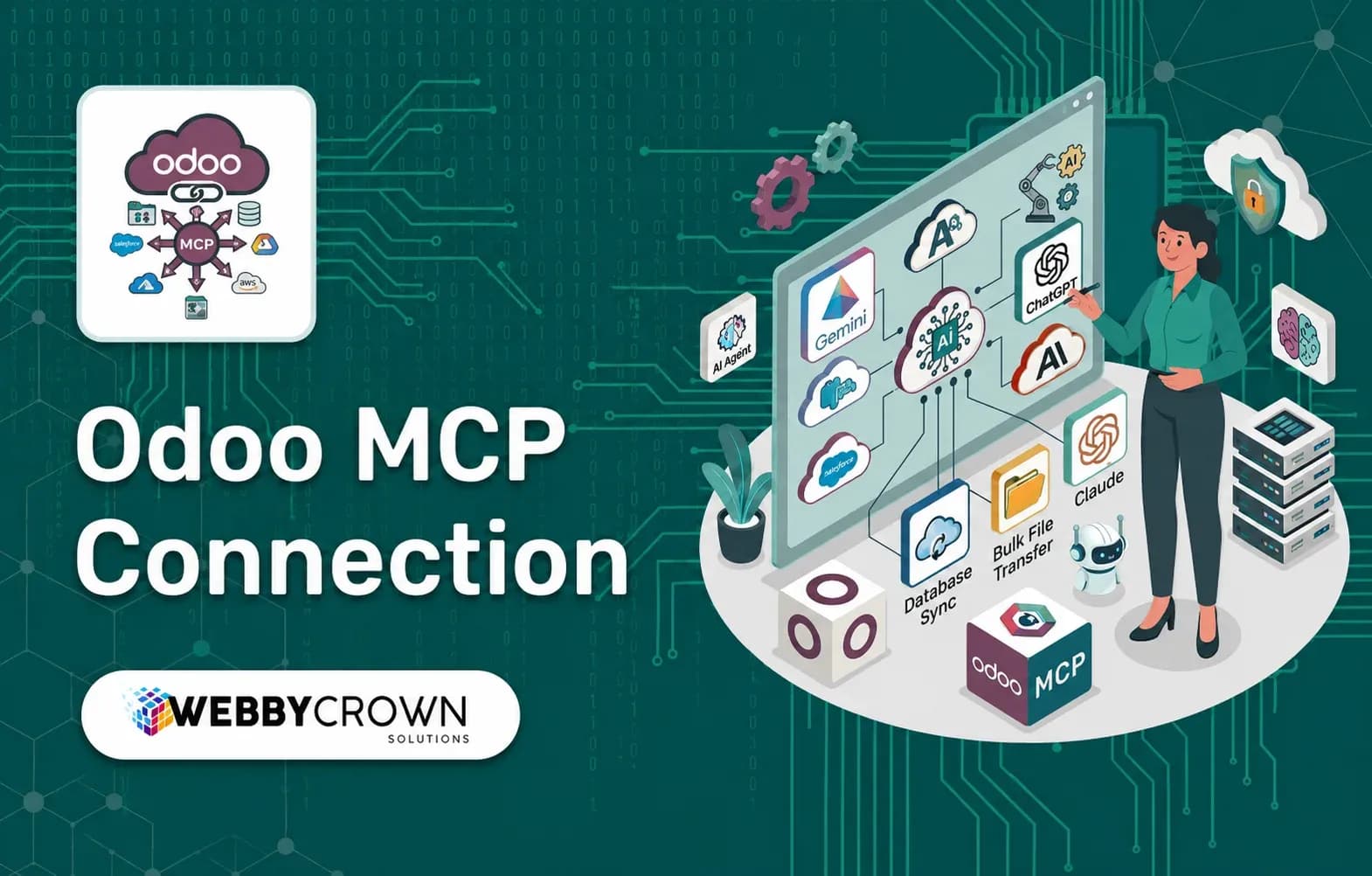
Odoo MCP Connection
Odoo MCP Connection is the stronger fit when you need broader tooling, structured analytics, controlled CRUD and granular app/model/field/domain governance. It supports Odoo 10-19 with version-matched packages and is documented for Claude, ChatGPT and Cursor.
Odoo MCP Connection provides broader tooling and governance, while RAG Odoo MCP Server offers a lighter Claude-oriented MCP workflow for record access and controlled creation.
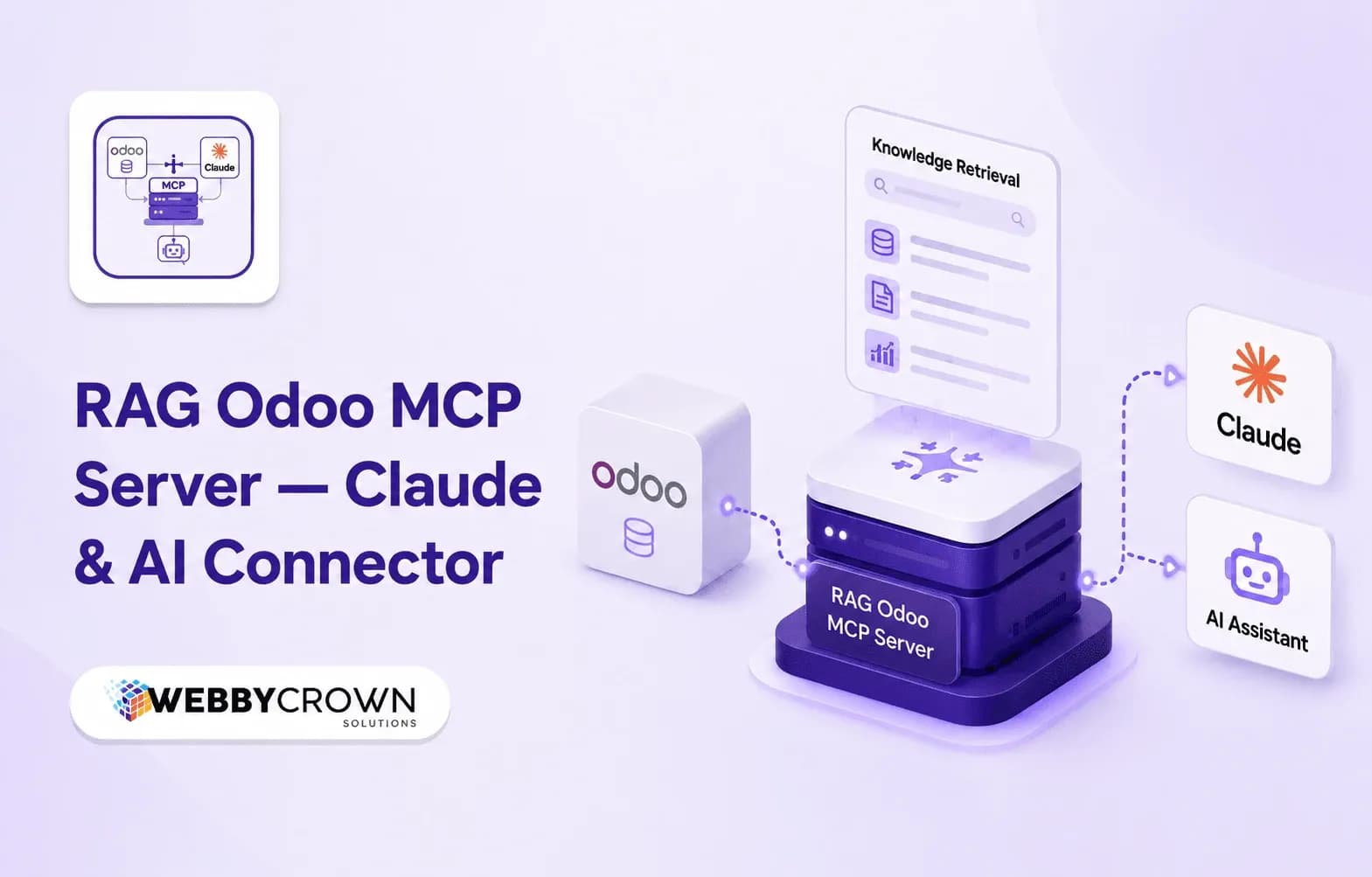
RAG Odoo MCP Server
RAG Odoo MCP Server is the lighter fit when you need Claude-focused live Odoo record access, controlled record creation and manually managed knowledge guidance without vector or embedding infrastructure. It supports Odoo 10-19 with version-matched packages.
First-Party Implementation Snapshot: Two Odoo MCP Products on WebbyTemplate
To make the buying criteria concrete, WebbyTemplate reviewed the current source/specification material for two Odoo MCP products listed in its marketplace. This is not a performance benchmark; it is a capability and architecture snapshot based on current first-party evidence.
| Requirement | Odoo MCP Connection | RAG Odoo MCP Server |
|---|---|---|
| Odoo versions | 10-19, version-matched packages | 10-19, version-matched packages |
| Community / Enterprise | Both | Both |
| Primary client evidence | Claude, ChatGPT, Cursor; model-agnostic HTTP/MCP clients | Claude Desktop/Mobile primary; Cursor and ChatGPT agents also named |
| Tool scope | Broader governed gateway; buyer-trust card lists 26 tools including analytics and controlled CRUD | 5 MCP tools: model list, record search, record retrieval, record creation, server info |
| Write capability | Create, update and delete when authorized; delete disabled by default | Create only at MCP tool layer; no dedicated update/delete tools |
| Governance | App/model/field/domain/CRUD controls plus IP/rate-limit controls | Odoo ACLs/record rules plus model/field/domain restrictions |
| AI-provider keys in Odoo | No | No |
| Vendor relay server | No | No |
| Vector DB / embeddings | Not required | None; not vector/embedding RAG |
| Last tested evidence | Buyer Trust Card: 20 Aug 2026 on Odoo 19 | Buyer Trust Card: 20 Aug 2026 on Odoo 19; source audit also reviewed |
| Support | 12 months | 12 months |
Odoo MCP Connection: Better Fit for Broader Tooling and Governance
For teams that need broader Odoo tool coverage, structured analytics and controlled write operations, Odoo MCP Connection is the more capable of the two WebbyTemplate options reviewed here.
Its current buyer-trust specification describes a governed Odoo-native gateway with 26 tools, scoped Bearer/OAuth access, model and field controls, domain filters, audit logging, IP controls and rate limiting. It is designed to keep ERP authorization inside Odoo rather than storing LLM provider keys in the module.
RAG Odoo MCP Server: Better Fit for a Lighter Claude-Focused Connector
For a lighter connection centered on live Odoo record access, controlled record creation and manually managed knowledge guidance, RAG Odoo MCP Server uses a smaller five-tool MCP surface.
Its source review confirms that it does not implement vector embeddings, a vector database, semantic similarity search, automatic document indexing or document chunking. That limitation is important: choose it for the tool-based Odoo access model, not for classic vector RAG.
Which Odoo MCP Approach Fits Which Requirement?
| Requirement | Better-aligned approach |
|---|---|
| Broad analytics and governed CRUD | Odoo MCP Connection |
| App/model/field/domain permission controls | Odoo MCP Connection |
| Built-in rate limiting and IP controls | Odoo MCP Connection |
| Lightweight Claude-oriented live record access | RAG Odoo MCP Server |
| Read access plus controlled record creation | RAG Odoo MCP Server |
| Manual Odoo knowledge snippets | RAG Odoo MCP Server |
| Vector/embedding-based semantic RAG | Neither product; use a separate vector-RAG architecture |
| Odoo Online SaaS with no custom module install | Use an external integration approach; verify Odoo plan/API availability |
This table is intentionally based on architecture fit rather than declaring one product universally better. The right choice depends on the tools, permissions, client, deployment and data-handling model required by the workflow.
A Practical Odoo MCP Implementation Plan
Define the use case
List the exact questions and operations the AI client needs. Separate read, analytics, create, update and delete requirements.
Map the minimum Odoo data
Document the apps, models, records and fields required for each workflow. Remove access that is not necessary.
Confirm client and transport compatibility
Check the AI client, MCP protocol/transport, authentication method and deployment before purchasing or configuring the connector.
Create a restricted Odoo user
Assign only the minimum Odoo rights required for the workflow. Odoo 19 documentation recommends dedicated bot users for extended automated API usage.
Configure read access first
Test model discovery, record search and retrieval before enabling write operations.
Test denied requests
Confirm the client cannot access restricted models, fields or records. A successful allowed query does not prove that restrictions work.
Enable writes selectively
Add create or update permissions only where needed. Treat delete as a separate risk decision.
Review audit logs
Check successful requests, denied requests, errors and write operations during testing.
Recheck after upgrades
MCP and AI clients evolve quickly. Revalidate protocol compatibility, permissions and write behaviour after significant client, Odoo or connector updates.
Methodology and Limitations
This guide was prepared on August 22, 2026 using current official MCP documentation, Odoo 19 API/access-right documentation, the live search landscape for Odoo MCP queries, WebbyTemplate product pages, supplied product specifications, Buyer Trust Cards dated August 20, 2026, and source-level review of the RAG Odoo MCP Server addon.
The article does not claim independent load testing, penetration testing or production performance benchmarking across customer Odoo databases. Client compatibility and MCP protocol support can change, so deployment requirements should be rechecked before purchase and again before production rollout.
FAQs
Q1.
What is an Odoo MCP server?
Q2.
Can Claude connect to Odoo through MCP?
Q3.
Can ChatGPT connect to Odoo through MCP?
Q4.
Is MCP the same as Odoo's API?
Q5.
Can an Odoo MCP server update or delete records?
Q6.
Does an Odoo MCP server require a vector database?
Q7.
Is an Odoo MCP server automatically a RAG system?
Q8.
Does Odoo data have to pass through WebbyTemplate?
Q9.
What should I verify before buying an Odoo MCP server?
Q10.
Which Odoo MCP product should I choose on WebbyTemplate?
Final Takeaway
An Odoo MCP server gives compatible AI applications a structured way to use approved Odoo data and actions, but the term does not guarantee a specific tool set, transport, permission model or security posture. The practical buying decision is therefore not "Does it use MCP?" but "Which exact capabilities does this implementation expose, and how tightly can they be controlled?"
Start with the workflow, restrict the Odoo identity, verify the tool list, test read-only access and denied requests, and enable writes only where the business case justifies them. That approach is more reliable than choosing a connector because it mentions the largest number of AI clients or uses a familiar AI label.