On this page
Odoo AI Integration: How to Connect AI Assistants, Agents & Automation

WebbyCrown Solutions-
September 2, 2026-15 min read
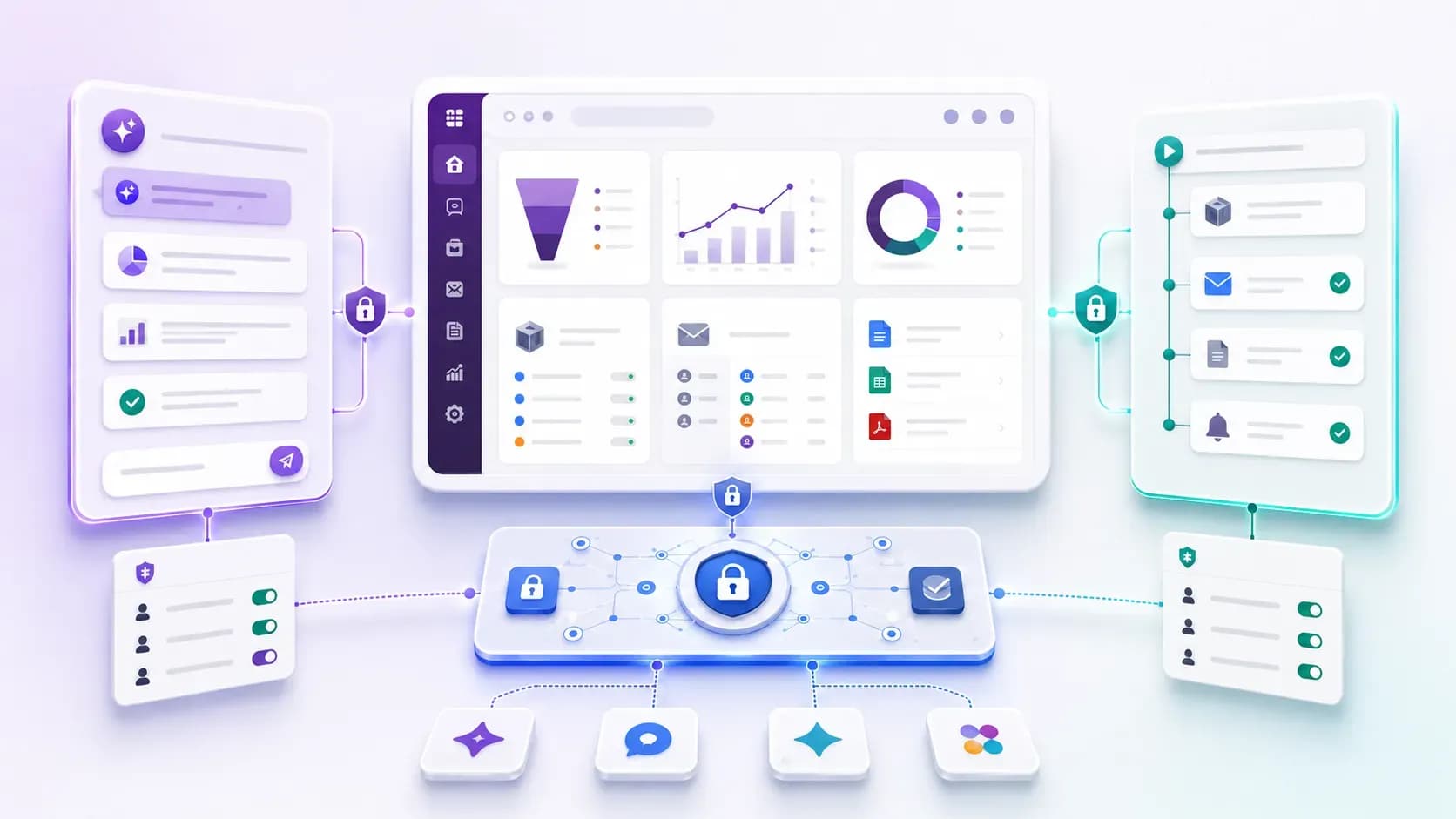
Odoo AI integration can mean in-app assistance, governed external access, deterministic automation - or a controlled combination of all three.
Odoo AI integration is the process of connecting AI capabilities with Odoo workflows, data and approved actions. The integration may run inside Odoo, expose governed tools to an external AI client through MCP, or combine AI with automation rules. Each path fits a different business requirement.
The best starting point is to match the architecture to the task: use an in-Odoo AI assistant for contextual writing and user-facing help, use an MCP connection when an external compatible AI client needs approved Odoo tools, and use ordinary automation rules when the workflow is predictable. AI should enter an automation only where language understanding or judgment is genuinely useful.
Editorial disclosure: WebbyTemplate publishes this guide and lists the Odoo AI and MCP products referenced below. Product statements are based on live product pages, supplied first-party specifications and source-audit material; important limitations are included where relevant.
Choose the smallest suitable Odoo AI integration. Use native or in-Odoo AI when users need help inside Odoo; use MCP when Claude, ChatGPT, Cursor or another compatible client needs governed access to Odoo data and actions; use automation rules for fixed trigger-condition-action workflows. Keep permissions narrow, test denied access as well as successful access, and add human approval before high-impact writes.
Key Takeaways
- Odoo AI integration is not one fixed architecture; it can mean native AI, an installed assistant, an MCP connection, deterministic automation or a controlled combination.
- Odoo 19 includes official AI capabilities such as AI agents, AI fields and AI server actions; availability and setup should be checked against the installed Odoo version and edition.
- An in-Odoo AI assistant is best when users need drafting, rewriting, summaries, subject lines or chatter replies inside the interface they already use.
- MCP is best when an external AI client needs discoverable, permission-controlled tools for live Odoo data or approved actions.
- Automation rules are better than AI for repeatable workflows where the same condition should trigger the same action.
- Provider credentials and data flow differ by architecture: an in-Odoo assistant may call the selected AI provider from Odoo, while the reviewed MCP products keep AI-provider credentials on the client side.
- The RAG Odoo MCP Server listed on WebbyTemplate does not implement vector embeddings, semantic search, automatic indexing or document chunking; it should not be presented as classic vector RAG.
What Does Odoo AI Integration Mean?
Odoo AI integration is an umbrella term rather than one fixed product or connector. In practice, it can describe four related but technically different approaches:
- Native Odoo AI: AI features supplied as part of the current Odoo platform, including Odoo 19 agents, fields, writing assistance and AI-aware server actions.
- An installed AI assistant: an Odoo addon that sends selected prompts and approved record context to a configured AI provider and returns the result inside Odoo.
- An MCP connection: a controlled tool interface that lets a compatible external AI application use approved Odoo data or operations.
- Automation: predefined trigger-condition-action logic, with optional AI decision steps only where a deterministic rule is not enough.
These approaches can coexist, but they should not be treated as interchangeable. The user experience, credential location, data path, permission model, audit requirements and risk of write actions differ.
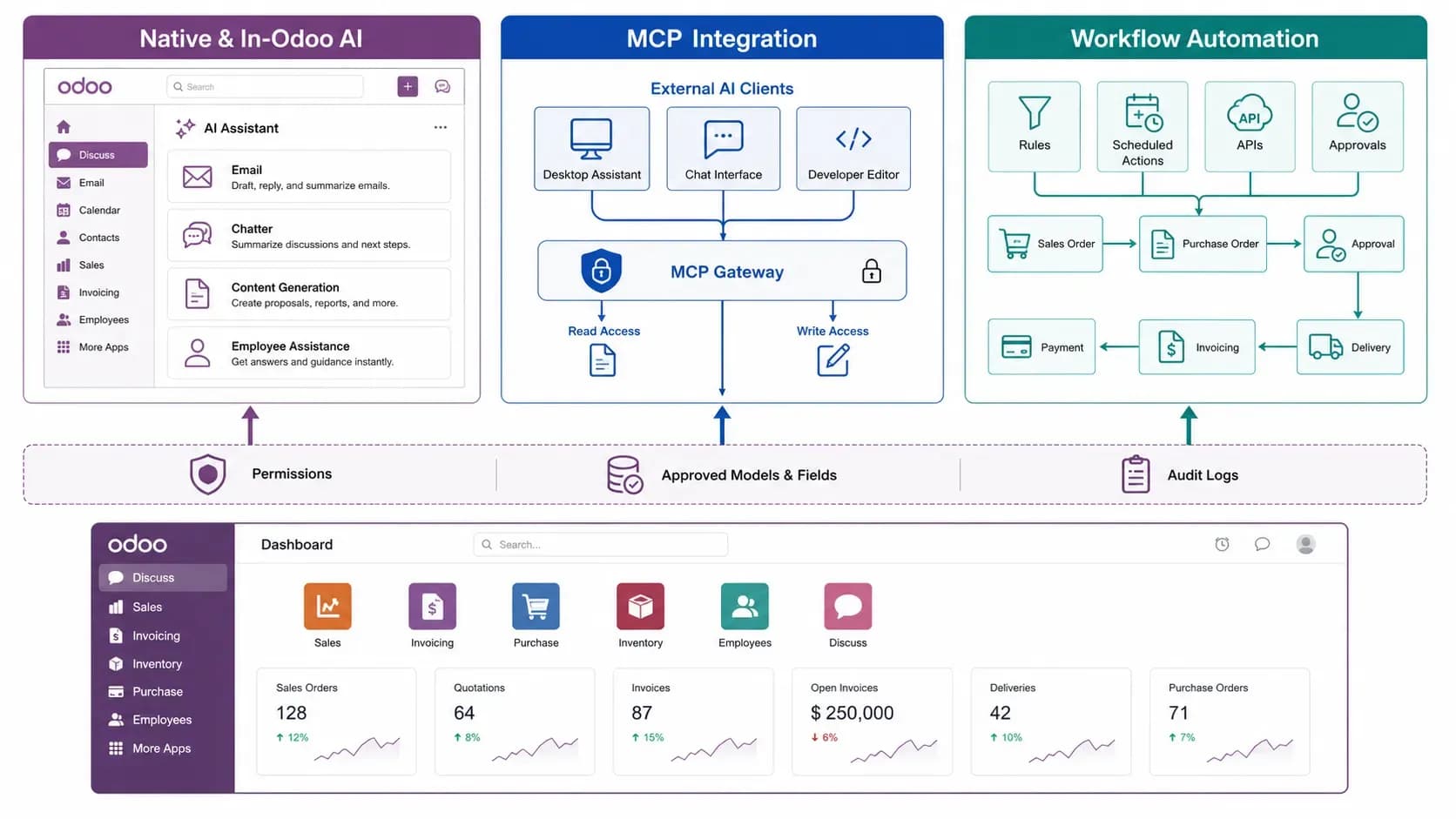
Three practical Odoo AI integration paths: assist the user, expose governed tools to an external AI client, or automate a predictable workflow.
Which Odoo AI Integration Fits Which Requirement?
| Business Requirement | Best Starting Approach | Why It Fits | What to Verify |
|---|---|---|---|
| Draft or improve email and chatter | In-Odoo AI assistant | Keeps the user inside the current record and communication flow | Fields included, provider, human review |
| Use Odoo 19 AI agents or AI fields | Native Odoo AI | Uses current platform capabilities and Odoo tools | Version, configuration, tools, provider setup |
| Let Claude query approved Odoo records | MCP connection | Exposes a defined tool surface to a compatible client | Endpoint, authentication, tool list, access scope |
| Run analytics or controlled CRUD from an external AI client | Broader governed MCP connector | Requires analytics tools and separately controlled write operations | Model/field/domain controls, audit logs, write defaults |
| Always create an activity when a field changes | Automation rule | A deterministic action is simpler and easier to test | Trigger, conditions, duplicates, permissions |
| Classify text before choosing a workflow branch | AI server action plus automation | AI can provide bounded judgment before a controlled action | Prompt, allowed outcomes, fallback, approval |
| Semantic search across indexed documents | Separate vector-RAG architecture | Requires retrieval capabilities not supplied by the three reviewed products | Chunking, embeddings, index, access filters, evaluation |
1. Use Native or In-Odoo AI for Work Inside Odoo
The in-Odoo path is the best fit when a person is already working in Odoo and needs help understanding or producing content. The value comes from reducing context switching: the user can draft, rewrite, summarize or classify information without manually copying the whole record into a separate AI chat.
Native AI in Odoo 19
Odoo's official Odoo 19 AI documentation describes context-aware assistance across Odoo apps. The documented capability set includes AI agents, AI fields, AI server actions, live-chat assistance, email-template support, voice transcription and writing/improvement tools. Odoo also documents OpenAI and Gemini provider configuration for the AI application.
Native Odoo AI is attractive when the required feature already exists in the installed version because it reduces the need for a separate integration layer. Do not assume the full Odoo 19 AI feature set exists unchanged in Odoo 17 or 18; check the documentation and installed modules for the exact version.
Odoo AI Email & Chatter Assistant for Odoo 17-19
For teams that specifically need communication assistance, Odoo AI Email & Chatter Assistant is a separate addon family for Odoo 17, 18 and 19. It focuses on draft replies, rewriting, summaries, subject lines, reusable prompts and HTML email-template generation inside Odoo.
The source-audited Odoo 19 build supports OpenAI, Azure OpenAI, Google Vertex AI, Anthropic Claude, Cohere, OpenRouter and custom endpoints. It also includes usage logging, configurable limits, caching, user roles and Standard, Strict and Custom field-inclusion modes.
For a focused explanation of this workflow, read Odoo AI Assistant: How Email & Chatter AI Works. That article owns the product-specific assistant intent; this guide only uses it as one architecture option.
Data Flow for an In-Odoo Assistant
Typical path: Odoo -> selected prompt and configured record context -> customer-selected AI provider -> result returned to Odoo.
For the reviewed WebbyTemplate assistant, provider credentials are configured inside the customer's Odoo environment. Selected record, partner or conversation context may be transmitted to the configured provider. Administrators should therefore review field scope, provider retention policies, role access and whether human approval is required before sending or posting the output.
2. Use MCP for External Odoo AI Integration
The Model Context Protocol (MCP) is an open standard for connecting AI applications with external systems, data and tools. In an Odoo implementation, the MCP server exposes defined capabilities that a compatible AI client can discover or invoke after authentication.
MCP is useful when the primary user experience lives outside Odoo - for example, inside Claude, ChatGPT, Cursor or a company AI agent - but the assistant still needs current Odoo information or approved operations. It does not automatically grant broad ERP access. The actual capability is determined by the connector's tool list, the linked Odoo identity, Odoo ACLs and record rules, and any connector-level model, field, domain or CRUD controls.
If the protocol is new to your team, start with What Is an Odoo MCP Server? before selecting a product. For Claude-specific implementation, use the separate Claude-to-Odoo MCP setup guide.
Broader Governed MCP Access
Odoo MCP Connection is the broader fit when the workflow needs structured analytics, model discovery, record retrieval and controlled create, update or delete operations. Its public product page lists 12 read/analytics tools plus write controls, with delete disabled by default. It also documents app, model, field-allowlist, domain-filter and CRUD governance, along with rate limiting, IP controls and audit logs.
The product supports Odoo 10-19, Community and Enterprise editions, and is officially tested with Claude, ChatGPT and Cursor. It uses direct communication between the AI client and the customer's Odoo environment; AI-provider credentials remain on the client side rather than inside the module.
Lighter Record Access and Controlled Creation
RAG Odoo MCP Server is the lighter fit when the requirement is mainly Claude-oriented model discovery, record search, record retrieval, controlled record creation and server information. Its current MCP layer exposes five tools and no dedicated update or delete tools.
The product also stores manually created Odoo knowledge snippets, but it does not implement vector embeddings, a vector database, semantic search, automatic indexing or document chunking. Its knowledge layer should be understood as configurable guidance stored in Odoo, not as a classic vector-RAG pipeline.
Data Flow for the Reviewed MCP Products
Typical path: Compatible AI client <-> authenticated MCP endpoint in the customer's Odoo environment <-> approved Odoo tools and records.
Neither reviewed MCP product requires an OpenAI or Anthropic provider key inside Odoo, and neither uses a WebbyCrown relay server for the MCP data path. That does not remove the need to review the AI client's own data handling, connector authentication, HTTPS exposure, token storage and permission scope.
3. Use Automation for Predictable Odoo AI Workflows
Odoo's automation rules execute one or more predefined actions when a configured trigger and conditions are met. Examples include creating an activity, updating a field, sending a notification, calling a webhook or moving a record through an approval process.
A normal automation rule is often the better solution when the workflow is known in advance. It is easier to test, cheaper to operate and less ambiguous than asking an AI model to decide something that can already be expressed as a condition.
When Should AI Enter an Automation?
Odoo 19 also documents AI server actions, which let AI make a bounded decision during a workflow. This can help when the input is unstructured - for example, classifying a customer message or extracting an intent before selecting one of several approved actions.
Simple rule: If the same input should always produce the same outcome, use deterministic automation. If the workflow requires interpretation of language or context, add a narrowly scoped AI step and constrain its allowed outputs.
How AI and Automation Can Work Together
A controlled support workflow can combine both approaches without giving AI unrestricted autonomy:
1. An automation rule triggers when a new support ticket is created.
2. An AI step summarizes the ticket and classifies it into an approved category list.
3. A deterministic rule assigns the team and priority from that category.
4. An in-Odoo assistant drafts a reply using selected ticket context.
5. A human reviews and sends the response.
6. Audit and usage logs record the workflow outcome.
This design gives AI a narrow interpretation role while keeping routing, permissions and the final customer-facing action under explicit control.
A Practical Architecture Comparison
| Decision area | In-Odoo AI assistant | MCP connection | Automation rule |
|---|---|---|---|
| Primary user | Odoo user inside a record | User in an external AI client | System workflow |
| Best task type | Writing, summaries, contextual help | Live data access, analytics, approved actions | Repeatable trigger-condition-action |
| Interaction style | User requests or reviews output | AI client invokes tools | Runs automatically after trigger |
| Permission boundary | Odoo roles plus field/context configuration | Odoo identity plus connector/tool scope | Automation owner and action permissions |
| Credential location | AI-provider keys may be configured in Odoo | AI-provider keys remain with client for reviewed products | Usually no LLM credential unless AI is added |
| Main operational risk | Sending excess context or publishing unreviewed text | Overbroad tools or write access | Incorrect trigger, duplicate action or missing condition |
| Safe first rollout | One team, one action, human review | Read-only tools and denied-access tests | Staging test with narrow conditions |
How to Choose the Right Odoo AI Integration Architecture
1. Define the exact business task. Replace 'add AI to Odoo' with a testable outcome such as 'draft a CRM follow-up' or 'let Claude retrieve approved sales records.'
2. Decide where the user will work. Choose an in-Odoo assistant for an Odoo-screen workflow and MCP for an external AI-client workflow.
3. Separate read, analysis, create, update and delete requirements. Do not enable a stronger operation merely because the connector supports it.
4. Check the Odoo version and deployment. Native AI features, third-party module support and endpoint requirements differ by version and hosting model.
5. Map the data path. Identify where provider credentials live, which fields leave Odoo, whether a vendor relay exists and which party processes the prompt.
6. Choose the permission boundary. Use dedicated identities, least-privilege Odoo roles, record rules, field restrictions and connector scopes.
7. Define logging, approval and rollback. High-impact writes should have auditability and a recovery path; customer-facing content should normally receive human review during rollout.
8. Document what is not included. If the use case requires vector search, automatic document indexing or long-running autonomous workflows, verify those capabilities separately.
Security and Governance Checklist
- Use a dedicated Odoo user or tightly scoped roles for AI and integration workflows.
- Limit apps, models, records, fields and operations to the workflow's actual need.
- Keep read, create, update and delete permissions separate; treat delete as a distinct approval decision.
- Review which record and conversation context is transmitted to an AI provider.
- Store provider keys, bearer tokens and OAuth credentials outside prompts, screenshots and public repositories.
- Use HTTPS and current authorization guidance for remotely reachable MCP endpoints.
- Test denied models, fields and records - not only successful queries.
- Set rate limits, usage limits, audit retention and alerting where the implementation supports them.
- Use staging data or low-risk records before production writes.
- Require human approval for high-impact financial, HR, legal, deletion or customer-facing actions until the workflow is proven.
- Revalidate permissions and compatibility after significant Odoo, connector, AI-client or provider changes.
For MCP-specific risks, review the official MCP Security Best Practices. Odoo's external API documentation also states that operations are validated against the access rights, record rules and field access of the connected Odoo user.
Which WebbyTemplate Product Fits Your Odoo AI Integration?
The following is a workflow-fit summary, not a performance ranking. Choose from the required user experience and operation scope.
| Primary requirement | Better-aligned product | Reason |
|---|---|---|
| Draft, rewrite, summarize or reply inside Odoo | Odoo AI Email & Chatter Assistant | Communication-focused assistance inside Odoo with multiple AI providers |
| External AI needs broader analytics and controlled CRUD | Odoo MCP Connection | Broader tool surface, analytics, granular governance and separately controlled writes |
| Claude-focused live record access and controlled creation | RAG Odoo MCP Server | Smaller five-tool surface, Odoo knowledge guidance and no vector infrastructure |
None of these three products is a classic vector-RAG platform. If the requirement is semantic document retrieval, evaluate a separate architecture with embeddings, indexing, retrieval evaluation and data-level access controls.
Methodology and Limitations
This guide was prepared on September 1, 2026 using current Odoo 19 documentation, the Model Context Protocol documentation, live WebbyTemplate product pages, the live WebbyTemplate Odoo article cluster, supplied Buyer Trust Cards and source-audit product specifications for the three reviewed products.
The review is an architecture and capability analysis. It is not an independent penetration test, load test, provider-policy audit or production benchmark across customer databases. Odoo AI features, MCP specifications, AI-client support and product implementations can change; version, transport, authentication, tool and hosting compatibility should be rechecked before purchase and production rollout.
FAQs
Q1.
What is Odoo AI integration?
Q2.
Does Odoo 19 include built-in AI?
Q3.
Can Odoo 17 or Odoo 18 use AI?
Q4.
Do I need MCP to use AI in Odoo?
Q5.
Is an Odoo automation rule the same as AI?
Q6.
Can an external AI assistant update Odoo records?
Q7.
Where do AI-provider API keys live?
Q8.
Does an AI integration bypass Odoo access rights?
Q9.
Does AI in Odoo require a vector database?
Q10.
Which Odoo AI integration approach should I choose first?
Final Takeaway
A successful Odoo AI integration starts with one defined business task, the smallest suitable architecture, and clear control over Odoo permissions, data scope and human accountability.
Use native or in-Odoo AI when the user needs contextual help inside Odoo. Use MCP when an external AI application needs approved tools for live ERP data or actions. Use deterministic automation for repeatable workflows, and add AI only for the parts that truly require language understanding or judgment. That separation produces clearer expectations, safer rollouts and a more maintainable Odoo AI stack.
Sources
- Odoo 19 AI documentation
- Odoo 19 AI agents
- Odoo 19 AI server actions
- Odoo 19 automation rules
- Odoo 19 External JSON-2 API
- Odoo 19 access rights
- Official Model Context Protocol introduction
- Official MCP Security Best Practices
- Odoo AI Email & Chatter Assistant on WebbyTemplate
- Odoo MCP Connection on WebbyTemplate
- RAG Odoo MCP Server on WebbyTemplate