WooCommerce Warehouse Fulfillment Plugin — Kanban Order Board, Picker Assignment, Bin Locations & Staff Portal

0 (0 Reviews)
0 Sales
License Options
View License Policy1 site / project / end product
up to 5 sites / projects / end products
up to 30 sites / projects / end products
Add-on Services
$149.00
$299.00
Technology
No title available : WooCommerce Warehouse Fulfillment Plugin — Kanban Order Board, Picker Assignment, Bin Locations & Staff Portal

Created : 16 July 2026
Updated : 31 August 2026
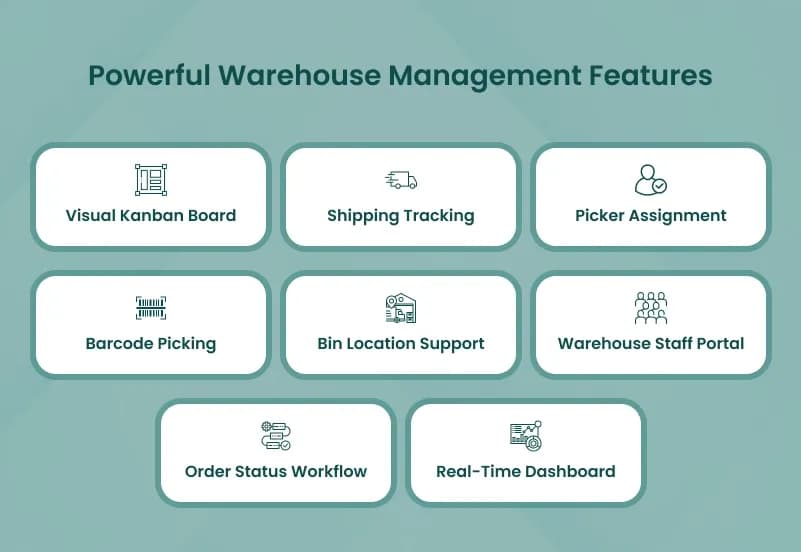
WooCommerce Warehouse Fulfillment Plugin helps WooCommerce stores manage order processing through a visual kanban-style warehouse workflow. It supports configurable order statuses, order triage, picker assignment, high-priority flags, barcode scanning, bin locations, packing slips, shipping tracking, staff notifications, email notifications, completed order archive, status history logs, and a dedicated frontend warehouse staff portal.
This plugin is not a multi-warehouse inventory management system. It does not create multiple warehouses, manage warehouse-wise stock, assign products to warehouses, transfer stock between locations, route orders by warehouse, auto-select the nearest warehouse, or show customer-facing warehouse availability. It is designed for warehouse order fulfillment workflow, team accountability, bin-based picking, and staff portal operations.
What Is WooCommerce Warehouse Fulfillment Plugin?
WooCommerce stores often need a clearer way to move orders from new order intake to picking, packing, shipping, and completion. Without a dedicated warehouse workflow, teams may rely on manual notes, admin-only order screens, spreadsheets, or verbal updates, which can create delays, missed items, unclear responsibility, and poor visibility.
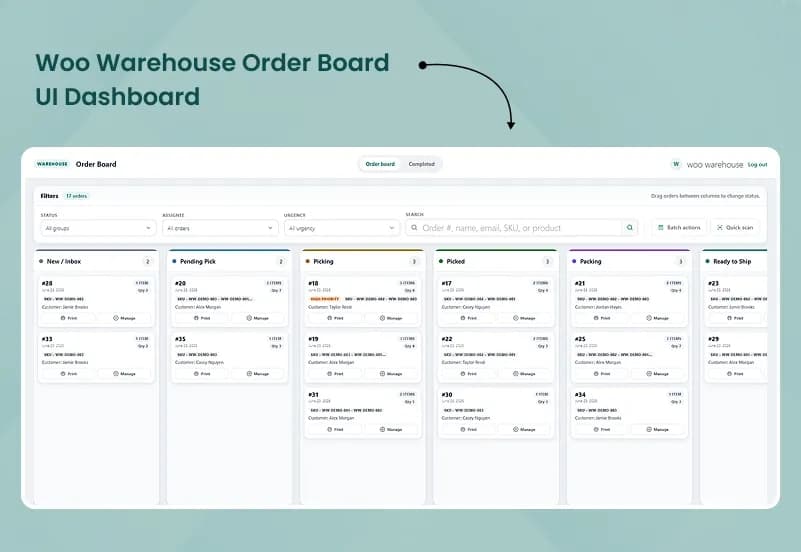
WooCommerce Warehouse Fulfillment Plugin gives store teams a dedicated order fulfillment portal with a kanban-style board, configurable workflow statuses, picker assignment, bin location guidance, barcode picking support, shipping tracking, packing slips, staff notifications, completed order archive, and order-level status history. It helps warehouse teams process WooCommerce orders with better visibility and accountability without giving every staff member full WordPress admin access.
Who Is This Plugin For?
- WooCommerce stores with internal order fulfillment teams
- eCommerce businesses that pick, pack, and ship orders manually
- Warehouse teams needing a visual order workflow
- Store owners who want picker assignment and order accountability
- Businesses using bin locations for product picking
- Teams that need packing slips and shipping tracking entry
- WooCommerce stores that want a frontend staff portal
- Agencies building order fulfillment workflows for WooCommerce clients
- Store managers who need configurable order statuses
- Teams that want status logs showing who changed what and when
- Businesses that need barcode scanning during picking
- WooCommerce shops that want a cleaner warehouse operations view
This plugin is not suitable for businesses looking for full multi-warehouse inventory management, warehouse-wise stock reports, warehouse transfer workflows, nearest warehouse routing, per-location inventory, variation-wise warehouse stock, stock adjustment logs, or customer-facing warehouse availability. It focuses on WooCommerce order fulfillment workflow and warehouse staff operations.
What Is Included?
Warehouse Order Workflow
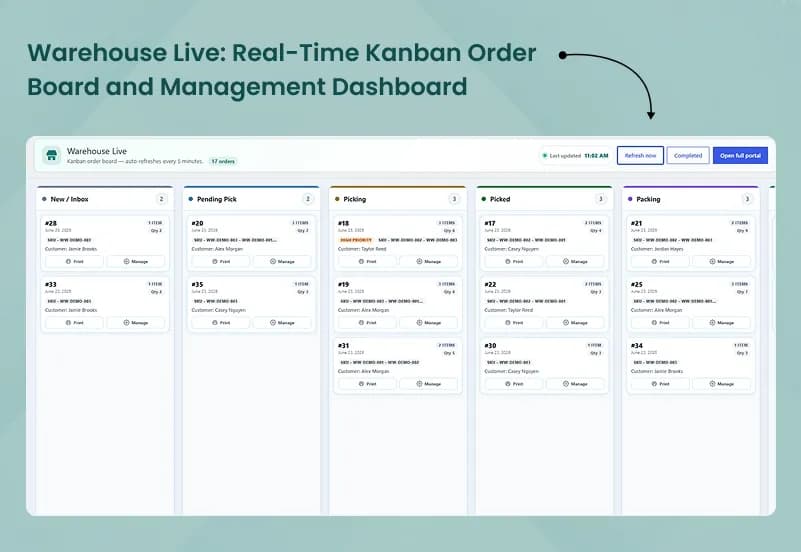
- Kanban order fulfillment board
- Drag and column-based order workflow
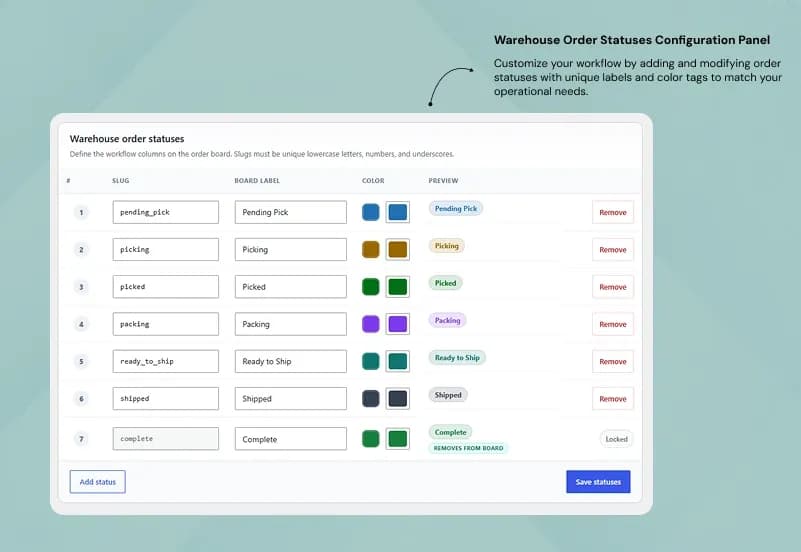
- Configurable workflow statuses
- Create custom statuses
- Edit custom statuses
- Reorder custom statuses
- Color-code statuses
- Pending Pick status
- Picking status
- Picked status
- Packing status
- Ready to Ship status
- Shipped status
- Complete status
- Order triage / inbox
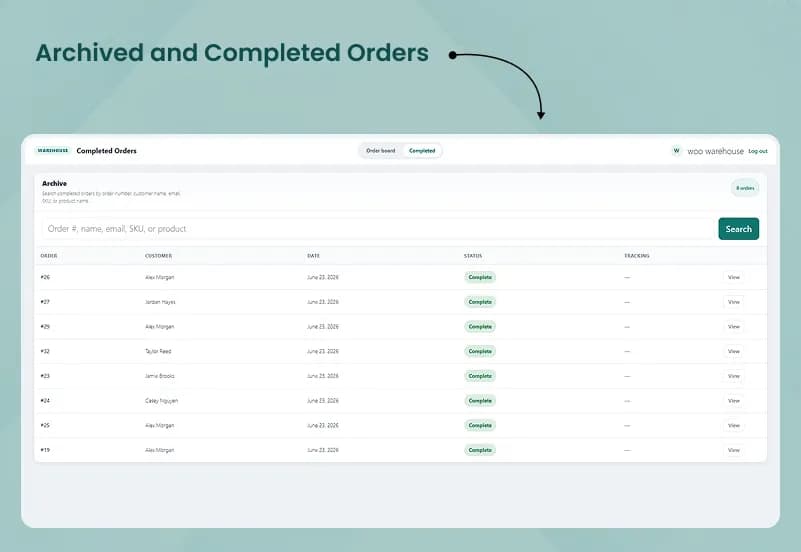
- Completed order archive
- Move order back to inbox
- Auto-refresh board every 5 minutes
- Manual Refresh Now button
Picker and Staff Management
- Picker assignment
- Assign warehouse staff to specific orders
- Warehouse staff login portal
- Warehouse staff logout
- Warehouse staff role
- Warehouse-specific user roles and permissions
- Picker scoping
- Pickers can see only assigned orders
- Staff notifications on status changes
- Dedicated frontend portal for warehouse staff
Order Management
- Track warehouse order status
- View all active orders on /warehouse/orders/
- Move orders through workflow stages by drag or click
- Filter board by status
- Filter board by assignee
- Filter board by urgency
- Mark orders as high priority
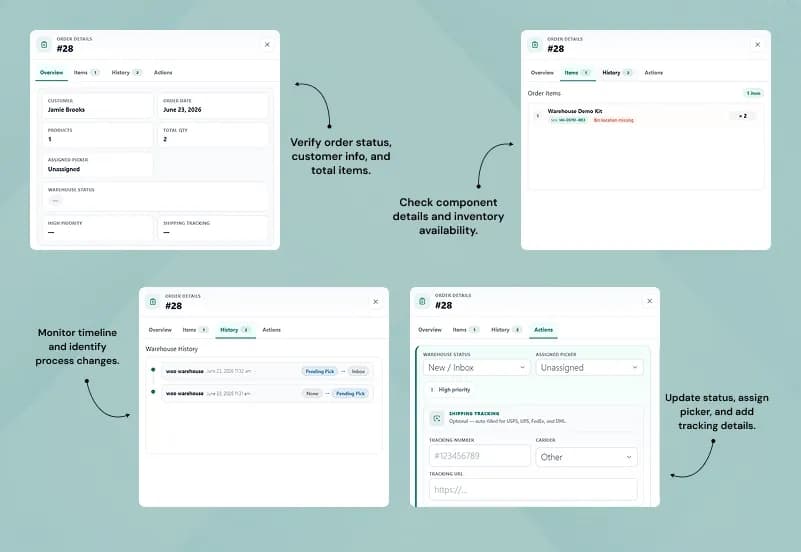
- View order details in a modal
- View customer details
- View order items
- View SKU
- View bin location
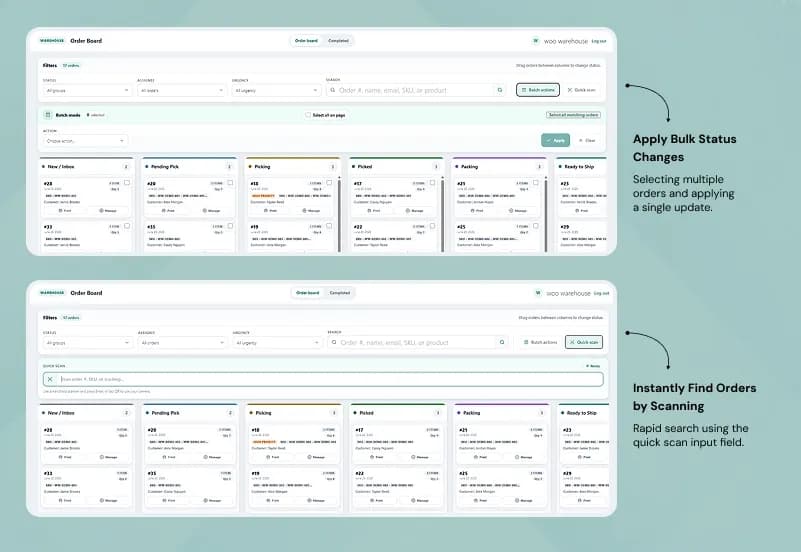
- Bulk actions on orders
- Print packing slip per order
- Add shipping tracking number
- Add carrier to an order
- Completed order archive with search
- Order status change history log
Bin Location Features
- Bin location per product
- Single aisle / shelf / bin text field
- Product inventory tab bin field
- Bin location validation
- Block status advancement when product has no bin assigned
- Bin location CSV import
- Bulk assign bins by SKU
- Bulk assign bins by product ID
- AJAX batching for CSV import
- Sample CSV download
- Order modal bin location display
Shipping and Notifications
- Shipping tracking number entry
- Carrier configuration
- Tracking URL templates
- WooCommerce-style warehouse emails
- Email notifications triggered by warehouse status
- Staff notifications on status changes
- Customer notification support through configured tracking workflow
Portal Appearance
- Dedicated warehouse staff portal
- Staff login page at /warehouse/login/
- Staff logout at /warehouse/logout/
- Active orders board at /warehouse/orders/
- Completed orders archive at /warehouse/completed/
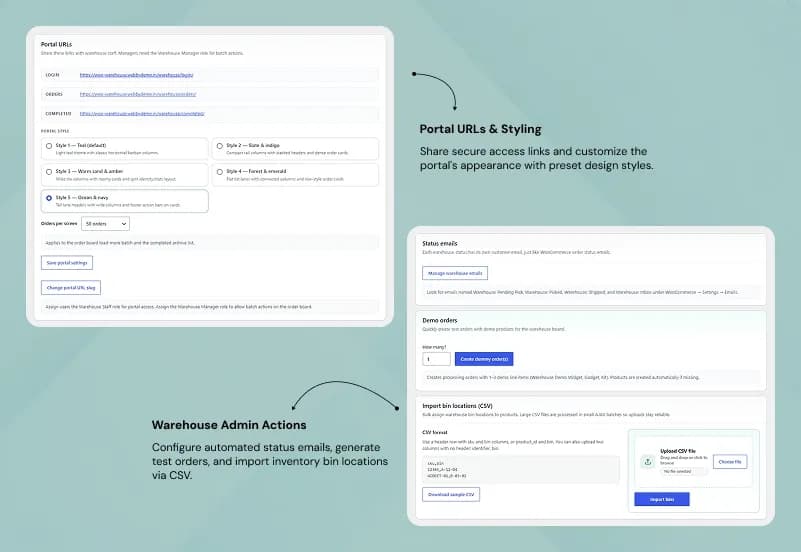
- 5 selectable portal visual themes
- Configurable orders-per-page
- Frontend portal access without full WP admin access
Admin Tools
- Warehouse settings page
- Workflow status configuration
- Shipping carrier configuration
- Portal appearance settings
- Warehouse staff role management
- Picker scoping controls
- Bin location CSV import tool
- Sample CSV download
- Dummy order generator
- Live board panel inside WordPress admin
- Help / guidelines page
- Quick settings link on plugins list screen
- Warehouse status field on WooCommerce order edit screen
- Picker assignment field on WooCommerce order edit screen
- High priority checkbox on WooCommerce order edit screen
- Status change history table on WooCommerce order edit screen
- REST API endpoints for portal interactions
How to Use WooCommerce Warehouse Fulfillment Plugin
Step 1: Install the Plugin
Upload and activate WooCommerce Warehouse Fulfillment Plugin in your WordPress website.
Result: Warehouse fulfillment settings, portal options, and workflow tools become available for your WooCommerce store.
Step 2: Configure Workflow Statuses
Create, edit, reorder, and color-code fulfillment statuses such as Pending Pick, Picking, Picked, Packing, Ready to Ship, Shipped, and Complete.
Result: Your warehouse board matches your real order processing workflow.
Step 3: Set Up Staff Roles and Portal Access
Assign warehouse roles to users, configure picker scoping, and prepare the frontend staff login and order portal.
Result: Warehouse staff can access assigned order workflows without needing full WordPress admin access.
Step 4: Add Bin Locations and Carriers
Add product bin locations manually or through CSV import, then configure shipping carriers with tracking URL templates.
Result: Pickers can find products faster and staff can add shipping tracking information during fulfillment.
Step 5: Process Orders on the Kanban Board
Use /warehouse/orders/ to triage new orders, assign pickers, mark high priority orders, move orders through workflow stages, scan barcodes, print packing slips, and update tracking information.
Result: Orders move through a clear warehouse fulfillment process from intake to completion.
Step 6: Review Completed Orders and Logs
Use the completed order archive, status history logs, board filters, and admin views to review fulfillment activity.
Result: Managers can track accountability, order progress, completed work, and warehouse team activity.
Modules and Features
Kanban Order Fulfillment Board
Manage active WooCommerce orders through a visual drag-and-column workflow.
- Kanban board at /warehouse/orders/
- Drag or click to move orders
- Filter by status
- Filter by assignee
- Filter by urgency
- High priority flag
- Auto-refresh every 5 minutes
- Manual Refresh Now button
Configurable Workflow Statuses
Build warehouse stages that match your fulfillment process.
- Create statuses
- Edit statuses
- Delete statuses
- Reorder statuses
- Color-code statuses
- Pending Pick
- Picking
- Picked
- Packing
- Ready to Ship
- Shipped
- Complete
Picker Assignment and Staff Portal
Assign warehouse work to specific staff members and give pickers a dedicated portal.
- Assign picker to order
- Warehouse staff login page
- Warehouse staff logout
- Warehouse staff role
- Picker scoped visibility
- Staff notifications
- Frontend warehouse portal
Bin Location Management
Help staff find products faster during picking.
- Product inventory tab bin field
- Aisle / shelf / bin text field
- Bin location validation
- CSV bin import by SKU
- CSV bin import by product ID
- AJAX batching
- Sample CSV download
Barcode Picking
Support barcode scanning during warehouse picking.
- Scan product barcodes
- Support picking workflow
- Improve product confirmation during order processing
- Reduce manual lookup during fulfillment
Shipping Tracking and Carriers
Add carrier and tracking details during fulfillment.
- Configure shipping carriers
- Add carrier slug
- Add tracking URL template
- Add tracking number to order
- Notify customers through configured email workflow
Completed Order Archive
Keep terminal-status orders separate from active warehouse work.
- Completed orders archive at /warehouse/completed/
- Archive search
- Separate completed order view
- Cleaner active board
Order History and Accountability
Track warehouse status changes per order.
- Order-level status history
- Who changed status
- From status
- To status
- Timestamp
- Status history table on WooCommerce order edit screen
Admin Warehouse Settings
Manage warehouse workflow settings from WordPress admin.
- Warehouse → Settings
- Warehouse → Live
- Warehouse → Help
- Quick settings link on Plugins screen
- Status field on order edit screen
- Picker field on order edit screen
- High priority checkbox on order edit screen
Admin & Advanced Settings
WooCommerce Warehouse Fulfillment Plugin provides centralized settings for warehouse workflow statuses, staff access, picker assignment, carrier tracking, portal appearance, bin imports, and order fulfillment board behavior.
Admins can configure workflow stages, assign warehouse roles, restrict pickers to assigned orders, import product bin locations, configure tracking carriers, manage board appearance, generate demo orders, and review warehouse status history from individual WooCommerce order screens.
The admin configuration covers:
- Configure workflow statuses
- Add workflow statuses
- Edit workflow statuses
- Delete workflow statuses
- Reorder workflow statuses
- Color-code workflow statuses
- Configure shipping carriers
- Add carrier name
- Add carrier slug
- Add tracking URL template
- Configure portal themes
- Configure orders-per-page
- Assign warehouse roles to users
- Remove warehouse roles from users
- Configure picker scoping
- Import bin locations by CSV
- Download sample CSV
- Generate dummy orders
- Open Warehouse → Settings
- Open Warehouse → Live
- Open Warehouse → Help
- Use quick settings link from Plugins list
- Set warehouse status on WooCommerce order edit screen
- Assign picker on WooCommerce order edit screen
- Mark high priority on WooCommerce order edit screen
- Review status change history table on WooCommerce order edit screen
Important Capability Notes
Supported
- Kanban order fulfillment board
- Drag and column-based order workflow
- Configurable workflow statuses
- Custom status labels and colors
- Picker assignment
- High priority flag
- Order triage / inbox
- Completed order archive
- Barcode scanner
- Shipping tracking carriers
- Tracking URL templates
- Staff notifications
- Warehouse status email notifications
- Warehouse staff login portal
- Warehouse staff logout
- Custom warehouse roles and capabilities
- REST API endpoints for portal actions
- 5 portal visual themes
- Configurable orders-per-page
- Dummy order generator
- Bin location per product
- Bin location validation
- Bin location CSV import
- Sample CSV download
- Order-level status history log
- Order board filters
- Order detail modal
- Bulk actions
- Packing slip printing
- Move order back to inbox
- Auto-refresh every 5 minutes
- Manual Refresh Now button
- Staff scoped visibility
- Warehouse users / team access
- Workflow status settings
- Shipping carrier settings
- Portal appearance settings
- Live board panel in WP admin
- Help / guidelines page
Not Supported
- Create multiple warehouses
- Manage unlimited warehouse locations
- Assign products to different warehouses
- Set stock quantities by warehouse
- View stock by warehouse
- Transfer stock between warehouses
- Warehouse-wise inventory reports
- WooCommerce stock by warehouse
- Per-location inventory
- Product-wise warehouse assignment
- Variation-wise warehouse stock
- Low stock alerts
- Stock adjustment
- Inventory history / stock logs
- Assign orders to warehouses
- Fulfill orders from selected warehouse
- Auto-select nearest warehouse
- Manual warehouse selection
- Split order between multiple warehouses
- Customer-facing warehouse-based availability
- Customer-facing stock availability by location
- Estimated fulfillment location
- Nearest warehouse delivery
- Manage warehouse locations
- Product assignment rules
- Stock rules
- Order routing rules
- Reports / dashboard
- Multi-warehouse inventory control
- Warehouse-wise stock visibility
Product Compatibility
Availability
- WordPress
- WooCommerce
Product Type
WooCommerce Order Fulfillment Plugin / Warehouse Staff Portal Plugin
Supported Experience
- Visual order fulfillment workflow
- Warehouse staff portal
- Picker assignment
- Bin-based picking
- Barcode-assisted picking
- Shipping tracking entry
- WooCommerce warehouse status management
- Completed order archive
- Order status history logging
Tags:
Template Features:
Streamlined Order Fulfillment
Kanban Order Fulfillment Board
Configurable Workflow Statuses
Order Triage / Inbox
Picker Assignment