WooCommerce Mobile App Template — Convert Store Into Mobile App

0 (0 Reviews)
0 Sales
License Options
View License Policy1 site / project / end product
up to 5 sites / projects / end products
up to 30 sites / projects / end products
Add-on Services
$149.00
$299.00
Technology
No title available : WooCommerce Mobile App Template — Convert Store Into Mobile App

Created : 16 July 2026
Updated : 31 August 2026
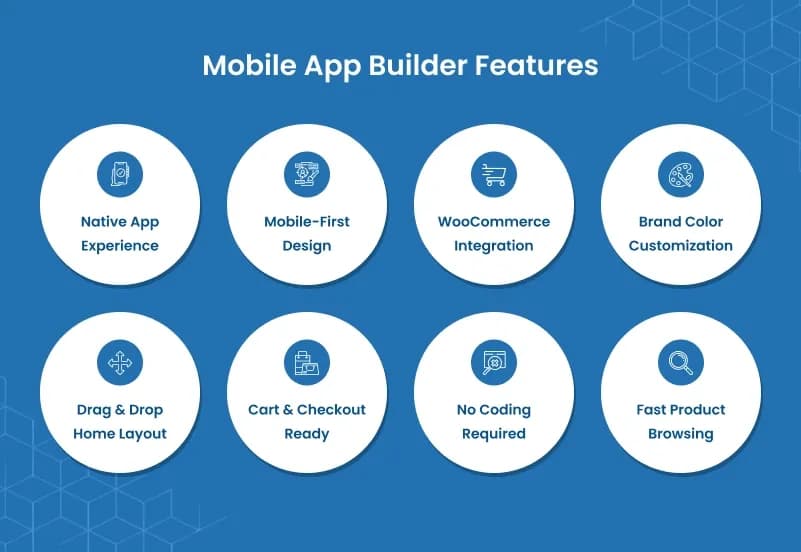
WooCommerce Mobile App Template is a WooCommerce mobile app template and WooCommerce PWA-style storefront plugin that helps store owners convert a WooCommerce store into a mobile-first app experience. It supports app access controls, mobile redirects, branded app colors, storefront layouts, catalog pages, product pages, cart, checkout, account screens, and home layout controls.
The plugin works as a WordPress WooCommerce mobile app experience for stores that want app-style shopping without rebuilding their WooCommerce store from scratch. Customers can browse products, open product details, use cart and checkout, access My Account pages, view orders, manage addresses, and shop through a cleaner mobile-first storefront.
What Is WooCommerce Mobile App Template?
WooCommerce stores often look and feel too heavy on mobile when the theme was originally designed for desktop browsing. Customers may need a cleaner mobile shopping flow with faster product discovery, easier catalog browsing, clearer product pages, smooth cart and checkout access, and simple account navigation.
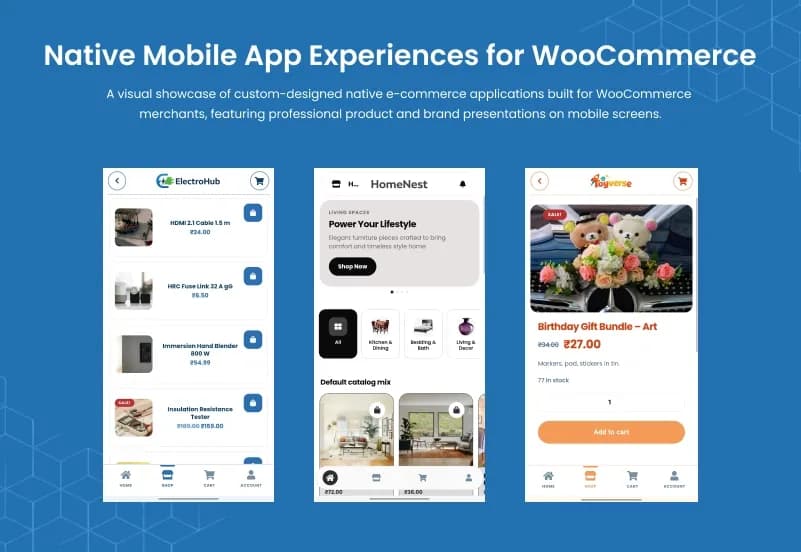
WooCommerce Mobile App Template helps store owners create a mobile-first app-style storefront for WooCommerce. It keeps WooCommerce as the store backend while giving customers a dedicated mobile shopping experience with app access, redirects, branded colors, catalog layout controls, product display options, checkout screens, account pages, and a customizable app home layout.
Who Is This Plugin For?
- WooCommerce store owners who want a mobile-first shopping experience
- WordPress shops that want an app-style storefront
- Online stores with high mobile traffic
- eCommerce brands that want a WooCommerce PWA-style layout
- Retail stores needing faster mobile product browsing
- Fashion, lifestyle, electronics, grocery, beauty, and general WooCommerce stores
- Agencies building mobile-first WooCommerce experiences for clients
- Developers needing a WooCommerce app-style frontend layer
- Store managers who want layout and branding control from the admin area
- Businesses that want to convert WooCommerce store to mobile app-style shopping
This plugin creates a WooCommerce mobile app-style / PWA-style storefront experience. Native iOS App Store publishing, Android Play Store publishing, push notifications, payment gateway setup, shipping setup, product inventory, and order management still depend on WooCommerce, hosting, third-party integrations, or separate app-wrapping workflows.
What Is Included?
Storefront
- Mobile-first homepage
- Product listing
- Categories
- Search
- Filters
- Product details
- App-style browsing flow
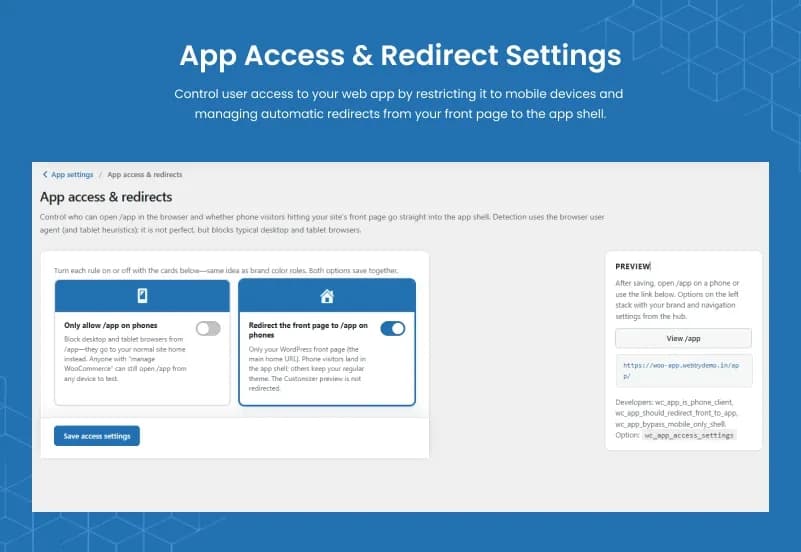
App Access & Redirects
- App access control
- Mobile user redirects
- App entry behaviour controls
- App-style access for WooCommerce users
- Mobile-first navigation flow
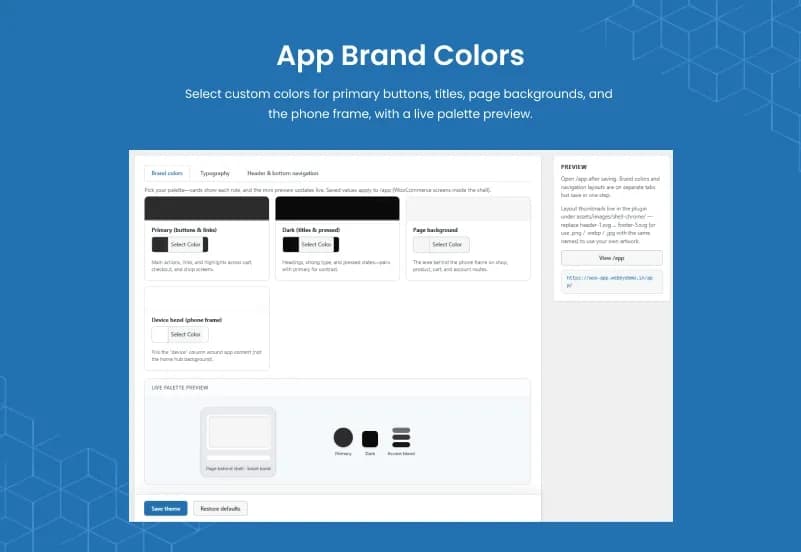
- App Colors & Theme
App color controls
- Theme style controls
- Primary visual element settings
- Secondary visual element settings
- Branded mobile storefront styling
- Clean WooCommerce app theme experience
Catalog, Product Page, Cart, Checkout & Account
- Mobile-first product catalog
- Product detail page layout support
- Cart flow support
- Checkout layout support
- My Account dashboard support
- Order history support
- Address management support
- Downloads support
- Account details support
App Home Layout
- Reorder home sections
- Reorder content blocks
- Show product sections
- Show featured areas
- Control mobile homepage layout
- Create app-style storefront sections
App Guide
- Built-in setup guide screens
- Chapter-by-chapter guidance
- Home layout guidance
- Screen control guidance
- Catalog setup guidance
- Cart setup guidance
- Account setup guidance
Catalog Layout Options
- Pastel Tiles
- List Rows
- Clean Cards
- Compact Grid
- Hero + Grid
List Row Arrangement Options
- Center + Top Right Cart
- Left Stack + Cart Below
Pastel Tile Look Options
- Pastel Blocks + Bag Hint
- Clean White
- Cinema Overlay
- Minimal Catalog
- Inset Frame
- Accent Stripe
How to Use WooCommerce Mobile App Template
Step 1: Install the Plugin
Upload and activate WooCommerce Mobile App Template in your WordPress website.
Result: Mobile app template settings become available for your WooCommerce store.
Step 2: Configure App Access and Redirects
Set how visitors enter the mobile app experience and configure mobile redirect behaviour.
Result: Mobile users can be guided into the app-style storefront experience.
Step 3: Customize App Colors and Theme
Set app colors, theme styling, and visual branding controls to match your WooCommerce store identity.
Result: The mobile storefront begins to match your brand design.
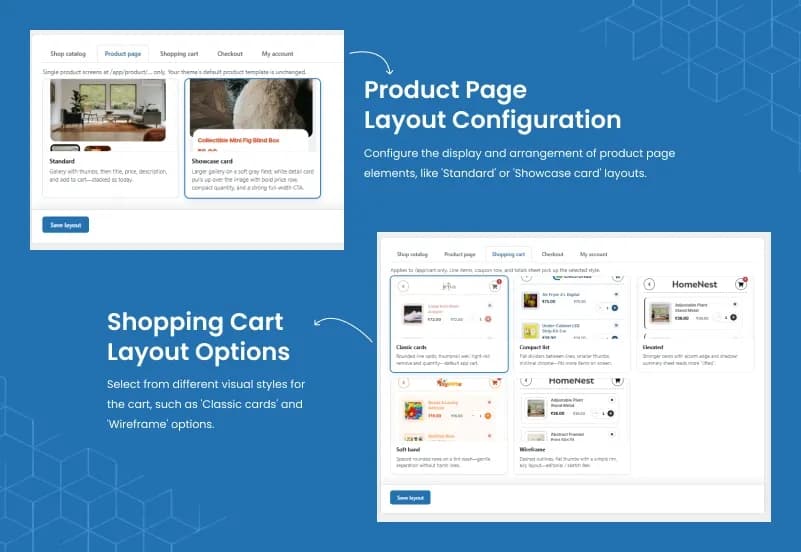
Step 4: Choose Catalog and Product Layouts
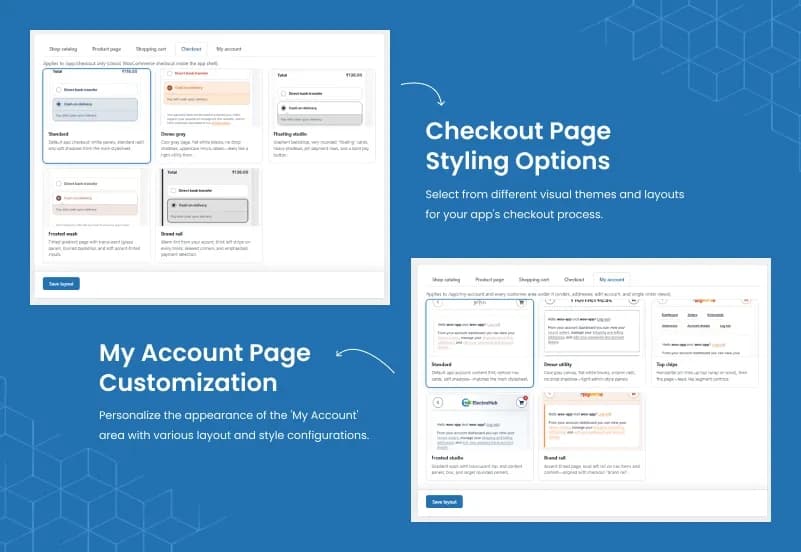
Select catalog layouts, product page layouts, cart layout, checkout layout, and account screen options.
Result: Customers get a cleaner mobile-first shopping flow across the main WooCommerce pages.
Step 5: Build the App Home Layout
Reorder home sections, add featured product areas, and organize the mobile homepage content blocks.
Result: Your app-style storefront home page is ready for mobile shoppers.
Step 6: Test the Mobile Shopping Flow
Test product browsing, search, filters, product details, cart, checkout, My Account pages, redirects, and mobile screen behaviour.
Result: Your WooCommerce mobile app-style storefront is ready to launch after final testing.
Modules and Features
Storefront
Create a mobile-first storefront for better browsing and a smoother app-style shopping experience.
- Mobile-first homepage
- Product listing
- Categories
- Search
- Filters
- Product details
App Access & Redirects
Control how visitors enter the app and manage mobile access from the WordPress admin.
- Limit app access to selected users or visitors
- Redirect mobile users into the app experience
- Control how the mobile app template opens
- Support app-style entry for WooCommerce users
- Improve mobile-first store navigation
App Colors & Theme
Customize the look and feel of the WooCommerce app theme to match your brand.
- Set app colors and theme styles
- Match branding across mobile screens
- Control primary and secondary visual elements
- Create a clean WooCommerce mobile store template
- Improve the overall mobile shopping experience
Catalog, Product Page, Cart, Checkout & Account
Manage the main shopping flow inside the app experience.
- Display product catalog in mobile-first layout
- Open product detail pages clearly on mobile
- Support cart and checkout flows
- Show My Account dashboard and order history
- Manage addresses, downloads, and account details
App Home Layout
Build a mobile-first home page that highlights your store content.
- Reorder home sections and content blocks
- Show product sections and featured areas
- Control homepage layout for mobile users
- Create a clean app-style storefront
- Make browsing easier on small screens
App Guide
Use built-in guide screens to help store admins understand each setup area.
- Learn how each app setting works
- Get chapter-by-chapter guidance
- Understand home layout and screen controls
- Review catalog, cart, and account setup
- Make configuration easier for new users
Admin & Advanced Settings
WooCommerce Mobile App Template provides centralized configuration options to control the mobile storefront experience. Store owners can manage app access, branding, catalog layouts, product display styles, and mobile shopping screens directly from the WordPress admin panel.
The settings are divided into dedicated sections to customize how customers browse products and interact with the WooCommerce mobile app template.
App Settings
Manage the core WooCommerce mobile app experience, including access control, branding, layouts, and app structure from one place.
The configuration covers:
- Configure app access and mobile redirects
- Control how visitors enter the mobile app experience
- Customize app colors and theme branding
- Manage catalog, product page, cart, checkout, and account layouts
- Configure mobile-first storefront navigation
- Organize app home layout sections
- Access setup guidance through the built-in app guide
Key capabilities:
- App access & redirects
- App colors & theme customization
- Catalog and product page configuration
- Cart and checkout layout control
- Account page management
- Mobile storefront setup
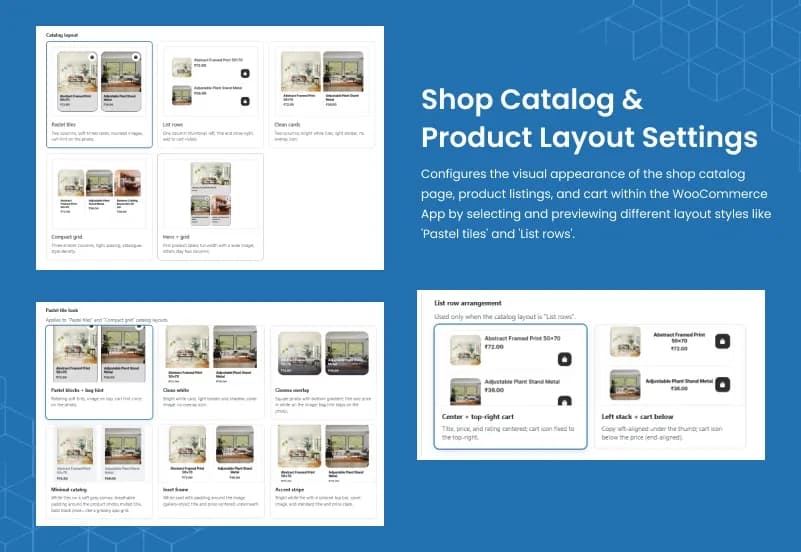
Catalog Layout Settings
Customize how products appear inside the WooCommerce mobile app storefront. Catalog layout settings control the product browsing experience for /app/shop and product grids.
The configuration covers:
- Select mobile catalog layouts for product browsing
- Configure grid-based product displays
- Use list row layouts for compact product viewing
- Apply different product presentation styles
- Improve mobile shopping navigation
Available catalog layouts:
Pastel Tiles
Display products with modern tile-style cards and soft visual styling.
- Two-column product card layout
- Product images with clean card presentation
- Cart interaction directly from product cards
- Mobile-friendly shopping experience
List Rows
Show products in a compact list-style layout.
- Thumbnail-based product listing
- Product title and pricing display
- Quick cart access
- Better for stores with many products
Clean Cards
Create a simple product card layout with clear product visibility.
- Clean product presentation
- Easy product comparison
- Better mobile catalog browsing
Compact Grid
Display more products with a denser grid layout.
- Multiple products visible together
- Space-efficient storefront design
- Suitable for larger catalogs
Hero + Grid
Highlight featured products with a larger hero section.
- Featured product display
- Promotional storefront layout
- Product-focused mobile experience
List Row Arrangement Settings
Configure the product listing style when the catalog layout is set to List Rows.
The configuration covers:
- Control product information alignment
- Customize list row appearance
- Improve readability for mobile shoppers
- Create cleaner product browsing flow
Available list row styles:
Center + Top Right Cart
- Center product title and price display
- Cart button positioned at top-right
- Balanced mobile product layout
Left Stack + Cart Below
- Left-aligned product information
- Product details stacked below thumbnail
- Cart action positioned below pricing
Pastel Tile Look Settings
Customize the visual appearance of Pastel Tiles and Compact Grid catalog layouts.
The configuration covers:
- Adjust product card presentation
- Create different storefront visual styles
- Improve mobile shopping appearance
- Match product layouts with store branding
Available styles:
Pastel Blocks + Bag Hint
- Soft tile colors
- Product image-focused design
- Cart hint indicator on product images
Clean White
- Minimal white card design
- Simple product presentation
- Modern storefront appearance
Cinema Overlay
- Image-focused product cards
- Overlay product information
- Premium shopping style
Minimal Catalog
- Clean product grid
- Simple pricing and product display
- Lightweight mobile browsing
Inset Frame
- Product images inside framed cards
- Centered title and pricing
- Gallery-style product layout
Accent Stripe
- Highlighted product card design
- Strong visual separation
- Modern ecommerce appearance
Product Compatibility
Availability
- WordPress
- WooCommerce
Product Type
Plugin / App Template
Supported Experience
- Mobile-first storefront
- App-style shopping
- PWA-style layout
- Responsive WooCommerce experience
Tags:
Template Features:
Convert Store to Mobile App
Mobile-First Shopping
Branded App Design
Better Product Browsing
Faster Checkout Experience