Admin Templates, Themes & Starter Kits
Admin templates are pre-designed interfaces for creating dashboards, administration panels, internal business systems, SaaS applications, and web app back offices. They provide prepared layouts and reusable interface elements that can reduce the amount of frontend design and development required to build an administrative interface.
On WebbyTemplate, buyers can compare available admin templates by reviewing their dashboard layouts, included pages, UI components, underlying technology, source files, documentation, dependencies, and customization requirements. Always check the individual product details before choosing because backend functionality, integrations, framework requirements, and included features can vary between products.
Best Downloads
Discover the most in-demand top-downloaded items trusted by top businesses.


by WebbyCrown Solutions
Newly Added
Discover the most in-demand top-downloaded items trusted by top businesses.
Top Rated
Skyrocket your creativity with our Top rated collection of supreme.
What Are Admin Templates?
Admin templates are ready-made user interface designs created for the management side of websites, applications, SaaS platforms, portals, and internal business systems. They can provide the visual foundation for navigation, dashboards, data displays, account management, settings, forms, tables, analytics, reports, and other administrative workflows.
An admin template should not automatically be treated as a complete working application. A product may visually include users, orders, invoices, charts, authentication screens, settings, notifications, or other functionality while providing only the frontend interface. APIs, databases, permissions, authentication, calculations, integrations, and other application logic may require separate development unless the individual product explicitly includes them.
What You Can Find in Admin Templates
Depending on available marketplace inventory, this category can include:
- Admin dashboard templates
- SaaS dashboard templates
- Analytics dashboard templates
- Business dashboard templates
- CRM admin interfaces
- ERP dashboard interfaces
- eCommerce administration dashboards
- Project management dashboards
- User management interfaces
- Finance dashboard templates
- Sales dashboards
- Marketing dashboards
- Reporting dashboards
- Customer portal interfaces
- Employee portal interfaces
- Inventory administration interfaces
- Order management dashboards
- Application settings interfaces
- Data management interfaces
- Authentication page layouts
- Profile and account pages
- Tables and data layouts
- Form interfaces
- Chart and analytics layouts
- Reusable admin UI components
Availability depends on the products currently listed in the marketplace.
Who Should Use Admin Templates?
Admin templates can be useful for:
- Frontend developers
- Full-stack developers
- SaaS development teams
- Startup product teams
- Software companies
- Web development agencies
- Freelance developers
- UI developers
- Businesses creating internal software
- Teams building analytics platforms
- Developers creating CRM systems
- Developers creating ERP interfaces
- Companies building customer portals
- eCommerce development teams
- Teams developing management dashboards
- Developers building MVPs and proof-of-concept applications
How to Choose the Right Admin Template
Start with the type of application you are building. A SaaS dashboard, CRM, ERP, analytics platform, eCommerce administration system, project management application, customer portal, and internal business tool can require different interfaces and workflows.
Review the pages included with the template. Depending on your project, you may need overview dashboards, user management, profiles, settings, authentication pages, tables, forms, charts, reports, invoices, calendars, notifications, account pages, or application-specific administration screens.
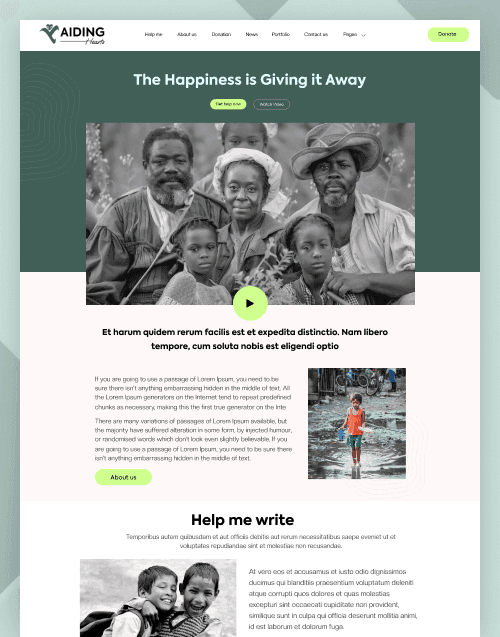
Check the underlying technology before choosing a product. Admin templates may use HTML, CSS frameworks, JavaScript libraries, React, Next.js, or other development technologies. For example, buyers looking for a React-based administration interface can review the Aiding Hearts React Admin Dashboard Template to see how a specific admin product presents its technology, dashboard functionality, included components, and application requirements.
For projects that combine a website or CMS experience with an administration interface, products such as the Orion Construction Next.js CMS Admin Dashboard Template can also help buyers understand how requirements differ from a standalone frontend dashboard.
Review the available UI components. Useful admin interfaces may require navigation menus, cards, tables, forms, filters, tabs, alerts, buttons, dropdowns, pagination, charts, modal windows, search interfaces, and other reusable components. Choose according to your actual application requirements rather than simply selecting the product with the longest feature list.
Consider responsive behavior carefully. Admin dashboards often display dense information, data tables, navigation, filters, and charts. Review each product's preview and specifications to understand how its layouts behave across the devices relevant to your application.
Check dependencies and setup requirements as well. Framework packages, third-party libraries, chart libraries, fonts, icons, API services, or other dependencies may require separate installation, configuration, licensing, or maintenance.
Most importantly, distinguish the frontend interface from application functionality. A template can provide designs for authentication, analytics, user management, billing, orders, inventory, reports, or other features without necessarily providing the database, API, business logic, permissions, payment processing, or server-side systems behind those interfaces.
Before using an admin template for a SaaS product, commercial application, or client project, review the WebbyTemplate License Policy to understand the permitted project and end-product usage.
Popular Use Cases for Admin Templates
Admin templates can provide a starting point for:
- SaaS application dashboards
- Business administration systems
- Analytics platforms
- CRM dashboards
- ERP interfaces
- Project management applications
- Customer portals
- Employee portals
- eCommerce administration systems
- Inventory management dashboards
- Order management systems
- Finance dashboards
- Accounting interfaces
- Sales reporting dashboards
- Marketing analytics platforms
- User management systems
- Content administration interfaces
- Booking management systems
- Support dashboards
- Internal company tools
- Application control panels
- MVP dashboards
- Reporting systems
- Data visualization interfaces
Admin Templates Quality Notes
Admin templates can vary significantly in technology, structure, included components, functionality, documentation, and intended use. Buyers should evaluate each product separately instead of assuming every admin template provides the same capabilities.
Important points to check include:
- Frontend vs. backend: Many admin templates provide the frontend interface only. Backend systems may require separate development.
- Authentication: Login, registration, password reset, account, or authentication screens may only be visual layouts unless working authentication is specifically included.
Database functionality: Tables, reports, user records, orders, or other information displayed in a demo may use sample or static data. Do not assume a database connection is included.
- APIs: Dashboard interfaces may require APIs or other data sources to display real application information.
- Charts and analytics: Charts shown in a preview may use sample data and can require configuration or integration with your own data sources.
- User roles and permissions: Screens for administrators, users, roles, or permissions do not necessarily include the application logic required to enforce those permissions.
- Forms: Forms may provide frontend fields and layouts without server-side submission, validation, storage, email delivery, or API processing.
- Payments and billing: Billing, subscription, payment, invoice, or pricing interfaces do not automatically include a payment gateway or subscription system.
- Framework compatibility: Check the technology and version information provided for each product before integrating it into an existing application.
- Dependencies: Review required packages, frameworks, libraries, plugins, fonts, icons, and external services.
- Responsive behavior: Check individual product previews and documentation for device and layout support.
- Documentation: Review available setup and customization instructions, particularly for framework-based products.
- Third-party services: Some interface elements may rely on external libraries, APIs, or services that require separate accounts, licenses, or configuration.
- License: Confirm that the intended personal, commercial, SaaS, client, or other usage fits the applicable product license.
- Support: Support availability and scope can differ between marketplace products and authors, so review the product-specific support information before purchasing.
Related Category Ideas
Do not add live category links until final category URLs are confirmed.
Related category ideas:
- Site Templates
- Technology Templates
- Software Templates
- Business Templates
- Dashboard Templates
- SaaS Templates
- UI Templates
- Web App Templates
- JavaScript Templates
- React Templates
- Next.js Templates
Frequently Asked Questions
What is an admin template?
What is an admin dashboard template used for?
Do admin templates include a working backend?
What should I check before buying an admin template?
Can I use an admin template for a SaaS application?
Are the charts in admin templates connected to real data?
Can I customize an admin dashboard template?
Do admin templates include working login and registration systems?
Can I use an admin template for a client project?
How do I choose the right admin template for my technology stack?
Subscribe Now for Insider Access
Our newsletter is more than just updates it's your pass to the latest news, special promotions, and curated content designed to keep you ahead.