On this page
Web Design Trends 2027: What to Adopt, Watch and Skip in the AI Era

WebbyCrown Solutions-
September 29, 2026-9 min read

Web design in 2027 will be shaped by AI-assisted production, but durable results still depend on human judgment, accessibility, performance and brand coherence.
Web design in 2027 is moving beyond the question of whether AI can generate a page. The useful question is whether that page is clear, distinctive, accessible, fast and maintainable after launch. The strongest trends use AI to accelerate exploration while keeping human judgment in charge of brand, content, interaction and quality. The weakest trends add spectacle without helping visitors complete a task.
The web design trends worth adopting in 2027 are accessibility-first components, performance-aware visuals, responsive systems, authentic brand expression and AI-assisted workflows with human review. Adaptive personalization, conversational interfaces and spatial experiences are worth watching because their value depends on context and implementation. Excessive motion, unreadable glass effects, generic AI layouts and decorative 3D that slows a page should be skipped or used with strict limits.
Web Design Trends 2027 at a Glance
| Trend | Decision | Why it matters |
|---|---|---|
| Accessibility-first component systems | Adopt | Improves usable navigation, focus, contrast and interaction states. |
| Performance-aware visual design | Adopt | Protects loading, interaction and visual stability. |
| AI-assisted, human-directed workflows | Adopt | Speeds iteration without outsourcing brand judgment. |
| Distinctive brand systems | Adopt | Reduces the generic sameness of prompt-generated layouts. |
| Responsive content composition | Adopt | Designs components around real content and multiple viewports. |
| Adaptive personalization | Watch | Can improve relevance but needs consent, data quality and fallbacks. |
| Conversational interfaces | Watch | Useful for guided tasks; weak as a replacement for clear navigation. |
| Spatial and immersive layers | Watch | Effective for selected stories and products, but costly to build and run. |
| Excessive scroll animation | Skip | Can obstruct reading, accessibility and performance. |
| Unreadable glass effects | Skip | Low contrast and layered blur can reduce clarity. |
| Generic AI-generated sameness | Skip | Fast output is not the same as memorable positioning. |
| Decorative heavy 3D everywhere | Skip | Adds weight and distraction when it serves no user task. |
Why AI Changes Web Design Without Replacing It
Mainstream platforms already position AI as part of website creation. WebbyTemplate’s AI website builder statistics report documents that movement while also explaining why public data does not support a reliable platform-by-platform share of sites actually built with AI. The practical conclusion is not that designers disappear. Their work shifts toward direction, systems, validation and differentiation.
AI can produce a draft layout, rewrite interface copy, propose variations and accelerate repetitive production. It cannot automatically know which promise a brand should own, which trade-off a customer will accept, whether a workflow is understandable to a first-time visitor, or whether the finished experience works across assistive technologies and real devices. In 2027, design quality will be judged less by how quickly the first screen appears and more by how deliberately the whole experience behaves.
Adopt These Web Design Trends in 2027
1. Accessibility-First Component Systems
Accessibility should be designed into buttons, menus, forms, dialogs and content patterns before visual polish is applied. Use visible focus, meaningful labels, sufficient contrast, usable targets, logical reading order and alternatives for motion. The website template accessibility checklist provides a practical review process and correctly treats automated scans as a first pass rather than proof of conformance.
WCAG 2.2 remains the current W3C Recommendation. A trend forecast should not turn that standard into a design fashion: accessibility is a durable requirement. Templates can provide a stronger foundation, but final conformance still depends on implementation, content, integrations and ongoing testing.
2. Performance-Aware Visual Design
Large media, complex effects and continuous animation should earn their cost. Establish a performance budget before choosing a hero video, 3D scene or layered blur. Compress and size media correctly, reserve layout space, reduce main-thread work and test the finished page with real content. Google describes Core Web Vitals as measures of loading performance, interactivity and visual stability; design choices directly influence all three.
3. AI-Assisted Workflows With Human Review
Use AI for fast exploration, content variants, component suggestions and production support. Keep human approval at four gates: brand direction, information architecture, accessibility and final device testing. Preserve reusable decisions as variables, components and documented patterns so the system can be maintained after the prompt session ends.
4. Distinctive Brand Systems Instead of Prompt Sameness
A polished gradient, rounded cards and familiar SaaS layout can be generated quickly, which makes those choices less differentiating. Durable sites need recognizable typography, image direction, voice, spacing rhythm and interaction behavior. Start from the brand’s audience and promise, then use AI to explore within those boundaries—not to define them by default.
5. Responsive Content Composition
Responsive design in 2027 should be content-aware rather than a desktop canvas squeezed onto a phone. Define how headings wrap, cards reorder, media crops, navigation changes and actions remain reachable. These choices reflect broader UX design principles such as clarity, consistency, feedback, accessibility and user control.
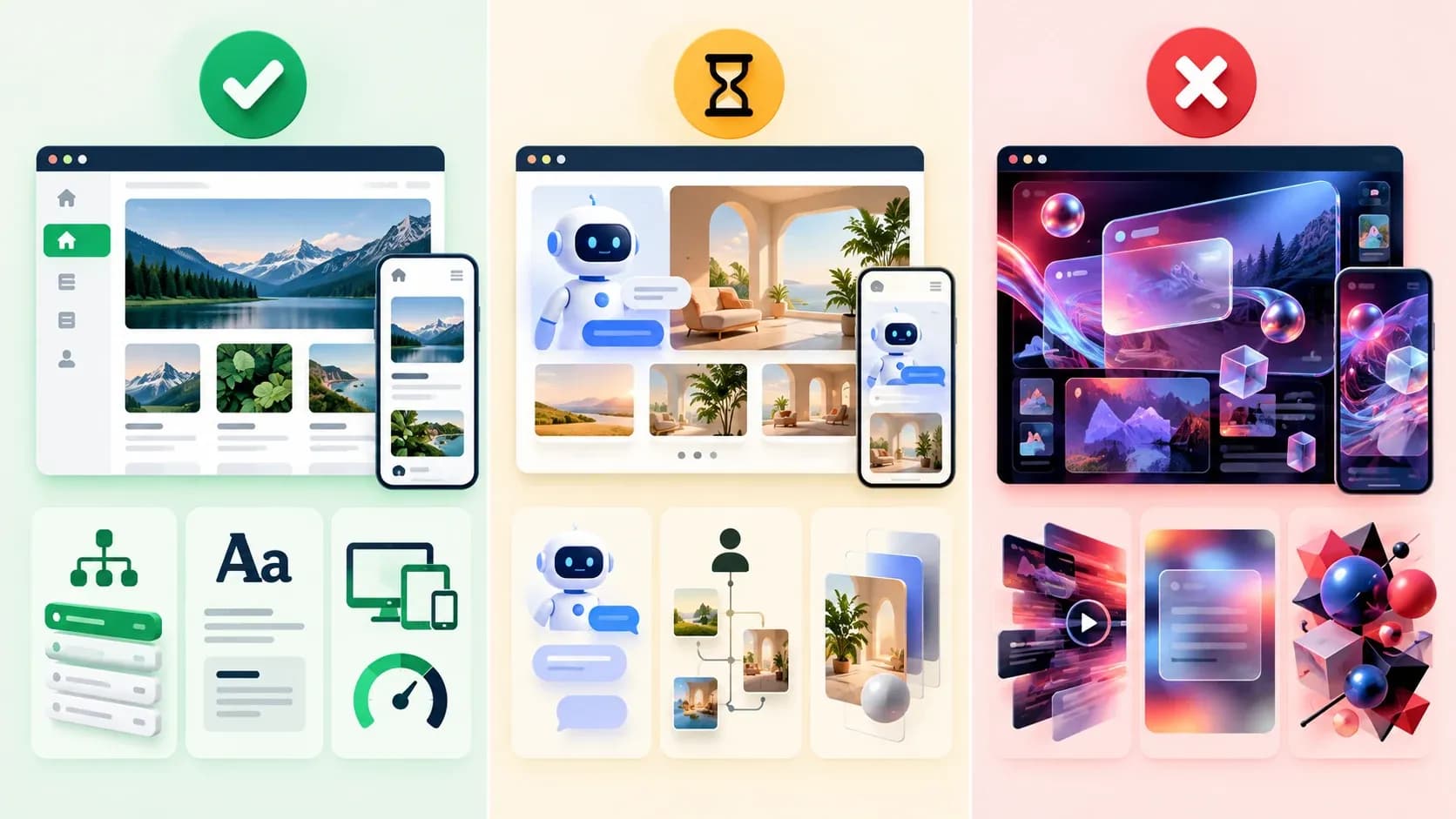
A decision framework for separating durable design practices from experimental patterns and avoidable visual excess.
Watch These Trends Before Committing
Adaptive Personalization
Interfaces may adjust content, recommendations or help based on context. The opportunity is relevance; the risks are unclear consent, weak data, surprising changes and experiences that fail when personalization is unavailable. Watch the category, but require a useful default experience and transparent controls before adopting it widely.
Conversational Interfaces
Conversation can help with product discovery, support and complex questions. It should not hide prices, policies, categories or basic navigation behind a chat box. Use conversation as an optional task path, show what it can do, provide recovery when it fails and allow visitors to continue through conventional interface patterns.
Spatial and Immersive Experiences
WebGPU, richer motion tools and better browsers make immersive presentation more practical. These experiences can suit product exploration, storytelling, architecture, games or creative portfolios. For most information and commerce pages, use them selectively. Always provide reduced-motion behavior, keyboard access, readable alternatives and a performance fallback.
Skip or Use These Trends Carefully
Avoid treating novelty as evidence of quality. Excessive scroll control can make a page feel slow or disorienting. Heavy blur and transparent layers can weaken contrast. Decorative 3D can compete with calls to action and increase loading cost. AI-generated personalization should not pretend to understand a visitor when it lacks reliable context. Brutalist or experimental typography should never make essential information difficult to read.
The test is simple: if removing the effect makes the task clearer, faster or easier to complete, the effect was probably decoration rather than design.

A durable AI-era website connects visual identity, accessible components, semantic structure, performance controls and human review in one maintainable system.
A Practical 2027 Web Design Decision Framework
| Question | Adopt when | Pause or reject when |
|---|---|---|
| Does it help the main user task? | The benefit is visible in a real journey. | The only justification is that it looks new. |
| Is it accessible? | Keyboard, focus, contrast, labels and motion are tested. | Critical actions depend on pointer precision, color or motion. |
| Is it fast enough? | Media and effects stay within a tested budget. | The visual requires heavy scripts or unstable layout. |
| Is it distinct to the brand? | It follows a documented voice and visual system. | It resembles a generic prompt output. |
| Can the team maintain it? | Components, variables and ownership are clear. | The effect depends on fragile one-off work. |
| Is AI output reviewed? | A person validates claims, flows and edge cases. | Generated output is published without evaluation. |
How to Choose a 2027-Ready Website Template
A current-looking template is a starting point, not proof of quality. Review the live demo on desktop and mobile. Check navigation, focus, contrast, forms, content flexibility, motion controls and page weight. Confirm what the product actually includes—design files, coded pages, CMS features and backend functionality are different deliverables.
For design-stage projects, browse Figma UI templates and evaluate components, mobile layouts and variables before assuming the file is production code. For an AI-company marketing site, AI website templates can provide a relevant visual and technical starting point, but model integrations, authentication, billing, databases and application logic must be verified separately for each product.
Final Takeaway
The defining web design trend of 2027 is not a single color, layout or effect. It is disciplined selection. Adopt accessible systems, performance-aware visuals, responsive composition, distinctive brands and AI-assisted workflows with human review. Watch personalization, conversation and immersive interfaces until their value is proven for the task. Skip visual excess that makes a site slower, less readable or harder to use.
When the foundation matters more than starting from a blank canvas, browse website templates and digital products and compare each item by format, included pages, technology, licensing and support rather than appearance alone.
FAQs
Q1.
What is the biggest web design trend for 2027?
Q2.
Will AI replace web designers in 2027?
Q3.
Is minimalism still relevant in 2027?
Q4.
Are 3D websites a good trend to adopt?
Q5.
Will conversational interfaces replace website navigation?
Q6.
How important is accessibility in 2027 web design?
Q7.
What makes an AI-generated website look generic?
Q8.
Should every website use animation?
Q9.
How can a website stay fast while using modern visuals?
Q10.
How should businesses choose a 2027-ready template?
Sources and Further Reading
- W3C — Web Content Accessibility Guidelines WCAG 2.2
- W3C WAI — What Is New in WCAG 2.2
- Google Search Central — Understanding Core Web Vitals and Google Search Results
- Google — Material Design 3
- WebbyTemplate — AI Website Builder Market Share and Statistics 2026
- WebbyTemplate — Website Template Accessibility Checklist
- WebbyTemplate — UX Design Principles
Methodology and limitations: This article is a forward-looking editorial assessment published in September 2026. “Adopt,” “Watch” and “Skip” labels are recommendations based on current web standards, platform direction and practical UX trade-offs—not guarantees of 2027 popularity. It does not claim private platform usage data, universal legal compliance or hands-on testing of every tool and template.