On this page
How to Integrate Real-Time Voice AI Agents into Headless Next.js & Shopify Storefronts

WebbyCrown Solutions-
September 24, 2026-6 min read
Have you ever tried using a standard text chatbot on a mobile store while walking down the street? You type out a question, wait for a generic automated reply, get directed to the wrong category page, and eventually give up. It is frustrating for the customer and terrible for the store owner.
Things are changing fast in e-commerce. By combining a headless Next.js frontend with Shopify’s Storefront API, you can let your customers speak to your store like they are talking to a helpful shop assistant.A customer can simply tap their microphone, ask for a specific item, and watch matching product cards appear on their screen while listening to a natural, instant reply.
Building a smooth, low-latency setup takes more than dropping a simple third-party widget into your layout. Let's walk through how to connect a real-time voice pipeline into a headless Next.js and Shopify setup without slowing down your site or confusing your users.
Understanding the Moving Parts Behind Real-Time Voice
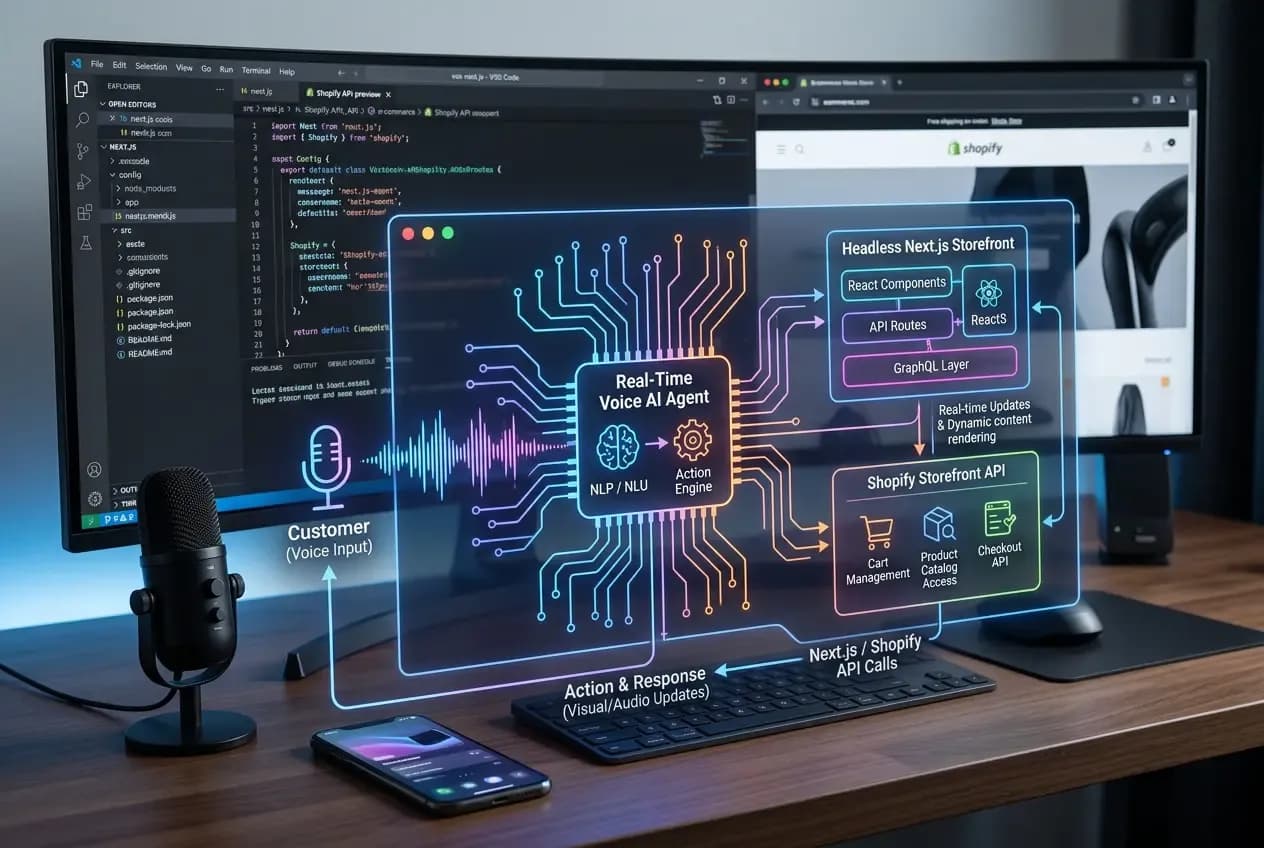
Prior to getting into the actual configuration process, it may be helpful to draw a roadmap of how data travels from your user’s browser, through the voice processing system, and eventually to the Shopify database.
A traditional headless flow has Next.js in charge of rendering pages and visual user interface elements, while Shopify runs behind the scenes, handling products, inventory, carts, and the checkout process. By adding live voice into the mix, you are adding a loop that needs to handle three things at once: listening to live audio, processing user intent, and fetching real-time store data.
A reliable voice-driven architecture relies on three main layers working together:
- The Next.js App Router Frontend: Captures microphone input directly from the browser, manages connection states, and renders dynamic product cards or cart drawers.
- The Voice Engine and Orchestrator: Processes raw audio chunks, translates voice (speech) into text, uses the language model for conversation logic, and initiates backend tasks.
- The Shopify Data Layer: Executes GraphQL queries and mutations to check inventory stock, search product collections, and update shopping carts in real time.
When building full-duplex audio experiences where users can talk and listen at the same time, using a dedicated AI voice agent for developers handles the heavy lifting of audio streaming, turn-taking, and natural speech generation. This allows engineering teams to focus on store-specific business logic instead of spending weeks building low-level audio streaming protocols from scratch.
Selecting the Right Streaming Protocol for Low Latency
The most crucial element in voice commerce is speed. If a customer poses a question and receives two seconds of silence as an answer, then the discussion seems incomplete. In order to maintain instant responses, the latency of your connection should be below 500 milliseconds.
Sending recorded audio clips through standard HTTP POST requests simply won't cut it. That traditional approach creates a huge delay because the browser has to wait until the user finishes speaking, package the file, upload it to the server, wait for processing, and then download an audio response file.
Instead, modern headless voice setups establish open, bidirectional channels right from the browser. You generally have two main choices:
1. WebSockets: Great for push-to-talk buttons and structured audio streaming. It is straightforward to configure within Next.js API routes and handles streaming text and audio data back and forth reliably over a single TCP connection.
2. WebRTC: The absolute gold standard for true conversational voice. It establishes direct peer-to-peer audio channels with extremely low overhead, making it ideal if you want users to be able to interrupt the assistant mid-sentence without crashing the system state.
Connecting Intent to Shopify Function Calls
An assistant that can only chat about general store policies isn't going to drive sales. To make your voice setup genuinely useful, your system needs to execute actual store operations using tool calling (also known as function calling).
Imagine a shopper says, "Do you have the vintage denim jacket in medium, and can you add it to my cart?"
Here is what happens behind the scenes:
1. The voice engine analyzes the spoken sentence and identifies two clear intents: search_inventory and add_to_cart.
2. Instead of returning plain text, the engine generates a structured payload containing the search parameters (item: denim jacket, size: medium).
3. Your Next.js backend receives this payload and executes a GraphQL request directly against Shopify’s Storefront API.
4. Shopify confirms the item variant ID is in stock and creates a cart session.
5. The voice engine gets the success signal and speaks out loud: "Got it! I added the medium vintage denim jacket to your cart."
By handling inventory checks and cart actions through Shopify's native Storefront API, you ensure that prices, stock levels, and discount codes stay 100% accurate.
Keeping Visual Screens and Voice Audio in Perfect Sync
One such difficulty that developers commonly encounter is how to ensure that the screen visuals are synchronized with what the assistant is verbally conveying. For instance, if the voice assistant suggests three particular running shoe pair options, then those three running shoes must appear on the screen immediately without requiring a manual page refresh.
Keeping visual feedback fast and accurate is essential for keeping shoppers engaged throughout their visit. This level of responsiveness matters even more when you consider that the average conversion rate of e-commerce sites stands at 1.4 percent. When web experiences feel clunky or slow, visitors leave without buying.
For keeping the Next.js user interface in sync with real-time voice audio:
- Employ either Server Sent Events (SSE) or custom client-side event listeners to fire UI events at the precise point when the server runs the Shopify search operation.
- Generate dedicated React UI components such as slider or drawer for quick viewing and selecting of size options, alongside the voice session widget.
- Design visual cues to show if the system is listening to the user, processing data, or retrieving information about the products.
Build a Faster, Smarter Storefront Today
The incorporation of live voice capability in a headless Next.js and Shopify store doesn't come off as adding a fancy feature. It comes as a means of cutting down the process of buying and making users access what they are looking for without pressing through a countless number of menus. By integrating low-latency audio streams with Shopify's GraphQL backend, you can deliver an online shopping experience that feels fast, personal, and remarkably effortless.