On this page
Odoo Studio Is Enterprise-Only: Here's What You Lose Without It

WebbyCrown Solutions-
September 9, 2026-11 min read
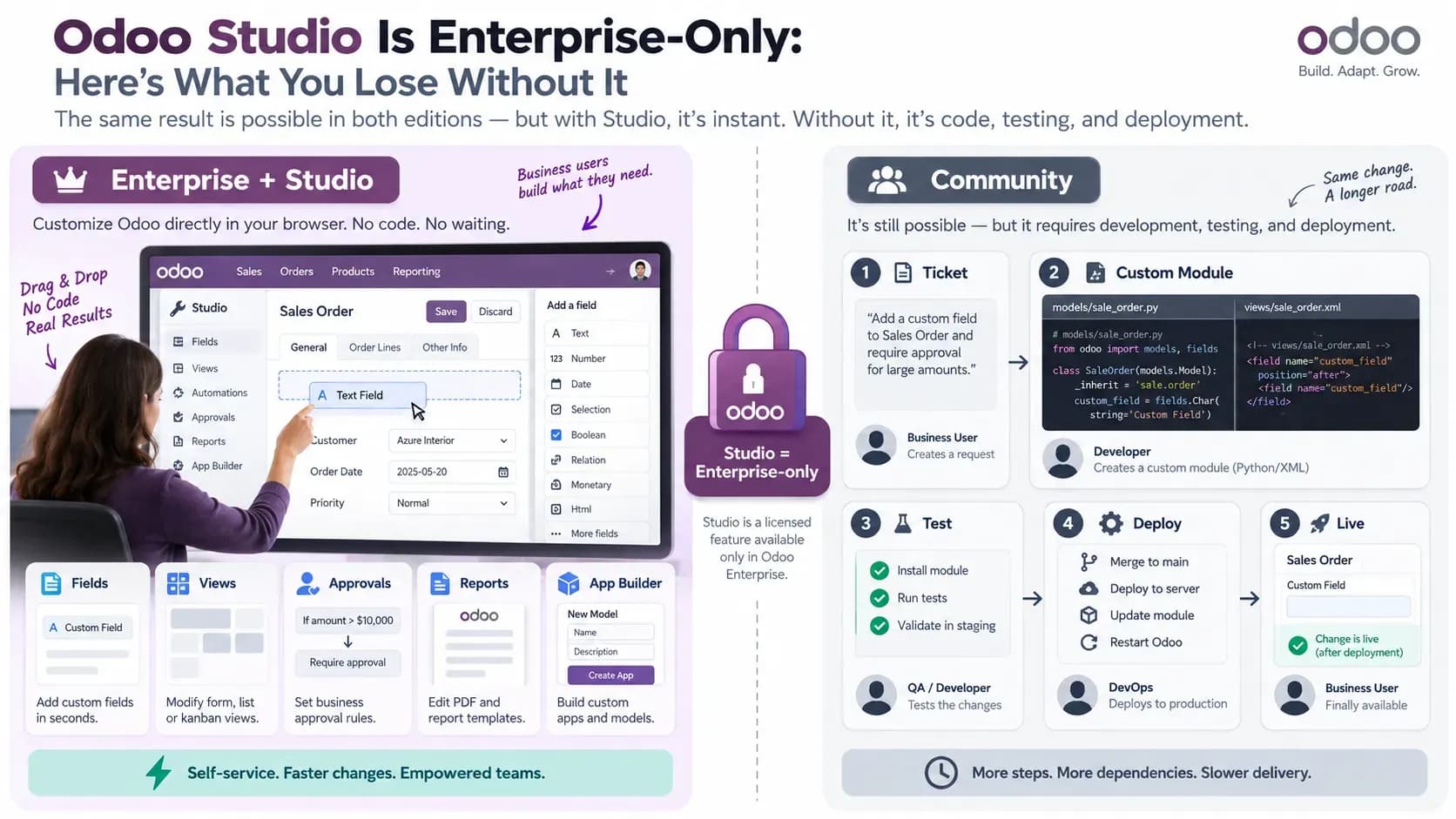
A business analyst gets a request on Monday morning: add a Rejection reason field to the purchase order form, make it required when someone declines, and route anything above €10,000 through a second approver. On an Enterprise database with Studio, that's an afternoon of work done by the analyst, with no deployment involved. On Community, it's a ticket, a branch, a module, a staging test, and a restart window.
The requirement didn't change. The cost of satisfying it did, by roughly an order of magnitude.
Odoo Studio is the sharpest single line separating the two editions, and it isn't a module you can install your way around. If you're deciding whether Community can carry your implementation, this is the feature that decides it. Here's what the gate actually blocks, what Community already does without help, and how to price the difference.
What Studio actually is, and why you can't install it
Studio lives in Odoo's enterprise addons repository, which is proprietary and unpublished. There's no community fork, no OCA package that reproduces it, and no install path that gets you there. That's the whole mechanism behind the gate. It isn't a feature flag Odoo could switch on for Community users; it's code they don't ship.
What it does is narrower than the marketing suggests and broader than most Community teams assume. Odoo's documentation describes Studio as a toolbox for adding or modifying fields, views, models, automation rules, webhooks, PDF reports, approval rules, and security rules without writing code. Every one of those is something an Odoo developer already does. Studio's contribution is removing the developer from the loop for the simple 80% of requests.
Under the hood, Studio doesn't generate a module on your filesystem. It writes records. Fields you add become `ir.model.fields` rows, usually prefixed `x_studio_`. Layout changes become `ir.ui.view` rows. Triggers become `base.automation` rows. Your customization lives in the database, which is why it applies the instant you save it, and why it doesn't travel to a fresh database without a deliberate export.
That storage model has a governance consequence worth naming early. Studio edits apply to whichever database the user is logged into, so a person with the right permissions can reshape a production form at 4pm on a Friday with no review step between the idea and the live system. Some teams treat that as the whole point. Others discover it during an incident postmortem.
There's a second gate that most buyers find late. Studio isn't included across the entire Enterprise plan ladder. Odoo's documentation states plainly that installing Studio on a database running the Standard plan "automatically triggers an upsell to the Custom pricing plan": a 30-day upsell order on yearly and multi-year contracts, and an automatic subscription switch with the new rate applied at the next bill on monthly ones. So "we're on Enterprise" doesn't reliably mean "we have Studio."
What you give up when Studio isn't in your database
Strip Studio out and nothing becomes impossible. Things become slower, and the slowness lands on a different person.
Here's the honest mapping for the change requests that dominate a typical Odoo implementation's backlog:
| Change request | Community | Enterprise with Studio |
|---|---|---|
| Add a field to the sale order form | Python model extension plus XML view inheritance in a custom module | Drag the field onto the form |
| Reorder or hide list view columns | Edit the view architecture as raw XML in developer mode, or ship a module | Point-and-click column editor |
| Email someone when a record changes stage | Automated action via base_automation | Same engine, guided editor |
| Two-step approval above a spend threshold | Custom module with your own state and access logic | Studio approval rules |
| Restyle the quotation PDF | Hand-edit QWeb templates | Visual report editor |
| Stand up a small new model with its own menu | Full module: model, views, menu, access CSV | App builder wizard |
Row three deserves a pause, because people get it wrong in both directions. `base_automation` ships in Community. You can build triggered actions, scheduled actions, and Python-backed server actions from the Settings menu without paying anyone. Studio doesn't unlock automation; it wraps a friendlier editor around automation Community already has. If your roadmap is automation-heavy rather than form-heavy, that single fact keeps Community viable considerably longer than most comparison charts imply.
Rows two and five run the other way. Community's developer mode does let you open a view's XML architecture and edit it in place, which looks like a free workaround until you do it twice. Direct edits to base views are unversioned, invisible to code review, and among the first things to break on a version upgrade. QWeb report editing has the same shape: entirely possible, entirely a developer task, and entirely dependent on someone knowing which template inherits which.
Row six is where the gap widens most. Studio's app builder produces a working model, menu entry, views, and access rules from a wizard. Reproducing that in Community is not hard, but it's four files and a security CSV, and getting the access rules wrong is the most common way a Community customization ends up either invisible or dangerously open.
Studio is also one line on a longer ledger rather than the entire split. Multi-company management and external API access sit behind the same Custom plan on Odoo Online, and hosting, support, and upgrade terms differ across editions too. A decision framed as "do we need Studio" is usually a decision about four or five things at once. An Odoo Community vs Enterprise comparison covering the full edition boundary is a more useful input at that stage than a feature-by-feature argument about one module.
The Community path, step by step
When a Community team receives that Rejection reason request, this is the real sequence:
1. Scaffold a module: `odoo-bin scaffold reason_tracking addons/`.
2. Extend the model in Python with `_inherit = "purchase.order"`, then declare the field.
3. Inherit the form view in XML and position the field with an `xpath` expression.
4. Add access rules to `ir.model.access.csv` if you created anything new.
5. Update the app list, install or upgrade the module, and restart the worker.
That's an hour for someone fluent and most of a day for someone learning. It also produces something Studio doesn't: a diffable artifact that goes through pull request review, deploys identically to staging and production, and carries a commit message explaining why the field exists. Two years later, when nobody remembers the decision, one of those two approaches can be read.
You're rarely starting from zero, either. The Odoo Community Association maintains 266 public repositories on GitHub, spanning accounting localizations, reporting, connectors, and hundreds of small behavioral modules that would otherwise be Studio tweaks. Odoo's own about page counts roughly 50 apps it builds in-house alongside more than 50,000 community-contributed ones, on a user base it puts past 28 million. A meaningful share of those modules exist because someone hit precisely the gap you're hitting, and searching before building is the cheapest hour in any Odoo project.
The wrinkle is that experienced Enterprise teams often end up on the Community path regardless. Studio can export its customizations as a module, and teams running anything load-bearing use that export deliberately: prototype fast in Studio, export, commit, then maintain it as code like everything else. Once you're doing that, Studio has become a scaffolding tool rather than a runtime, and the practical gap between editions shrinks to how quickly you can produce a first draft.
The upgrade question nobody asks until it's urgent
Odoo ships a major version every year, and version upgrades are where customization strategy stops being a preference and starts being a bill.
Module-based customizations upgrade the way code upgrades. You read the release notes, run the module against the new version, find the three places where a field was renamed or a view's structure changed, fix them, and test. It's work, but it's bounded work you can estimate and assign.
Database-stored customizations behave differently, because the record referencing a view element carries no explanation of intent. When the base view it patches gets restructured upstream, the patch either silently stops applying or breaks the view outright, and the person diagnosing it has no commit history to read. The problem isn't that Studio's output is fragile in itself; it's that the audit trail is thinner exactly when you need it most.
The practical takeaway sits between the two camps. Studio is excellent for the phase where you're still discovering requirements and changing your mind weekly. It's a worse fit as a permanent home for customizations you intend to run for five years. Teams that treat it as the former and export to modules once a design stabilizes get most of the speed and keep the maintainability. Teams that treat Studio as the permanent system of record tend to meet their accumulated changes at the worst possible moment, midway through a version upgrade with a go-live date already announced.
Where Studio genuinely doesn't change the answer
Two situations where paying for Studio buys close to nothing.
The first is a team that already employs an Odoo developer. Someone who writes a model extension in twenty minutes saves no meaningful time in a drag-and-drop editor, and gives up version control they'd rather keep. Studio's value is almost entirely a function of who's at the keyboard: transformative for a business analyst with no Python, marginal for an engineer with five years of Odoo behind them.
The second is integration work, which is where a lot of current Odoo attention sits. If you're connecting Odoo to an external service, standing up an MCP server so an assistant can read and write records, or building an agent that files expense reports, Studio isn't in the path at all.
That work runs through the ORM and the XML-RPC or JSON-RPC endpoints, and both are fully present in Community. What you need there is model access, a service user scoped to the right groups, and stable field names, none of which Studio provides or withholds. Worth noting that on Odoo Online specifically, the external API sits behind the Custom plan, while self-hosted Community has it unconditionally. That's one of the few places Community is straightforwardly less restricted than a mid-tier Enterprise subscription
Where Studio genuinely earns its price is the messy middle of an implementation, when requirements shift weekly and every round trip through a developer adds three days to a two-hour decision. That phase is real and expensive, and Studio compresses it hard. It also ends.
Running the numbers
The step people skip is the arithmetic, which fits in a spreadsheet cell.
Odoo's pricing page lists Standard at €14.90 per user per month and Custom, the plan that includes Studio, at €22.90 at list rate. That's an €8 monthly gap per user. For a 25-user database, the Studio decision costs €200 a month, or €2,400 a year, before any implementation or migration work.
The structure matters more than the number. That gap is charged per user, so it scales with headcount, while the developer time Studio saves scales with change volume. Those two curves have nothing to do with each other, which is why the same feature is obviously worth buying for one company and obviously not for another. A 12-person company with a demanding, constantly shifting process gets a lot for about €1,150 a year. A 200-person company with a stable configuration and three change requests a quarter pays roughly €19,200 annually to avoid work a contractor would finish in a few days.
Two costs never appear on the pricing page:
- Migration effort. Moving a Community database to Enterprise means auditing every OCA and custom module you depend on for compatibility. Anything duplicating an Enterprise app usually has to come out first, and that removal is rarely clean.
- Licence terms. Community is LGPLv3; Enterprise is proprietary and subscription-bound. If you've built modules on Community and considered distributing or reselling them, the terms you operate under change with the edition.
Run all of this against your actual change log from the past year rather than a hypothetical one. Count the tickets that would have been a Studio click instead of a sprint item. That count, multiplied by your team size, is close to the entire calculation.
Making the call
Studio is a licensing boundary, not a technical ceiling. Community does nearly everything Studio does; it routes the work through a developer and a deployment instead of an analyst and a browser tab.
Three things worth doing before you decide:
- Count last year's change requests that Studio would have absorbed, then multiply by your user count. That's the real comparison.
- Check whether your bottleneck is customization or integration. If it's integration, Community already has the endpoints you need.
- Confirm which Enterprise plan you'd land on. Standard doesn't include Studio, and finding that out after signing is an expensive way to learn it.