Blog & Magazine
Blog and magazine website templates provide ready-made structures for publishing and presenting articles, categories, authors, featured stories, archives, and editorial content. Depending on the product, the template may be a Figma design, coded frontend, Ghost theme, Next.js project, HTML template, or CMS product, so buyers should verify the exact technology and publishing functionality before purchase.
Best Downloads
Discover the most in-demand top-downloaded items trusted by top businesses.
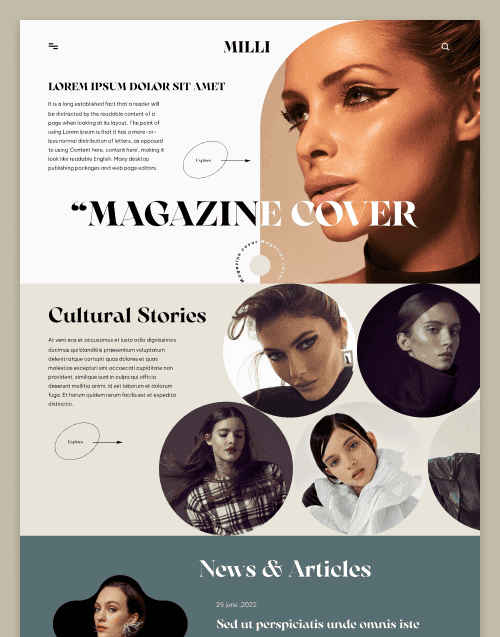


by WebbyCrown Solutions
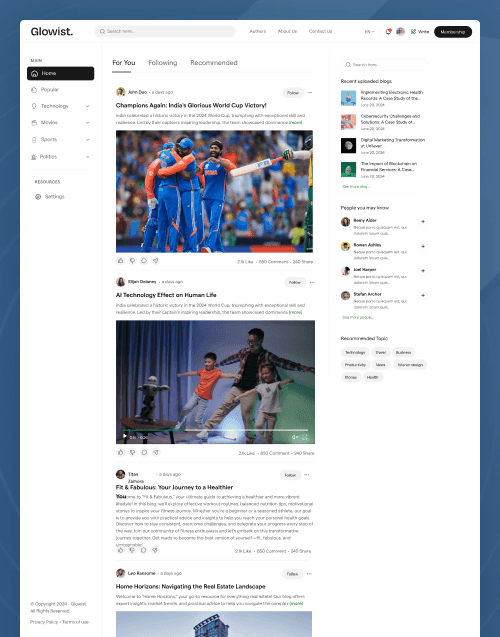
by WebbyCrown Solutions
Newly Added
Discover the most in-demand top-downloaded items trusted by top businesses.
Top Rated
Skyrocket your creativity with our Top rated collection of supreme.
What Are Blog & Magazine Website Templates?
Blog and magazine templates are design or code foundations for content-heavy websites where articles, authors, categories, tags, and reader navigation are central.
They can range from design-only Figma files to production-oriented frontend projects or CMS-specific themes.
WebbyTemplate's current product inventory demonstrates this multi-format model. Glowist is available in several technology variants, while Milli has Figma and HTML variants.
What You Can Find in Blog & Magazine Templates
- Personal blog templates
- Online magazine templates
- Editorial website templates
- News-style templates
- Multi-author publishing templates
- Creator blog templates
- Lifestyle magazine templates
- Newsletter-oriented websites
- Niche publication templates
- Content-community templates
Who Should Use Blog & Magazine Templates?
- Bloggers
- Writers
- Online publishers
- Editorial teams
- Content creators
- Magazine brands
- News-style publishers
- Agencies
- Developers building publishing sites
How to Choose the Right Blog or Magazine Template
Begin with publishing volume and editorial complexity.
A personal blog may need:
- Homepage
- Article page
- About
- Categories
- Archive
- Contact
A larger publication may also require authors, tags, featured sections, search, newsletter areas, membership presentation, advertising positions, notifications, accounts, and deeper navigation.
Next, identify the exact product format.
WebbyTemplate's current Glowist Figma Template includes 16 website pages and 16 mobile screens with author, profile, tag, notification, login, and content-focused layouts. Its listing clearly states that it is a design file and does not include a CMS, authentication, database, backend, or coded publishing functionality.
By contrast, Glowist Next.js is a coded Next.js/React frontend project with 20+ pages and publishing-oriented layouts. The listing positions CMS and authentication as integrations that may need to be connected rather than automatically treating the frontend as a complete publishing backend.
That distinction is central to this category.
A Figma design needs development.
An HTML template provides coded frontend pages but does not automatically provide CMS publishing.
A Next.js template can provide application structure but still needs an appropriate content source or CMS when editors need a backend.
A Ghost theme works inside Ghost and can use Ghost's publishing environment.
A WordPress theme should work within WordPress and should be evaluated separately for Gutenberg, Full Site Editing, page-builder, and plugin compatibility.
Review single-article layouts carefully. Most reader engagement occurs on content pages rather than only on the homepage. Typography, image treatment, captions, headings, author information, related content, sharing, and mobile readability are important.
Archive and category discovery are equally important for large sites. Readers should be able to find older and related stories without relying only on search.
For multi-author publications, check author pages and editorial workflow. A visual author profile does not automatically provide contributor permissions or approval workflows.
Monetization also requires separation from presentation. Advertising placeholders do not supply an ad network. Membership pricing pages do not create subscriptions. Newsletter forms need an email platform or CRM. Paid content requires membership, commerce, or payment infrastructure.
Performance deserves careful attention for publications with large imagery, advertising scripts, analytics, social widgets, embedded media, and high content volume.
Finally, review search functionality, content-management method, SEO flexibility, responsive design, accessibility, technology versions, dependencies, documentation, licensing, and seller support.
Popular Use Cases for Blog & Magazine Templates
- Launching a personal blog
- Creating an online magazine
- Building a multi-author publication
- Launching a creator platform
- Creating an editorial brand
- Building a niche content site
- Developing a publisher website
Blog & Magazine Template Quality Notes
- Verify exact product technology.
- Figma does not include publishing functionality.
- HTML does not automatically include a CMS.
- Check article readability.
- Review category and archive layouts.
- Verify author workflows.
- Newsletter UI requires integration.
- Membership UI does not guarantee subscriptions.
- Check mobile performance.
- Verify licensing and support.
Related Category Ideas
- Ghost Themes
- WordPress
- Next.js
- Figma
- Personal
- Email Templates
Frequently Asked Questions