On this page
Image Retrieval vs. Image Search: What's the Difference?

WebbyCrown Solutions-
May 15, 2026-9 min read
Quick Answer
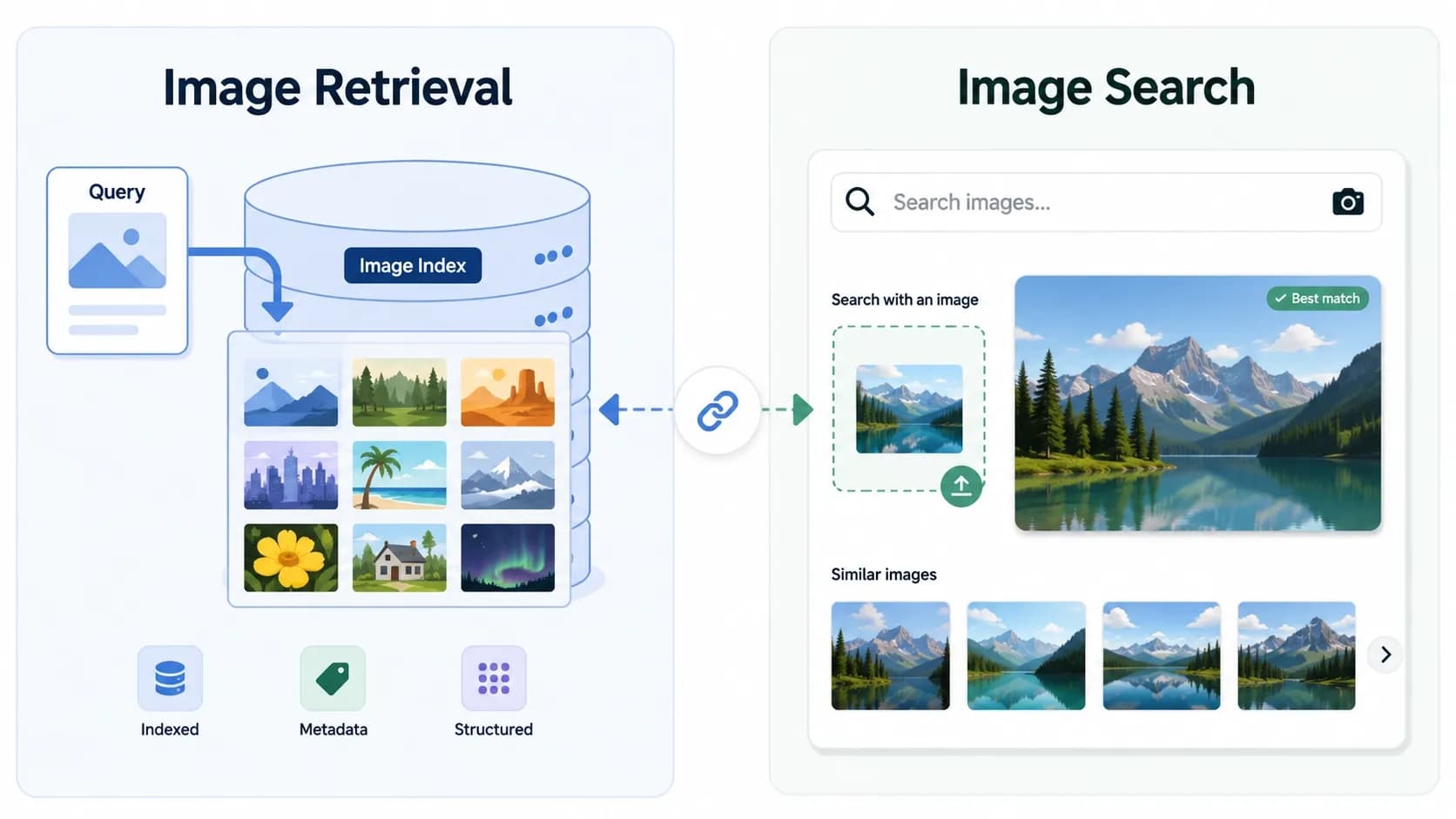
Image retrieval is the academic and technical term for the database technology that finds matching images, while image search is the consumer-facing application of that technology — the tools people actually use, such as Google Images, TinEye, and Google Lens. The most common form of image retrieval is content-based image retrieval (CBIR), which finds images based on their visual content (colors, shapes, objects) rather than their filename or surrounding text. Every modern image search engine is built on image retrieval principles, but not every image retrieval system is exposed to consumers as an image search product.
In Short
- Image retrieval is the technical field — the algorithms and database systems that find images matching a query.
- Image search is the consumer application — tools such as Google Images, TinEye, Yandex, and Google Lens.
- Content-based image retrieval (CBIR) is the most common type of image retrieval, using visual content as the query.
- Text-based image retrieval is the older approach, using filenames, captions, and surrounding text.
- Modern systems use both — visual content for the primary match, text metadata for ranking.
- Image search is image retrieval, productized — same technology, different audience and interface.
What Is Image Retrieval?
Image retrieval is the broad academic and technical field concerned with finding images in a database that match a given query. The query can be a piece of text describing what is wanted ("a red sports car"), or another image used as a reference, or in some systems a sketch or rough drawing.
The term is used primarily in computer science, library science, and academic research. Textbooks, peer-reviewed papers, and university courses on computer vision routinely use image retrieval as the standard term. The field has existed since the 1970s and predates the consumer internet by decades — early image retrieval systems were built for museum archives, medical imaging databases, and scientific collections long before Google Images existed.
The underlying problem image retrieval addresses is straightforward: given an index of millions or billions of images, how does a system find the ones most relevant to a given query, quickly and accurately? Every solution to this problem — every algorithm, every indexing strategy, every ranking model — falls under the umbrella of image retrieval.
What Is Image Search?
Image search is the consumer-facing application of image retrieval technology. It refers to the products and services that real users interact with: Google Images, TinEye, Yandex Images, Bing Visual Search, Google Lens, Pinterest Lens, and similar tools.
Where image retrieval is the field, image search is the product category. The term is used in marketing, product documentation, user help pages, and everyday conversation. When someone says "I used reverse image search to verify the photo," they are describing a consumer image search workflow.
The full overview of image search products, techniques, and methods is in the pillar guide on image search techniques, and the technical mechanism that powers all modern image search is explained in how image search works.
The relationship between the two terms is simple: image search is image retrieval, productized. Every consumer image search engine is built on image retrieval algorithms, but not every image retrieval system is exposed as a consumer product. Many image retrieval systems run inside specialized environments — medical imaging databases, satellite imagery archives, internal enterprise photo libraries — without ever being marketed as "image search."
The Key Differences Explained
The two terms overlap significantly, but the differences are meaningful in certain contexts.
| Dimension | Image Retrieval | Image Search |
|---|---|---|
| Type of term | Academic and technical | Consumer and product |
| Where the term is used | Research papers, computer science courses, technical documentation | Marketing, help pages, everyday conversation |
| Primary audience | Researchers, engineers, librarians | End users |
| Scope | Any system that finds images in a database | Specifically consumer-facing image-finding tools |
| Includes | Algorithms, indexing, ranking, database design | Products, user interfaces, workflows |
| Example contexts | "Content-based image retrieval for medical imaging" | "How to reverse image search on Google" |
| Origin | 1970s — predates the consumer internet | 2000s — emerged with the consumer web |
A useful analogy: image retrieval is to image search what information retrieval is to web search. Information retrieval is the academic field that includes everything from library catalog systems to enterprise document search; web search is the consumer application of those principles, embodied in Google, Bing, and similar products. The technical foundations are shared; the term that fits depends on the context in which it is used.
Content-Based Image Retrieval (CBIR) Explained
Content-based image retrieval, or CBIR, is the most important type of image retrieval and the foundation of every modern image search engine. The defining feature of CBIR is that queries are matched against the visual content of images — colors, shapes, textures, recognized objects — rather than against text labels or filenames.
The historical development. Early CBIR systems in the 1990s used hand-crafted feature descriptors: color histograms, edge detection algorithms, texture analysis methods, and shape descriptors such as the Scale-Invariant Feature Transform (SIFT), originally published by David Lowe in research papers available on the University of British Columbia's website. These systems worked but were limited in accuracy and required significant manual tuning.
The deep learning transformation. The publication of AlexNet in 2012 demonstrated that convolutional neural networks (CNNs) could classify images far more accurately than any hand-crafted feature approach. Within a few years, the CBIR field had rebuilt itself around deep learning. Modern CBIR systems use CNNs and increasingly vision transformers to convert images into mathematical embeddings, then match those embeddings using similarity search algorithms.
How CBIR works in practice. A modern CBIR system follows the same general process as a consumer image search engine: an image is converted into an embedding by a deep learning model, the embedding is compared against billions of pre-indexed embeddings using approximate nearest neighbor algorithms, and ranked results are returned. The technical details of this process are covered in how image search works.
Where CBIR is used outside consumer search. Beyond Google Images and similar products, CBIR powers medical imaging systems (finding similar X-rays or pathology slides), satellite and aerial imagery archives, fashion and retail product search, fingerprint and biometric matching, museum and archive collections, and stock photography libraries. For practical product and object identification, see how to image search an object
Text-Based Image Retrieval Explained
Text-based image retrieval is the older approach to finding images, and it remains widely used alongside content-based methods today. Instead of analyzing the image itself, text-based systems index the text associated with an image — filenames, alt attributes, image captions, surrounding article text, and metadata.
When a user searches for "red sports car," a text-based system returns images on pages where the words "red sports car" appear in or near the image — even if the system has no visual understanding of what a red sports car actually looks like.
Why text-based retrieval persists. Despite the rise of CBIR, text-based retrieval remains valuable for several reasons. It is computationally cheap. It works well for images where the surrounding text is descriptive and accurate. It handles abstract concepts ("happiness," "freedom") that visual features alone cannot capture. And it can return semantically relevant results for queries that no purely visual system could match.
Its limitations. Text-based retrieval depends entirely on the quality of the surrounding text. An image with a generic filename, no alt attribute, and uninformative captions is essentially invisible to text-based systems. Modern systems address this by combining text-based and content-based methods rather than relying on either alone.
How Modern Systems Combine Both Approaches
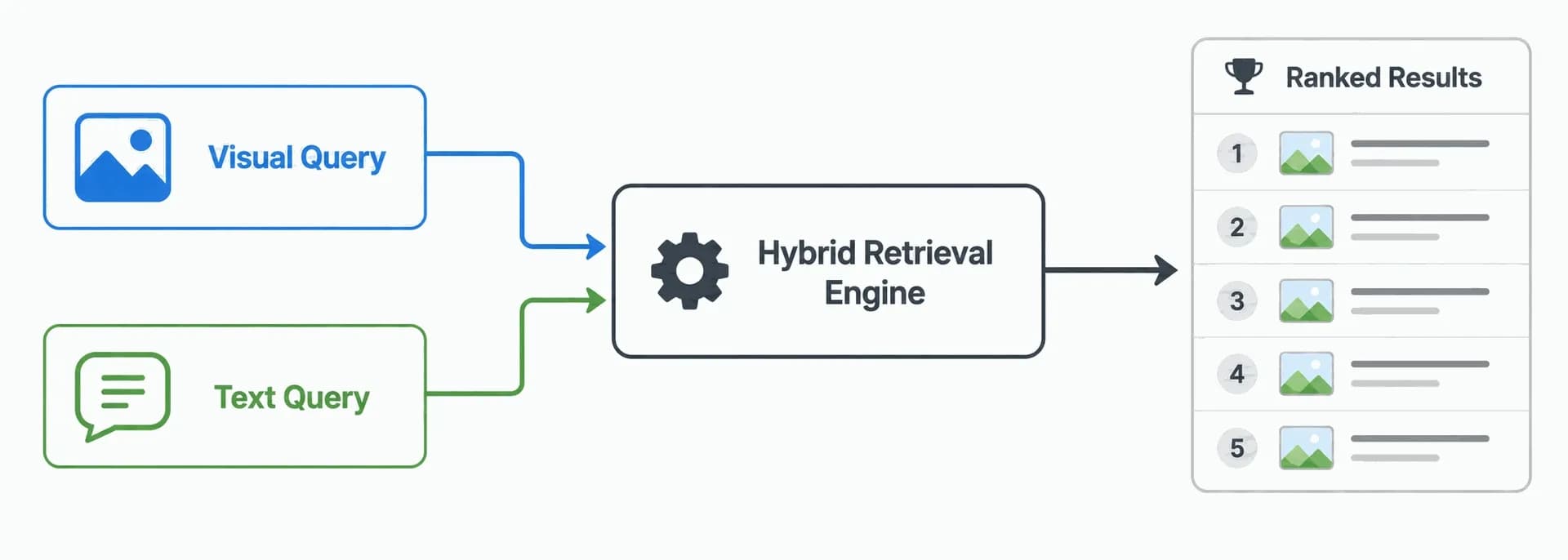
Every major consumer image search engine — Google Images, Bing, Yandex, and others — uses a hybrid approach that combines content-based and text-based retrieval. The two methods complement each other.
The typical workflow. When a user submits an image query, the engine first uses a deep learning model to extract a visual embedding (content-based) and find candidate matches. These candidates are then re-ranked using text signals: alt text, caption, surrounding article text, page title, and the authority of the host page. The final ranked list combines visual similarity with textual relevance.
When a user submits a text query, the engine inverts the process. It first matches the text against textual metadata of indexed images (text-based) and then uses visual features to refine and rank the candidate set.
The arrival of multimodal models. Multimodal models such as OpenAI's CLIP, described in OpenAI's public research, can map both images and text into a single shared embedding space. This means a text query and an image query can be compared directly without needing separate retrieval pipelines. The technique has become central to modern image search and is part of why typing a text query into Google Lens now returns matching images, and vice versa. For a practical similarity-search workflow, see how to find similar images.
Where Each Term Is Used
Understanding when each term is appropriate helps when reading technical material, communicating with developers, or evaluating tools.
Use "image retrieval" when:
- Reading or writing academic papers
- Studying computer vision, information retrieval, or machine learning
- Discussing the underlying algorithms and database systems
- Working in fields such as medical imaging, museum cataloging, or scientific archives
- Comparing technical approaches such as CBIR, sketch-based retrieval, or cross-modal retrieval
Use "image search" when:
- Writing or reading user-facing documentation
- Describing how to use Google Images, TinEye, Yandex, or similar products
- Discussing reverse image search, visual search, or consumer workflows
- Working in marketing, content strategy, or SEO
- Helping someone perform a practical image-finding task
The terms are not strictly exclusive — many practitioners and writers use them interchangeably in casual contexts — but in technical or professional writing, choosing the right term communicates precision and audience awareness.
FAQs
Q1.
Is image retrieval the same as image search?
Q2.
What is CBIR?
Q3.
What is the difference between CBIR and image search?
Q4.
Is reverse image search a form of image retrieval?
Q5.
What are image retrieval techniques used for?
Q6.
What is text-based image retrieval?
Q7.
Why do researchers use "image retrieval" instead of "image search"?
Q8.