On this page
How to Choose the Right Website Template for Your Business

WebbyCrown Solutions-
November 4, 2025-24 min read

Quick Answer
To choose the right website template, first identify your platform, website goal, required pages, content types, integrations, and available technical skills. Then evaluate shortlisted templates for mobile usability, accessibility, performance, SEO controls, customization, documentation, licensing, updates, and support.
Do not select a template only because its demo looks attractive. The strongest choice is the template that works with your real content, supports your essential features, fits your technical environment, and can be maintained as your business grows.
Key Takeaways
- Choose your website platform and product format before comparing visual styles.
- Separate template features from functionality provided by a CMS, hosting provider, plugin, app, API, or backend.
- Test templates using realistic content rather than relying only on polished demo material.
- Check mobile navigation, keyboard use, page stability, forms, responsiveness, and performance.
- Verify exactly what files, pages, components, integrations, licenses, updates, and support are included.
- Calculate total implementation cost, not only the template purchase price.
- Choose custom development when a template cannot support essential workflows without extensive rebuilding.
Website Template Selection Checklist
| Selection Criterion | What to Verify |
|---|---|
| Platform Compatibility | Does it work with your CMS, framework, version, hosting environment, and required tools? |
| Product Format | Is it a Figma design, HTML template, CMS theme, starter kit, or functioning application? |
| Required Pages | Does it include the pages your business needs at launch? |
| Content Compatibility | Can it handle your real text, images, products, services, and content volume? |
| Mobile Usability | Do menus, forms, buttons, tables, and media work well on smaller screens? |
| Accessibility Foundation | Can visitors navigate and understand the interface using different input and assistive methods? |
| Performance | Is the layout lightweight, stable, and reasonably fast under realistic conditions? |
| SEO Controls | Can you manage titles, headings, URLs, metadata, images, canonicals, and indexation? |
| Customization | Can you change branding, layouts, components, and content without rebuilding the product? |
| Documentation | Are installation, requirements, customization, dependencies, and deployment explained? |
| Licensing and Cost | Does the license permit your intended number of projects and type of use? |
| Support and Updates | Who provides support, for how long, and what update access is included? |
1. Start With the Platform and Template Format
Before choosing colors, typography, animations, or homepage layouts, determine what type of product your project requires.
A visually similar product may be sold as a design file, static code template, platform-specific theme, or application starter kit. These formats are not interchangeable.
Figma Website Template
A Figma template is an editable design file. It may include desktop screens, mobile screens, components, variables, prototypes, icons, and visual assets.
It is suitable when you need to:
- Establish a website’s visual direction
- Customize layouts before development
- Present concepts to stakeholders
- Hand designs to a developer
- Create a consistent design system
A Figma template is not automatically a working website.
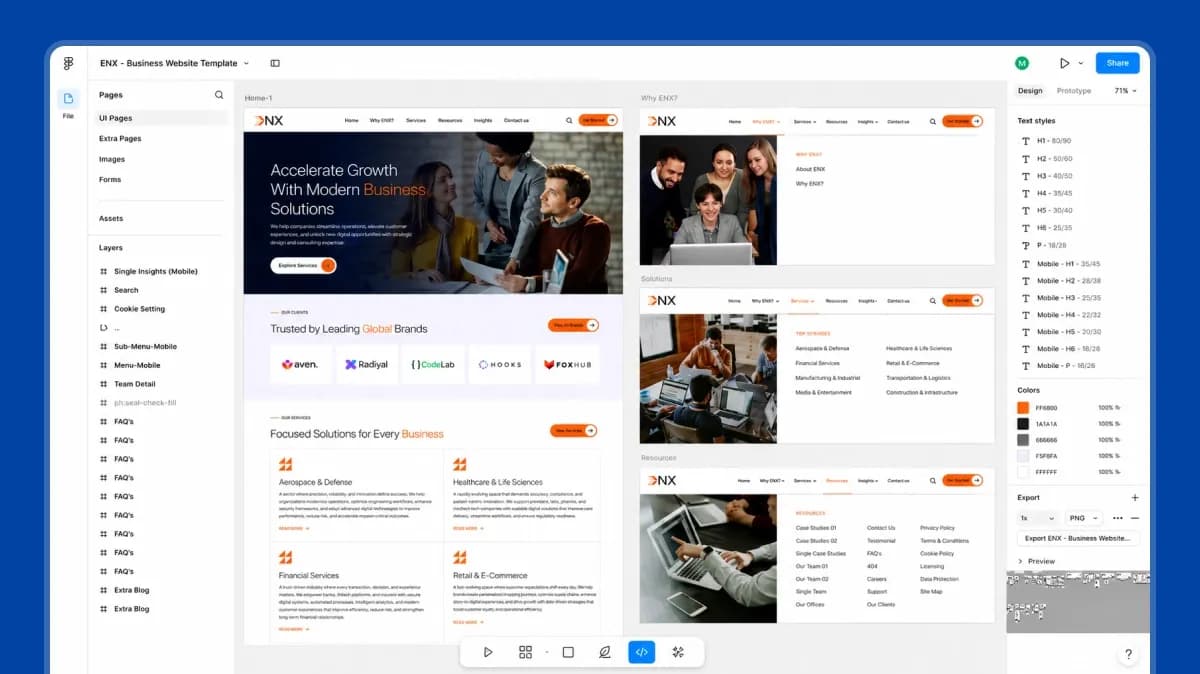
For example, the ENX Business Website Figma Template is clearly listed as a Figma design product rather than a coded website. Its product page describes desktop pages, mobile screens, reusable components, and design variables, while also stating that it does not include HTML, WordPress, Webflow, or another coded implementation.
ENX business website template opened in Figma, showing its page structure, visible layers, and desktop design.
Evidence captured on 22 July 2026. The screenshot confirms an editable Figma environment with visible page and layer structures. Buyers should still review the complete file to confirm exact components, variables, responsive views, and included screens.
Choose a Figma product when you need an editable design foundation. Do not choose it when you expect to upload files to a server and immediately launch a functioning website.
HTML Website Template
An HTML template normally includes coded HTML, CSS, JavaScript, assets, and reusable front-end sections. It can be suitable for a static website or as a front-end foundation for integration with another system.
Before purchasing one, verify:
- HTML and CSS structure
- Framework and library versions
- Number of included pages
- Responsive behavior
- Browser compatibility
- Form functionality
- Build requirements
- Documentation
- Backend requirements
A contact form appearing in an HTML demo does not necessarily mean email delivery or lead storage is included.
For example, the Design Studio Creative Agency HTML Template identifies its included HTML pages, files, libraries, and front-end structure. Its product page also explains that contact and newsletter interfaces must be connected to a backend, CRM, API, email platform, or form provider before they can collect real submissions.
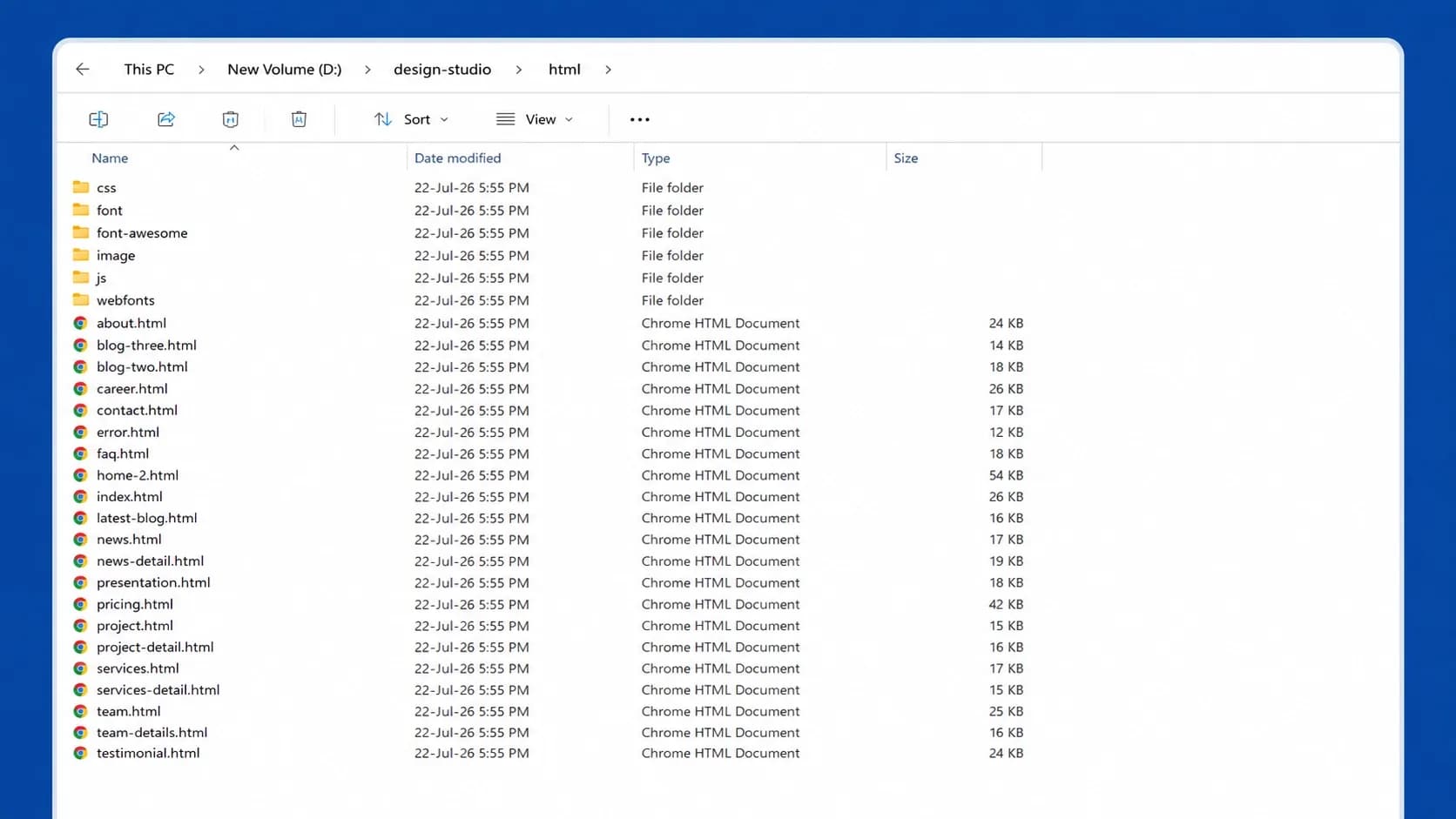
The ENX HTML template package includes CSS, JavaScript, font, image, video, distribution folders, and multiple HTML page files.
Evidence captured on 22 July 2026. The folder structure confirms that the package contains front-end assets and multiple HTML layouts. Code quality, dependency usage, and customization complexity should still be reviewed from the actual source files rather than inferred from folder names alone.
Choose an HTML template when you or your developer can work directly with code and connect any required backend functionality.
CMS Theme
A CMS theme is designed for a specific content-management platform such as WordPress, Ghost, Shopify, Odoo, Statamic, or another system.
A CMS theme may control:
- Page layouts
- Typography
- Header and footer design
- Content presentation
- Navigation
- Blog or product layouts
- Theme settings
However, many features still depend on the underlying platform, apps, modules, plugins, hosting environment, or third-party services.
Verify the exact CMS version and required extensions before purchasing. A theme that supports one platform version may not automatically work with older or future releases.
Next.js or Headless Starter Template
A Next.js or headless template provides a coded front-end foundation using a modern development framework. Depending on the product, it may include routes, components, layouts, sample data, integrations, and deployment configuration.
The presence of product, cart, account, booking, or checkout screens does not prove that a complete commerce or application backend is included.
For example, the Yummy Next.js Food and Restaurant Template includes shop, product, cart, checkout, booking, and account interfaces, but its product information clearly states that checkout and related flows are UI only and require backend or payment-gateway integration.
Choose this format when you have suitable development skills and understand which parts are complete, which use sample data, and which require APIs or backend development.
Website Builder Template
Website-builder templates are designed for hosted platforms that combine design, content editing, hosting, and platform features.
They may be easier for nontechnical teams to manage, but customization, code access, data portability, integrations, and migration options can be more limited.
Before selecting one, verify:
- Which sections can be edited
- Whether custom code is allowed
- Available integrations
- Content-export options
- eCommerce limitations
- Recurring platform costs
- Whether the design can be moved elsewhere
2. Define the Website’s Primary Goal
A template should support a measurable business objective rather than simply look modern.
Start by selecting the website’s primary goal:
- Generate qualified leads
- Sell physical or digital products
- Accept bookings or appointments
- Present a portfolio
- Publish articles or news
- Build a membership community
- Promote events
- Provide documentation
- Support an existing product or service
Then define the main visitor action.
Examples include:
- Request a quote
- Schedule a consultation
- Purchase a product
- Start a trial
- Book an appointment
- View a case study
- Download a resource
- Join a mailing list
- Contact the business
The required template structure should support this action naturally.
A professional-services website may need service pages, case studies, team profiles, testimonials, and a lead form. An online store may require category, product, cart, account, policy, and checkout interfaces. A portfolio may need project categories, detailed case studies, image galleries, and contact information.
3. Define Your Audience and Content Journey
Your audience affects layout density, navigation, readability, media use, and required functionality.
Ask:
1. Who is the website for?
2. What problem are visitors trying to solve?
3. Which devices are they likely to use?
4. What information do they need before acting?
5. What questions or concerns could prevent conversion?
6. Which pages will help them evaluate your business?
7. Who will update the website after launch?
Then map the basic journey:
Entry page → Supporting information → Evidence or product details → Action
For a service business, that might be:
Service page → Case study → About or team page → Consultation form
For an online store:
Category → Product page → Cart → Checkout
For a SaaS website:
Feature page → Use case → Pricing → Trial or demo
A template that looks attractive but cannot support this journey will require unnecessary customization.
4. List Required Pages Before Comparing Templates
Prepare a page inventory before opening template demos.
Common Business Website Pages
- Home
- About
- Services
- Individual service pages
- Case studies
- Individual case-study pages
- Team
- Contact
- Blog
- Individual article
- FAQs
- Privacy policy
- Terms and conditions
- Thank-you or confirmation page
- 404 page
- Search results
Common eCommerce Pages
- Shop
- Product categories
- Product details
- Cart
- Checkout
- Account
- Order history
- Wishlist
- Returns or refund information
- Shipping information
- Contact
- FAQs
Common SaaS Pages
- Product overview
- Features
- Use cases
- Integrations
- Pricing
- Documentation
- Security
- Customer stories
- Contact sales
- Login
- Sign-up
Separate your requirements into:
| Requirement Type | Meaning |
|---|---|
| Must Have | Required before launch |
| Should Have | Important but can be added later |
| Nice to Have | Helpful but not essential |
| Future Requirement | Likely to be needed as the business grows |
A template should cover most must-have requirements without forcing you to rebuild its underlying structure.
5. Separate Template Features From Platform Features
One of the most common buying mistakes is assuming that every feature shown in a demo is delivered by the template itself.
| Capability | Usually Provided By |
|---|---|
| Page Layout and Visual Style | Template or theme |
| SSL and HTTPS | Hosting provider, CDN, or platform |
| Payment Processing | Payment gateway and commerce platform |
| Inventory Management | Commerce platform, module, or application |
| Appointment Processing | Booking system or integration |
| Email Delivery from Forms | Backend, API, plugin, or form service |
| Customer Accounts | CMS, application, or commerce backend |
| Tax Calculation | Commerce platform or specialist service |
| Analytics | Analytics platform and implementation |
| Security Monitoring | Hosting, application, plugins, and operational controls |
| Product Search and Filtering | Platform, application, or included code |
| Visual Product-Page Design | Template or theme |
A template may provide the interface for a feature without providing the complete system behind it.
For example, a checkout page can be an attractive visual layout while still requiring product data, payment processing, order management, tax logic, security controls, and backend development.
Important Note for Healthcare Websites
A healthcare-oriented design may include provider profiles, service pages, appointment-request layouts, contact forms, and patient-information pages. The template itself does not make the complete website compliant with health-information laws.
In the United States, HIPAA obligations apply to qualifying covered entities and business associates and can involve contracts, privacy safeguards, systems, data handling, and operational practices beyond visual design. Organizations handling sensitive or regulated information should obtain appropriate technical and legal guidance before launch.
6. Test the Template With Real Content
Demo websites are usually designed with carefully selected images, short headings, balanced text, and ideal content quantities.
Your actual website may contain:
- Longer service names
- More navigation links
- Different image proportions
- Longer product titles
- Detailed legal information
- Large product catalogs
- Multilingual text
- Tables
- Forms
- Videos
- Customer reviews
- Case studies
- Author information
Test representative content before making a final decision.
Content-Population Test
Replace or simulate:
- Your longest navigation label
- A realistic page title
- A long service description
- A large product image
- A product with several variants
- A detailed case study
- A complete contact form
- A legal or policy page
- A blog post with several headings
- An image with a long caption
Watch for:
- Text overflowing containers
- Cropped images
- Broken cards
- Inconsistent button heights
- Unusable mobile tables
- Excessive empty space
- Poor readability
- Layout shifts
- Navigation wrapping
- Missing content styles
The right template should adapt to your content rather than require your content to imitate its demo.
7. Evaluate Mobile Usability
Responsive design means more than shrinking a desktop layout.
Test the template on an actual mobile device and examine:
- Menu opening and closing
- Dropdown navigation
- Button size and spacing
- Form fields
- Error messages
- Product galleries
- Pricing tables
- Tabs and accordions
- Sticky elements
- Pop-ups
- Carousels
- Long headings
- Horizontal scrolling
- Footer navigation
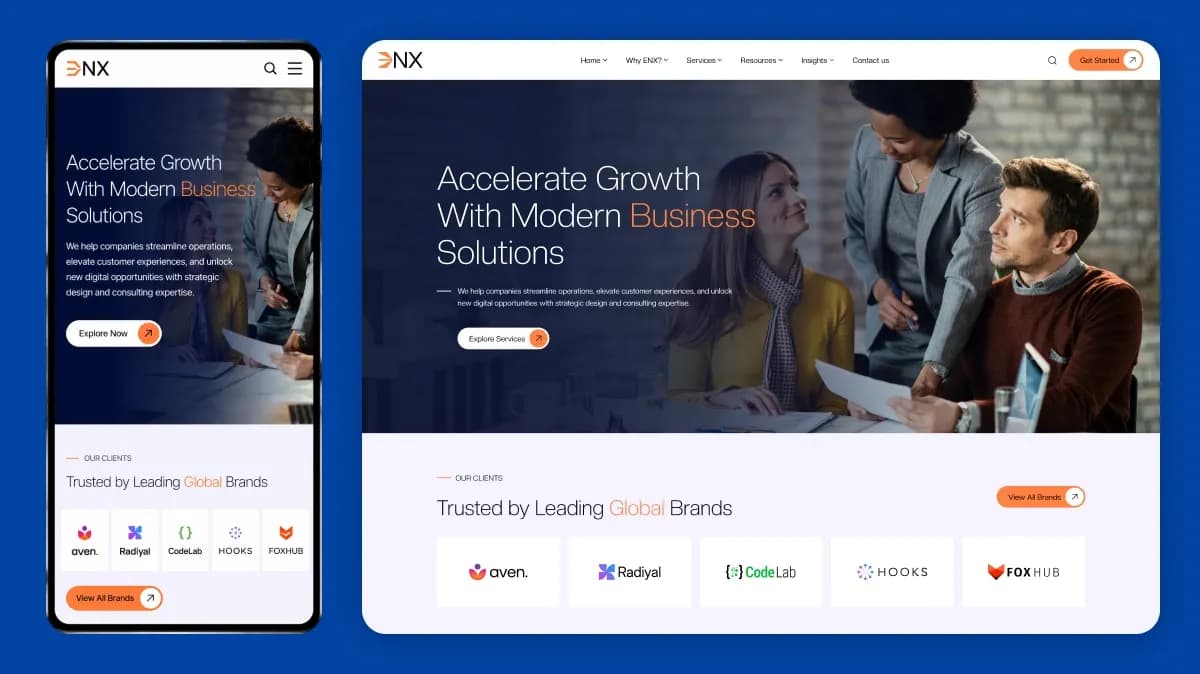
ENX template preview on an iPhone 14 Pro, showing the mobile homepage layout, navigation, and content sections.
Evidence captured on 22 July 2026. This preview demonstrates the layout on one mobile viewport. A complete mobile review should also include additional screen widths, landscape mode, browser zoom, form controls, menus, and interactive elements.
Important actions should remain easy to understand and complete on smaller screens.
Do not rely only on a browser’s responsive preview. Actual devices can reveal touch, keyboard, viewport, browser-interface, and orientation problems that are less obvious in desktop simulation.
8. Check the Accessibility Foundation
Accessibility cannot be confirmed by appearance alone.
WCAG 2.2 is the current W3C accessibility standard and adds or updates requirements related to focus visibility, target sizes, dragging alternatives, consistent help, and accessible authentication.
When reviewing a template, test:
- Keyboard navigation
- Visible focus indicators
- Logical focus order
- Color contrast
- Form labels
- Error identification
- Heading structure
- Link purpose
- Button labels
- Image alternatives
- Modal behavior
- Touch-target size
- Zoom behavior
- Reduced-motion support where relevant
A template can provide a stronger or weaker accessibility foundation, but final accessibility also depends on your content, integrations, plugins, customizations, and ongoing editorial practices.
Avoid stating that a template is fully accessible unless its complete implementation has been appropriately evaluated.
9. Evaluate Performance and Page Stability
A template affects performance through its code, assets, scripts, animations, fonts, image handling, and layout behavior. However, the final result also depends on hosting, content, analytics, plugins, third-party scripts, APIs, and implementation quality.
Google’s Core Web Vitals evaluate loading performance, responsiveness, and visual stability. The commonly used “good” thresholds are:
- Largest Contentful Paint: 2.5 seconds or less
- Interaction to Next Paint: 200 milliseconds or less
- Cumulative Layout Shift: 0.1 or less
These thresholds should ideally be evaluated at the 75th percentile using field data where available.
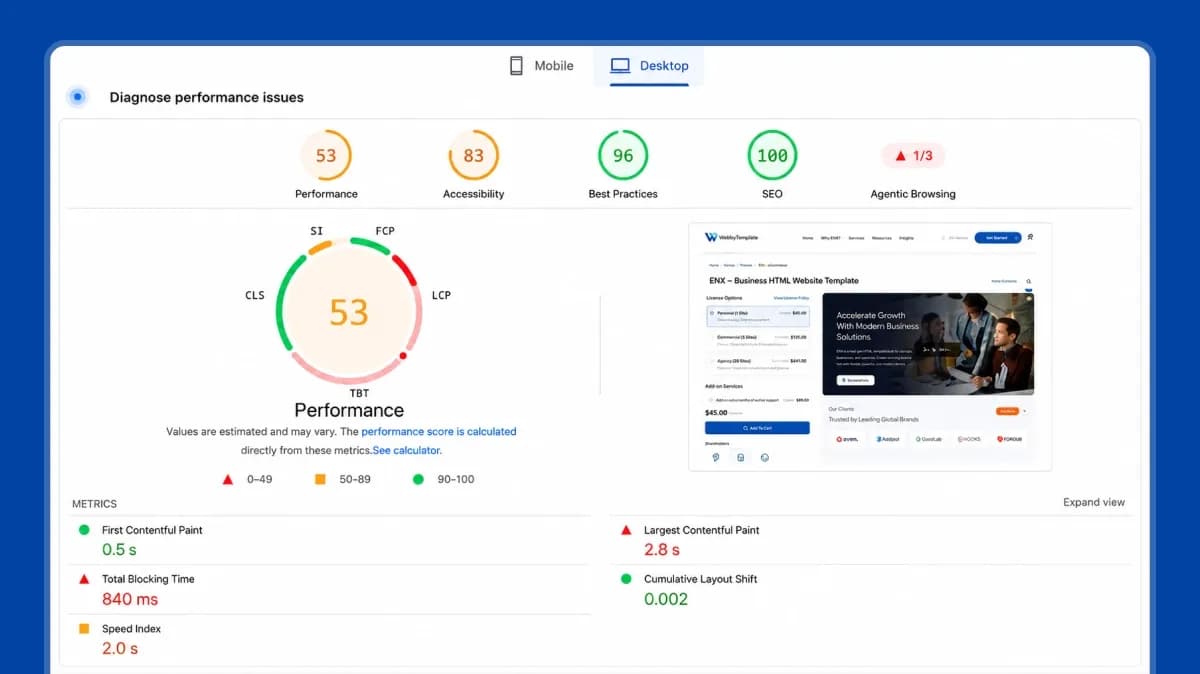
Desktop PageSpeed Insights test for the ENX demo: Performance 53, Accessibility 83, Best Practices 96, and SEO 100.
Evidence captured on 22 July 2026. The test recorded First Contentful Paint of 0.5 seconds, Largest Contentful Paint of 2.8 seconds, Total Blocking Time of 840 milliseconds, Cumulative Layout Shift of 0.002, and Speed Index of 2.0 seconds. These results reflect the tested demo environment and are not a guarantee for every installation.
The supplied test demonstrates a stable visual layout and strong PageSpeed SEO and Best Practices checks, while also revealing performance and accessibility areas that should be improved before launch.
When testing a demo:
1. Test several page types, not only the homepage.
2. Test mobile and desktop separately.
3. Record the date and tool used.
4. Note whether the demo contains analytics, animations, or third-party scripts.
5. Review image sizes and font loading.
6. Check for unexpected layout movement.
7. Test menus, tabs, forms, and interactive elements.
Do not treat one laboratory score as a permanent guarantee. Use it as one part of your evaluation.
10. Check the SEO Foundation
A template does not guarantee search rankings. It can, however, make optimization easier or more difficult.
Verify whether your final platform and template combination allows you to manage:
- Page titles
- Meta descriptions
- Main headings
- Supporting headings
- Clean URLs
- Canonical URLs
- Index and noindex controls
- Image alt text
- Internal links
- Breadcrumbs
- Redirects
- XML sitemaps
- Robots directives
- Open Graph information
- Structured data
- Pagination
- Product variants where relevant
Also inspect the template structure for:
- Clear semantic HTML
- Crawlable navigation
- Important text available in HTML
- Descriptive link labels
- Stable layouts
- Mobile-friendly content
- No hidden placeholder text
- No unnecessary duplicate pages
- No forced or inaccurate schema markup
Structured data should accurately represent the main visible content. Google does not guarantee a rich result merely because schema is present, and misleading or invisible structured data can make a page ineligible for enhanced search features.
For a deeper review, read template architecture for long-term SEO and website optimization tips for template-based sites.
11. Review Customization Flexibility
A template should let you apply your brand without requiring a complete rebuild.
Check whether you can change:
- Logo
- Colors
- Typography
- Buttons
- Header
- Footer
- Navigation
- Section order
- Card styles
- Forms
- Icons
- Images
- Page layouts
- Reusable components
- Mobile settings
The required technical skill depends on the product format.
| Product Format | Common Customization Method |
|---|---|
| Figma Template | Figma components, styles, variables, and layouts |
| HTML Template | Editing HTML, CSS, JavaScript, and assets |
| WordPress Theme | Theme settings, blocks, plugins, or child-theme code |
| Shopify Theme | Theme editor, sections, blocks, apps, and Liquid |
| Next.js Template | React components, configuration, CSS, APIs, and deployment |
| Webflow Template | Webflow Designer, CMS collections, components, and interactions |
| Odoo Theme | Odoo editor, theme settings, modules, assets, and development tools |
Avoid selecting a highly flexible developer template when nobody on your team can maintain its code. Similarly, avoid choosing a restrictive builder template when your project requires extensive custom workflows.
12. Inspect Code, Dependencies, and Compatibility
For code-based templates, review more than the visual demo.
Verify:
- Framework version
- Package versions
- Dependency list
- Build instructions
- Environment requirements
- Folder structure
- Reusable components
- Code comments
- Browser support
- Console errors
- Security history of included packages
- Deprecated libraries
- Update date
- Changelog
- Deployment instructions
A template with many scripts and visual effects may require more maintenance than a simpler product.
Check whether every major dependency serves a necessary purpose. Unused libraries can increase page weight, complicate upgrades, and create future compatibility work.
13. Review Documentation Before Purchasing
Good documentation reduces setup time and prevents incorrect assumptions.
Documentation should explain:
- System requirements
- Installation
- Folder or file structure
- Dependencies
- Build process
- Customization
- Image replacement
- Font replacement
- Forms
- Deployment
- Integrations
- Updates
- Troubleshooting
- Credits and licenses
- Support process
Look for documentation that addresses the actual product rather than a generic framework tutorial.
For design products, documentation should clarify:
- Figma version
- Included pages
- Component structure
- Variables or styles
- Fonts
- Image licensing
- Export process
- Developer handoff
14. Understand Licensing, Support, and Updates
The purchase price is only one part of the decision.
Review:
- Permitted number of websites or projects
- Personal, commercial, or agency use
- Client-work permissions
- Redistribution restrictions
- End-product rules
- Included assets
- Third-party licenses
- Support duration
- Download duration
- Update duration
- Refund rules
- Product-specific exceptions
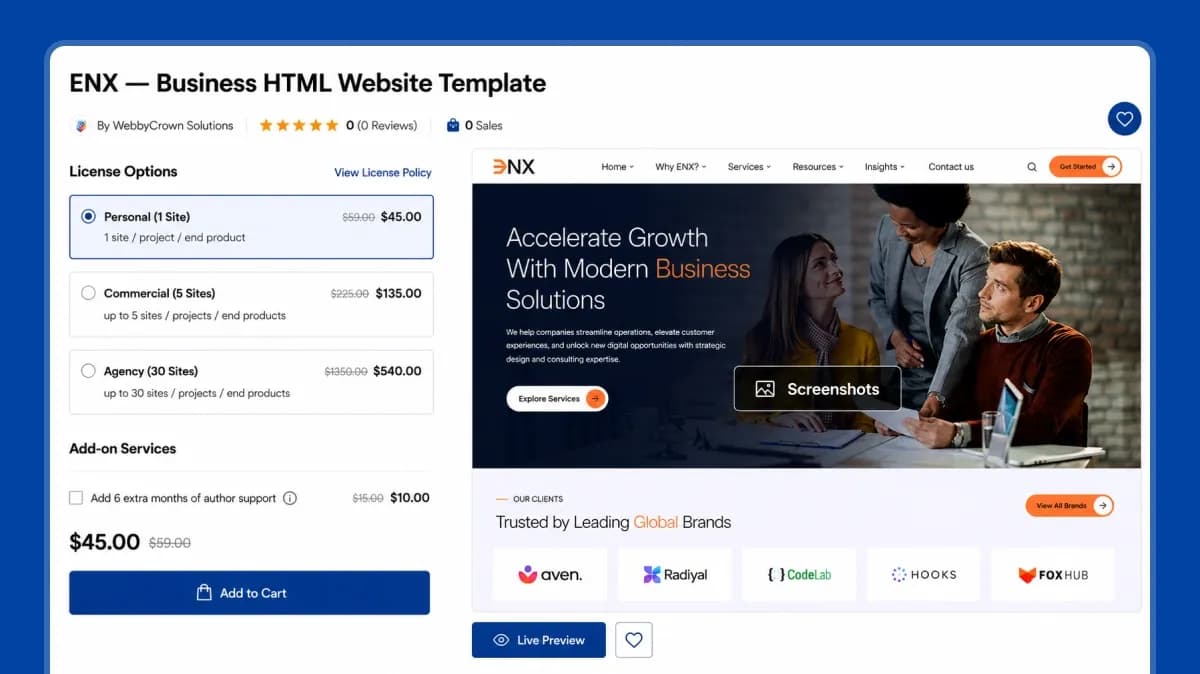
The ENX product page displays Personal, Commercial, and Agency license options together with support and documentation information.
Evidence captured on 22 July 2026. The product page demonstrates how license limits and support information should be visible before purchase. Buyers should still review the current product page and marketplace policies because product-specific conditions may apply.
WebbyTemplate product pages may display Personal, Commercial, and Agency options with different site or project limits. Always check the selected product and the current WebbyTemplate License Policy before use.
Support, download access, update access, and license rights are different. Do not assume that a license automatically includes lifetime support or unlimited future updates unless the current product page and policy explicitly say so.
15. Calculate the Total Cost of Ownership
A low purchase price does not necessarily mean a low-cost implementation.
| Cost Area | Possible Expenses |
|---|---|
| Product | Template, theme, UI kit, or starter-kit price |
| License | Commercial, agency, client, or extended-use license |
| Hosting | Server, platform, CDN, storage, and bandwidth |
| Setup | Installation, configuration, and deployment |
| Customization | Branding, page changes, components, and new layouts |
| Functionality | Plugins, apps, APIs, modules, or backend development |
| Content | Copywriting, photography, video, product data, and migration |
| Compliance | Accessibility, privacy, legal, or industry review |
| Maintenance | Updates, monitoring, backups, testing, and fixes |
| Support | Renewed or extended support |
| Migration | Future redesign or platform replacement |
A template that covers most of your required structure may cost more initially but reduce customization time. A cheaper template that lacks essential pages or functionality may become more expensive after development.
With a template, you control how much you invest in development and grow the site's value gradually, rather than paying upfront for value that's already fixed and assessed through a website valuation.
16. Match the Template to Your Website Type
Service Business
Essential pages often include:
- Services
- Individual service pages
- About
- Team
- Case studies
- Testimonials
- Contact
- Blog
Verify lead forms, local information, trust sections, case-study layouts, and clear calls to action.
eCommerce Website
Essential interfaces may include:
- Product categories
- Product details
- Search and filtering
- Cart
- Checkout
- Account
- Order information
- Policies
Verify the distinction between visual layouts and functioning commerce features. Product data, inventory, payments, orders, tax, shipping, and account management normally depend on the commerce platform or backend.
Portfolio Website
Look for:
- Project categories
- Project details
- Image and video galleries
- Case studies
- About
- Services
- Contact
Test media loading, image proportions, keyboard navigation, project filters, and mobile galleries.
Blog or Publication
Look for:
- Article layouts
- Category and tag archives
- Author pages
- Search
- Related articles
- Subscription elements
- Readable typography
Review how the design handles long articles, headings, quotations, tables, captions, references, and different image sizes.
SaaS or Startup Website
Look for:
- Product overview
- Features
- Use cases
- Pricing
- Integrations
- FAQs
- Documentation
- Customer stories
- Contact sales
- Trial or sign-up flows
Verify which product-interface screens are decorative examples and which are connected to actual functionality.
Appointment or Booking Business
Look for:
- Services
- Staff profiles
- Locations
- Schedule information
- Booking interfaces
- Confirmations
- Contact details
Confirm which booking platform, calendar, or API is required.
17. Use the WebbyTemplate 100-Point Selection Framework
Use the following framework to compare two or more shortlisted products.
This is a practical WebbyTemplate evaluation method, not a universal scientific rating system.
| Cost Area | Possible Expenses |
|---|---|
| Product | Template, theme, UI kit, or starter-kit price |
| License | Commercial, agency, client, or extended-use license |
| Hosting | Server, platform, CDN, storage, and bandwidth |
| Setup | Installation, configuration, and deployment |
| Customization | Branding, page changes, components, and new layouts |
| Functionality | Plugins, apps, APIs, modules, or backend development |
| Content | Copywriting, photography, video, product data, and migration |
| Compliance | Accessibility, privacy, legal, or industry review |
| Maintenance | Updates, monitoring, backups, testing, and fixes |
| Support | Renewed or extended support |
| Migration | Future redesign or platform replacement |
How to Interpret the Score
| Score | Interpretation |
|---|---|
| 85–100 | Strong match with limited required changes |
| 70–84 | Suitable with manageable customization |
| 55–69 | Significant work or additional tools required |
| Below 55 | Consider a different template or custom solution |
Do not select the highest-scoring option automatically. A product that fails one essential requirement should be rejected even when its total score is acceptable.
For example, an eCommerce template that looks excellent but cannot work with your required platform is not a suitable choice.
18. How to Test a Template Before Buying
Complete this seven-step check before making a final decision.
1. Explore Every Important Demo Page
Do not evaluate only the homepage.
Check:
- Inner pages
- Mobile menu
- Blog
- Product or service details
- Forms
- Search
- Empty states
- Legal pages
- 404 page
- Account screens where applicable
2. Test on Mobile and Desktop
Use at least one real mobile device and one desktop browser. Check portrait and landscape views where relevant.
3. Test Navigation and Interactions
Use:
- Mouse
- Keyboard
- Touch
- Browser zoom
Test menus, tabs, accordions, sliders, modals, forms, filters, and buttons.
4. Run Performance Checks
Test several pages using suitable performance tools. Record the page, device mode, date, and major findings rather than keeping only a single score.
5. Review the Files and Documentation
Where pre-purchase access is available, review sample files, documentation, package requirements, and version information. Otherwise, ask the seller specific questions before purchase.
6. Test Representative Content
Use realistic headings, images, descriptions, products, case studies, and legal text.
7. Verify Policies and Support
Confirm:
- License
- Download access
- Update access
- Support period
- Refund conditions
- Author identity
- Support channel
19. Warning Signs That a Template May Be a Poor Choice
Be cautious when you find:
- No clear product-format description
- No live demo
- Broken demo pages
- Missing mobile layouts
- No documentation
- No version information
- No update history
- Unclear licensing
- No support policy
- Unsupported compatibility claims
- Required plugins or services not disclosed
- Front-end forms presented as complete systems
- Very old dependencies
- Console errors
- Poor keyboard navigation
- Unreadable text
- Excessive animations
- Large unoptimized images
- Fake or unverifiable reviews
- Features shown only in screenshots
- No explanation of what is included in the download
Ask questions before purchasing when an important requirement is unclear.
20. When a Template Is Not the Right Solution
A template may not be suitable when your project requires:
- A unique application workflow
- Complex role and permission systems
- Specialized data processing
- Deep integration with existing business software
- Strict regulated-data requirements
- Unusual checkout or pricing logic
- A highly differentiated product interface
- Extensive real-time functionality
- Significant changes to almost every included page
- A design system built specifically for a large organization
If the required customization changes most of the template’s architecture, custom design or development may be more efficient.
Read the detailed comparison of website templates vs custom design before deciding.
FAQs
Q1.
What should I look for when choosing a website template?
Q2.
Should I choose a website platform or template first?
Q3.
Is a free or premium website template better?
Q4.
How do I know whether a template is mobile-friendly?
Q5.
Do I need coding skills to customize a website template?
Q6.
Can I change templates after my website is live?
Q7.
How can I check whether a template is SEO-friendly?
Q8.
What happens if the template developer stops providing updates?
Q9.
Can I use the same template as a competitor?
Q10.