On this page
Best AI Video Prompt Generators in 2026: Free and Paid Tools Compared

WebbyCrown Solutions-
September 24, 2026-14 min read

Best AI Video Prompt Generators in 2026: Free and Paid Tools Compared
A strong AI video prompt does more than describe a subject. It directs action, environment, framing, camera movement, lighting, pacing, continuity and—where supported—dialogue or sound. That level of detail can be difficult to assemble from a blank text box, which is why AI video prompt generators have become useful companions to tools such as Veo, Sora, Kling, Runway and Seedance.
The best option depends on the workflow. Some tools turn one sentence into a model-ready cinematic paragraph. Others expose structured controls, create multiple variations, output JSON, or reverse-engineer an uploaded reference video into a reusable prompt. This guide compares current options using publicly documented features and clearly separates prompt creation from actual video rendering.
Promptessor is a strong general-purpose choice for users who want model-aware controls and ready-to-copy output without an account. Revid is useful when creators want several prompt variations and a direct path into a broader video-production workflow. Aituts supports a wide range of named video models and structured choices. Genial Things is a simple browser-based option with platform and detail controls. Video Breakdown serves a different need by converting an existing reference clip into a prompt pack. No single tool is best for every creator, and a generated prompt should always be reviewed before rendering.
Best AI Video Prompt Generators at a Glance
| Tool | Best for | Input approach | Public access note |
|---|---|---|---|
| Promptessor | Model-aware prompt building | Idea plus model and language choices | Advertises no account required |
| Revid | Multiple creative directions | Idea, target generator, and optional style | Prompt tool connects to a wider video workflow |
| Aituts | Broad model selection | Model, idea, subject, style, and aspect ratio | Described as a free tool |
| Genial Things | Fast structured prompts | Idea, platform, and detail level | Advertises free access; first use may require a Puter account |
| ImageToPrompt.org | Idea or reference-image prompting | Text or image into scene, motion, and camera direction | Browser-based focused tool |
| PromptTool.co | Simple platform-tuned prompts | Tool selection plus video concept | Free prompt-generator page |
| Newisty JSON Prompt Generator | Structured JSON workflows | Guided multi-step prompt builder | Best for users who want valid JSON output |
| Video Breakdown | Reference video to prompt | Upload or link an authorized short video | Daily free quota stated publicly |
Access conditions were checked on September 24, 2026. “Free” does not guarantee unlimited use, permanent availability or free downstream video generation. The output of a prompt tool is text; rendering the video may require a separate account, credits or subscription.
How We Compared the Tools
The comparison uses public product pages rather than unsupported performance claims. Tools were included when their pages clearly described an AI video prompt workflow and exposed enough information to understand the intended user experience.
- Model support: Does the tool offer a universal prompt or target named systems such as Veo, Sora, Kling, Runway or Seedance?
- Creative controls: Can users specify style, camera movement, shot type, aspect ratio, dialogue, sound or level of detail?
- Editability: Can users review, copy and modify the generated prompt before using it?
- Access clarity: Does the page state whether signup, a quota or another account is required?
- Workflow fit: Is the product designed for text-to-prompt, image-to-prompt, video-to-prompt or a larger creation workflow?
- Transparency: Does the site explain what the tool produces without presenting prompt generation as finished video generation?
We did not assign numerical quality scores because that would require repeatable tests using identical ideas, multiple runs and downstream renders across every target model. Features and access terms may also change after publication.
Promptessor
Promptessor’s general AI video prompt generator turns an idea into a production-ready prompt with scene direction, motion, camera, timing, continuity, dialogue, sound and model-aware controls. Its page offers a Universal option alongside named models and states that no account is required. The broader tool collection also includes model-specific generators, which can help users who prefer a guided workflow rather than one generic paragraph.
Best for: Creators who want a straightforward, model-aware prompt builder with a clear copy-and-use workflow.
Revid
Revid asks for a video idea, target generator and optional style, then produces three distinct prompts. The page names Veo, Sora, Kling, Seedance and Runway and connects the result to Revid’s wider prompt-to-video workflow. That makes it useful for marketers and social creators who may want prompt ideation and production in the same ecosystem.
Best for: Users who want multiple creative directions and may continue into a broader video-creation workflow.
Aituts
Aituts provides a free generator with a broad target-model selector, an idea field, subject type, style direction and aspect ratio. Its public page lists a large range of supported targets, including Sora, Veo, Kling, Runway, Luma, Hailuo, Wan, Seedance, PixVerse and others. The wide menu is valuable, but users should still verify that its advice matches the current version of their chosen model.
Best for: Experimenters who work across many video models and want more structured starting choices.
Genial Things
Genial Things offers platform choices such as cinematic, Veo, Runway, Kling and Sora, along with brief, detailed and ultra output levels. The page says the tool is free and does not require an API key, while noting that a free Puter account may be required on first use. The workflow is simple: describe an idea, select the target and detail level, then copy the result.
Best for: Beginners who want a fast browser-based generator with visible detail controls.
ImageToPrompt.org
ImageToPrompt.org describes a focused tool that turns an idea or reference image into a detailed video prompt covering scene, motion and camera direction. Reference-image support makes it relevant when the starting point is a visual composition rather than a written concept. Users should only upload material they own or are authorized to use.
Best for: Image-to-video planning and users who want motion directions derived from a visual reference.
PromptTool.co
PromptTool.co offers a free generator that can tune wording for a selected platform or produce a general-purpose prompt. Its simpler positioning may suit users who do not need a complex storyboard or JSON structure. As with any lightweight generator, the result should be refined for timing, continuity and the limitations of the target model.
Best for: Quick prompt drafting with minimal setup.
Newisty JSON Prompt Generator
Newisty uses a guided wizard to produce valid JSON prompts for video tools. Structured output can be useful in repeatable production systems or workflows that store prompt fields separately. JSON is not automatically better than natural language; it is valuable only when the destination tool or internal workflow benefits from that structure.
Best for: Technical creators, agencies and repeatable production workflows that prefer structured prompt fields.
Video Breakdown
Video Breakdown approaches the task in reverse. Users upload or link an authorized short reference video, and the tool extracts subject, action, camera, lighting, style, pacing and edit notes into universal and model-ready prompt versions. Its page states a daily free quota. This is not a direct substitute for an idea-to-prompt generator, but it is useful for analyzing a motion reference.
Best for: Converting an authorized reference clip into an editable prompt pack.
What Makes a Good AI Video Prompt?
A prompt generator is useful only when its output gives the video model enough direction without introducing contradictions. Effective prompts usually define one coherent shot or short sequence instead of trying to fit an entire film into a single generation.
| Prompt element | What to specify | Example direction |
|---|---|---|
| Subject | Who or what appears and the defining visual traits | A matte-black running shoe with reflective details |
| Action | Observable motion in clear order | Rotates slowly as water droplets move across the surface |
| Setting | Location, time, weather and background | Minimal studio set with a dark wet floor |
| Framing | Shot size, angle and composition | Low-angle product close-up, centered composition |
| Camera movement | One primary movement and speed | Slow clockwise orbit with a gentle push-in |
| Lighting and mood | Light direction, contrast, palette and atmosphere | Cool rim light, soft reflections, premium dramatic mood |
| Timing and continuity | Clip duration, beats and what must remain consistent | Single continuous shot; product shape and logo placement remain stable |
| Audio when supported | Dialogue, ambience, effects and timing | Soft water impact and subtle studio ambience; no narration |
Reusable AI Video Prompt Framework
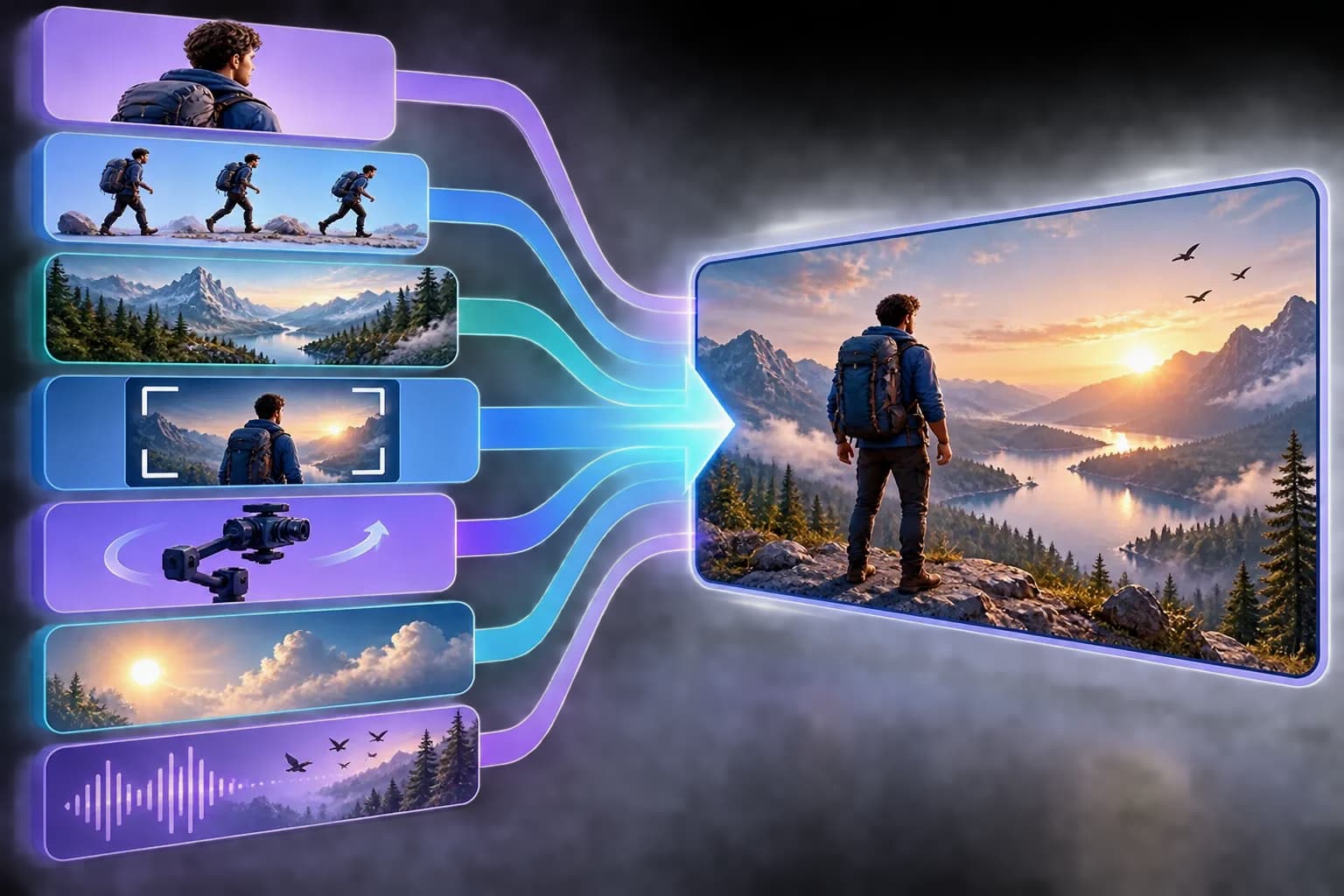
Use this framework manually or paste it into a prompt generator:
[Subject] performs [specific action] in [setting and time]. Use [shot size and angle] with [one camera movement]. Light the scene with [lighting description] and maintain a [mood and visual style]. The action unfolds in [timing or beats]. Preserve [continuity requirements]. Include [dialogue, sound effects or ambience] only if the target model supports audio. Output for [aspect ratio or platform].
Not every model needs every field. A shorter prompt can outperform a crowded one when the tool already receives a reference image, first frame or character asset. Remove directions that conflict with the input or the target model’s documented controls.
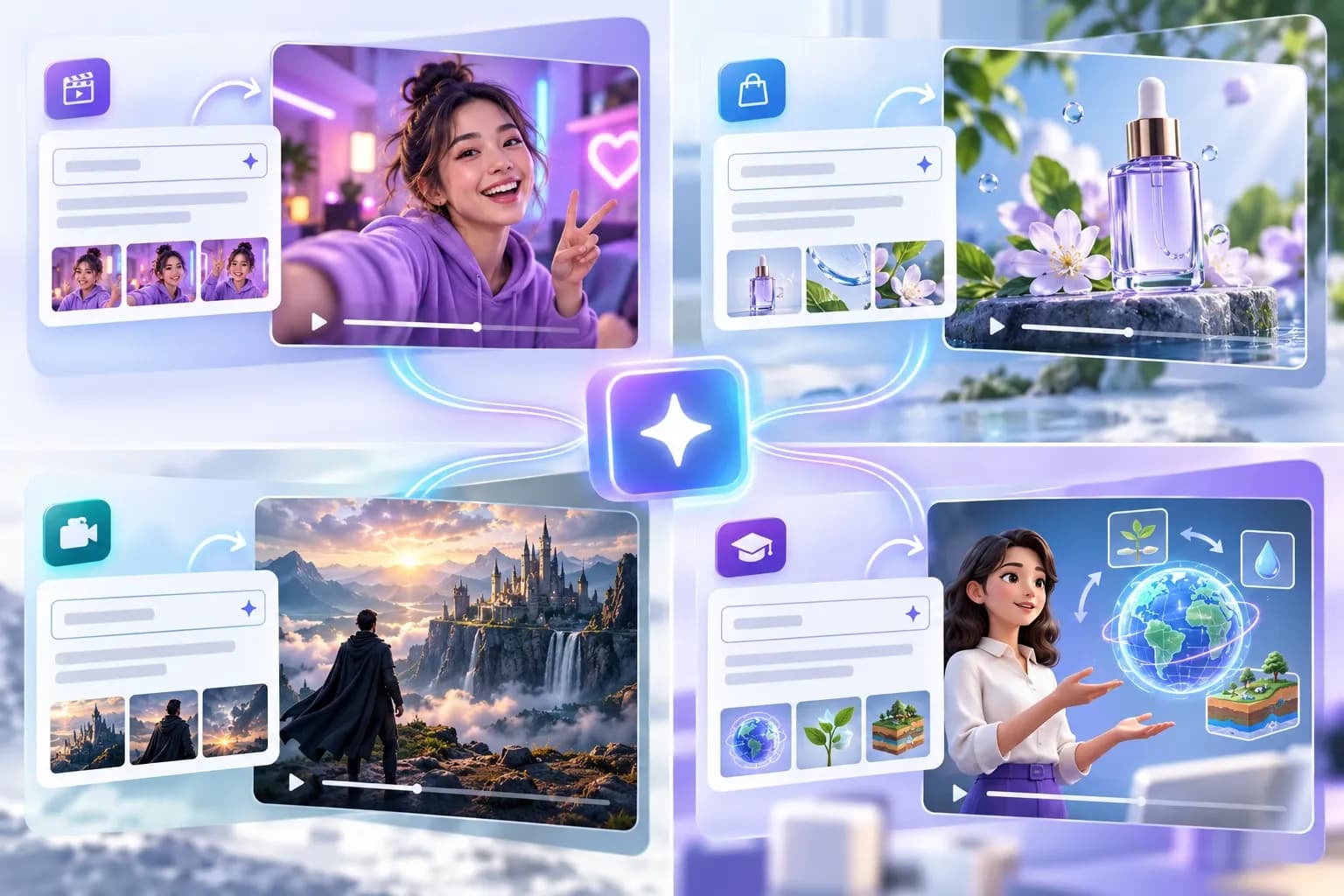
AI Video Prompt Examples
Product Advertisement Prompt
A matte-black running shoe rests on a dark reflective surface as fine water droplets fall around it. Begin with a low-angle close-up and make one slow clockwise orbit while the shoe remains perfectly shaped and centered. Cool blue rim lighting reveals the texture and reflective details. Premium athletic campaign mood, crisp realistic materials, single continuous six-second shot, 16:9. Add subtle water impacts and studio ambience only if native audio is supported. No captions or extra products.
Vertical Social Reel Prompt
A ceramic artist lifts a newly glazed cup from a sunlit studio table and turns it toward the camera. Medium vertical shot with a gentle handheld push-in, warm morning light, natural dust and workshop texture, authentic creator-documentary style. One continuous action over six seconds, stable hands and cup shape, 9:16 composition with clear space near the top for captions added later.
Cinematic Scene Prompt
A lone traveler in a weathered coat stands at the edge of a mist-covered mountain lake just before sunrise. Start in a wide rear view and slowly dolly forward as the first orange light crosses the water. The traveler remains still while fog moves naturally between the trees. Muted blue and amber palette, restrained cinematic realism, single unbroken eight-second shot, no text or sudden camera turns.
Educational Explainer Prompt
A clean three-dimensional cutaway of a green roof shows rain falling, water moving through soil layers and filtered runoff entering a storage tank. Fixed three-quarter camera view with a slow lateral slide, bright neutral studio lighting, accurate material separation, calm educational style. Reveal the process in three clear beats while keeping every layer and arrow direction consistent. Sixteen-by-nine with open space for labels added during editing.
Model-Specific Prompting Considerations
Model names inside a prompt generator do not guarantee perfect optimization. Video systems change quickly, and their interfaces may expose different duration, reference, camera, audio and editing controls. Review the destination product’s current documentation before relying on a preset.
- Veo workflows may support video with synchronized dialogue, effects and ambience, so audio directions can be relevant when that capability is available.
- Sora workflows benefit from a coherent subject, action, setting and camera plan; avoid stacking incompatible movements or too many scene changes into one clip.
- Kling workflows may expose text-to-video, image-to-video, motion and continuity controls depending on the current model and interface.
- Runway workflows combine prompting with reference and editing tools. Put settings handled by the interface into the interface instead of duplicating them ambiguously in the prose.
- Seedance and other models may respond differently to multi-shot structure, dialogue and timing. Treat generator presets as starting points, not official specifications.
Free vs Paid AI Video Prompt Generators
Many prompt generators advertise free access, but “free” can mean unlimited browser use, a daily quota, a no-signup form, a free account or a gateway into a paid video platform. Confirm what is free before recommending a tool.
| Question | Why it matters |
|---|---|
| Is prompt generation free? | A tool may generate text freely while charging for video rendering. |
| Is signup required? | No-signup tools reduce friction, while accounts may support history and saved projects. |
| Are there daily limits? | A free quota may be adequate for occasional use but restrictive for teams. |
| Does the tool store inputs? | Sensitive campaign concepts and uploaded references require a privacy review. |
| Can prompts be edited and exported? | Users should be able to review and adapt the result instead of accepting hidden automation. |
| Is a paid ranking involved? | Editorial comparisons should disclose sponsorship and keep selection standards independent. |
How to Choose the Right Tool
- Choose a general-purpose generator when you move between several video models and want a reusable prompt structure.
- Choose a model-specific generator when you consistently use one platform and the preset is maintained for its current version.
- Choose a structured or JSON generator when your team stores prompts, automates briefs or needs repeatable fields.
- Choose an image-to-prompt tool when a product image, storyboard frame or visual reference defines the composition.
- Choose a video-to-prompt tool when you are authorized to analyze an existing clip and want to study its camera, motion and pacing.
- Choose an integrated platform when you want prompt ideation, generation and editing in one workflow and accept its account or credit model.
Common Prompt Generator Mistakes
- Treating generated text as final instead of checking contradictions and unnecessary detail.
- Requesting several camera movements, locations and character changes in a clip that is only a few seconds long.
- Adding dialogue or sound instructions when the selected video model or mode does not generate audio.
- Using a preset for an outdated model version without checking current documentation.
- Uploading copyrighted, confidential or personally sensitive reference material without permission.
- Assuming a detailed prompt can solve every limitation in physics, text rendering, identity consistency or long-sequence continuity.
- Calling a prompt generator a video generator even though it produces only text.

Can ChatGPT or Another General AI Assistant Write Video Prompts?
Yes. A general AI assistant can expand a creative brief into a structured video prompt, generate variations and adapt the result for different aspect ratios or campaign goals. A dedicated generator can still be convenient because it exposes video-specific choices and reduces the amount of instruction required. The tradeoff is control: a general assistant is flexible, while a specialized form can be faster and more consistent for repeatable fields.
Whichever method you use, provide the target model, input type, duration, aspect ratio, scene, action, camera plan, continuity requirements and audio expectations. Then review the output rather than copying it blindly.
Methodology and Limitations
This article was researched using public product pages available on September 24, 2026. We reviewed what each site says its tool accepts, produces and supports. We did not run a controlled output-quality benchmark, render identical prompts through every downstream video model or verify private account features. Inclusion does not represent endorsement, sponsorship or a permanent ranking.
AI tools change quickly. Supported model names, free access, quotas, signup requirements and integrations can change after publication. Recheck the official page before making a purchasing or production decision. If a company later sponsors an inclusion, disclose the relationship and use the appropriate sponsored link attribute without rewriting the editorial conclusion solely for payment.
FAQs
Q1.
What is an AI video prompt generator?
Q2.
Which is the best AI video prompt generator?
Q3.
Are AI video prompt generators free?
Q4.
Do AI video prompt generators create videos?
Q5.
Can one prompt work with Veo, Sora, Kling and Runway?
Q6.
What should an AI video prompt include?
Q7.
Is JSON better than a normal video prompt?
Q8.
Can I generate an AI video prompt from an image?
Q9.
Can I turn an existing video into an AI prompt?
Q10.
How do I improve a generated video prompt?
Final Takeaway
AI video prompt generators are most useful as structured creative assistants. They can turn a rough idea into a clearer production brief, expose camera and lighting choices, and adapt the same concept for different models. They cannot guarantee a successful render or remove the need to understand the destination tool.
Start with the workflow: general idea-to-prompt, model-specific guidance, image-to-prompt, video-to-prompt or structured JSON. Choose a tool whose access and output are clearly explained, review every prompt, and keep the shot focused enough for the target model to execute. For businesses and agencies, transparency, editability, privacy and repeatability matter more than a long list of cinematic adjectives.
Sources and Tool Pages
- Promptessor AI Video Prompt Generator
- Revid AI Video Prompt Generator
- Aituts AI Video Prompt Generator
- Genial Things AI Video Prompt Generator
- ImageToPrompt.org Video Prompt Generator
- PromptTool.co AI Video Prompt Generator
- Newisty JSON Prompt Generator
- Video Breakdown
- OpenAI Sora
- Runway AI Video Generator
- Kling AI Video Generator
- Adobe Firefly AI Video Generator