On this page
UX vs UI: What's the Difference Between User Experience and User Interface?

WebbyCrown Solutions-
July 3, 2026-11 min read
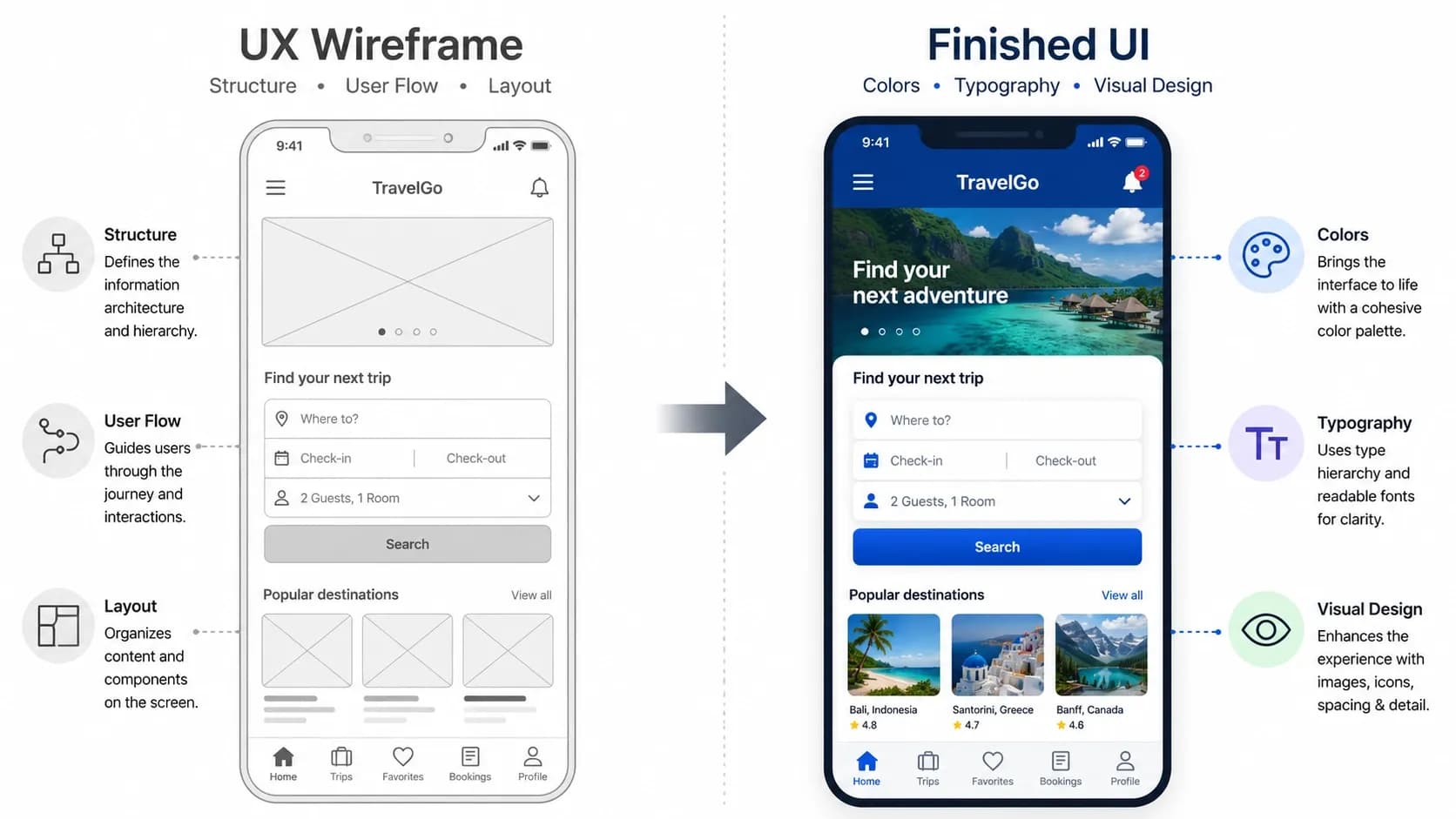
Quick Answer: UX (user experience) is the whole experience of using a product — how logical, fast, and satisfying it is to reach your goal. UI (user interface) is the visual layer you interact with — the buttons, colours, typography, and screens. In short: UX is how it works and feels; UI is how it looks. They're separate disciplines that depend on each other, and a product needs both done well.
Key Takeaways:
UX is the entire journey through a product; UI is the visual and interactive surface of that journey.
A UX designer maps flows, structure, and logic; a UI designer styles the screens that flow runs on.
You can have great UI and terrible UX (a beautiful app that's confusing to use), and the reverse is rarely true.
One person can do both — the "UX/UI designer" role is common — but at larger companies the jobs split.
If you're choosing what to learn first, UX usually comes first because it defines the structure UI then makes visual.
Introduction
UX vs UI is the most common source of confusion for anyone new to digital design — and it's an easy trap, because the two terms travel together so often that people assume they mean the same thing. They don't. They describe two different layers of the same product, handled by two different (though overlapping) skill sets.
If you're not yet sure what UX itself means, start with our user experience basics guide and come back — this article assumes you've got the gist and want the distinction made clear.
By the end of this page you'll be able to point at any app or website and say which parts are UX and which are UI, you'll understand what each role actually does, and you'll know which one to focus on first if you're learning or hiring.
What Is the Difference Between UX and UI?
The cleanest way to hold the difference in your head: UX is the experience, UI is the interface.
UX is concerned with how the whole thing works — the order of steps, whether the structure makes sense, whether people can reach their goal without friction, how fast it responds, whether it's accessible. It's largely about logic, flow, and behaviour, much of which isn't even visual.
UI is concerned with how the thing looks and how you touch it — the layout of each screen, the colours, the fonts, the icons, the buttons, the spacing, the animations. It's the tangible surface a person sees and taps.
A simple analogy: think of a house. UX is the architecture and floor plan — are the rooms in a sensible order, is the kitchen near the dining room, can you move through the space without backtracking? UI is the interior design — the paint, the fittings, the furniture, the finish. A house can be beautifully decorated but exhausting to live in if the layout is wrong (good UI, bad UX), or perfectly laid out but ugly and unwelcoming (good UX, weak UI). You want both.
UX vs UI: Side-by-Side Comparison
| UX (User Experience) | UI (User Interface) |
|---|---|
| Focuses on the overall experience and journey | Focuses on the visual and interactive surface |
| Main Question: "Does this work and feel right?" | Main Question: "Does this look right and clear?" |
| Concerned with flow, structure, logic, speed, and accessibility | Concerned with colour, typography, layout, icons, and buttons |
| Often Non-Visual? Yes — much of UX is invisible | Often Non-Visual? No — UI is what users see |
| Typical Deliverables: Wireframes, user flows, journey maps, research | Typical Deliverables: Mockups, style guides, design systems, prototypes |
| Goal: Help users reach their goal easily | Goal: Make the interface clear, attractive, and pleasant to use |
| Analogy: The floor plan of a house | Analogy: The interior design of a house |
Is UX the Same as UI? Is UI Part of UX?
These two questions come up constantly, so here's the precise answer to each.
Is UX the same as UI? No. They overlap and rely on each other, but they're distinct disciplines with different goals, methods, and deliverables. Treating them as one term is the mistake this whole page exists to fix.
Is UI part of UX? In a sense, yes — the interface is one component of the overall experience, so good UI contributes to good UX. But UX is much bigger than UI. UX also covers things UI never touches: whether the product is useful at all, how fast it loads, whether the steps are in a logical order, and whether it's accessible. So UI sits inside UX, but it's far from all of it.
One Product, Both Lenses: A Real Example
Take a food-delivery app — the same example used throughout these guides — and look at it through each lens.
Through the UX lens: Can you find a restaurant quickly? Is the path from browsing to checkout logical and short? Does the app remember your saved address so you don't re-type it? Does the order tracker update reliably? Does the whole thing feel fast? None of that is about how it looks — it's about how the experience is structured and how it behaves.
Through the UI lens: What do the restaurant cards look like? Are the food photos appealing? Is the "Add to cart" button obvious and easy to tap with a thumb? Is the text readable? Do the colours guide your eye to the right place? That's all the visual surface.
Now the key point: a stunning UI on top of a broken UX is still a bad product. If the app looks gorgeous but the checkout loses your order, you won't come back. And a flawless flow rendered in cramped, unreadable screens will frustrate people too. The two only succeed together.
What Does a UX Designer Do vs a UI Designer?
The roles are as distinct as the disciplines — though they collaborate closely.
A UX designer works on the structure and logic of the experience before most of the visuals exist. Their day-to-day typically involves user research, mapping user flows, building wireframes (low-fidelity skeletons of screens), running usability tests, and organising information so it's findable. They answer questions like "what steps should this process have?" and "where do people get stuck?"
A UI designer takes that structure and makes it visual and tangible. They work on layout, colour palettes, typography, iconography, spacing, component states (what a button looks like when you hover or tap it), and often a design system that keeps everything consistent. They answer questions like "what should this screen look like?" and "how do we make this action obvious?"
In a typical workflow, UX comes first and UI follows: the UX designer defines what goes where and why, then the UI designer defines how it looks. They iterate together — UI work often surfaces UX problems and vice versa.
Can One Person Do Both UX and UI?
Yes — and many do. The combined "UX/UI designer" title is one of the most common in the industry, especially at smaller companies, startups, and agencies where one person owns the whole design layer of a product.
The split tends to appear at larger organisations with bigger teams and more complex products, where there's enough work to justify dedicated specialists in each area. Neither setup is "more correct" — it depends on team size, product complexity, and budget. For a small business commissioning a website, a single capable UX/UI designer is usually the practical answer.
From our own work
The clearest way to see why user experience matters is to watch what happens when you reduce friction in a real product. When our team rebuilt the Shopify store for NAILD, a press-on nail brand selling across Germany, Austria, and Switzerland, the biggest gains didn't come from a flashier look. They came from removing friction: checkout localized to each country's preferred payment methods, pricing in the customer's own currency, the interface in their own language.
A one-off conversion can be bought with a discount, but a 40% return rate is what good UX looks like measured over time. When the experience is smooth, people don't just finish once — they choose you again.
+200%
sales uplift, post-launch
40%
repeat purchase rate
Source: WebbyCrown NAILD.de case study
Should I Learn UX or UI First? What Comes First?
If you're learning design, start with UX. UX defines the structure, logic, and flow that UI then makes visual — so understanding the experience first gives you the foundation to make better visual decisions. Many people then learn UI alongside or shortly after, since the combined skill set is highly employable.
If you're naturally drawn to the visual side, you can begin with UI and learn UX in parallel — there's no single rule. But the common advice holds: grasp how experiences are structured before you focus purely on how they look, because a beautiful screen built on a broken flow doesn't solve the user's problem.
Either way, both disciplines are worth understanding, and the practical rules that apply to both live in our guide to UX design principles.
Conclusion
The difference comes down to one line: UX is the experience, UI is the interface — how it works versus how it looks. They're distinct disciplines, handled by distinct (if overlapping) roles, and a good product needs both. Beautiful screens can't rescue a broken flow, and a perfect flow still needs clear, pleasant visuals to land.
If you're deciding where to focus, lead with UX to understand structure, then build UI skills on top. And once the difference is clear, the natural next step is learning the practical rules that make both work in real products — read UX design principles next, or revisit user experience basics if you'd like the fundamentals reinforced first.
FAQs
Q1.
What is the difference between UX and UI in one sentence?
Q2.
Is UX the same as UI?
Q3.
Is UI part of UX?
Q4.
What does a UX designer do compared with a UI designer?
Q5.
Should I learn UX or UI first?
Q6.
Can one person do both UX and UI?
Q7.