On this page
How to Get Your Website in ChatGPT Search: A Technical Checklist

WebbyCrown Solutions-
November 6, 2026-12 min read
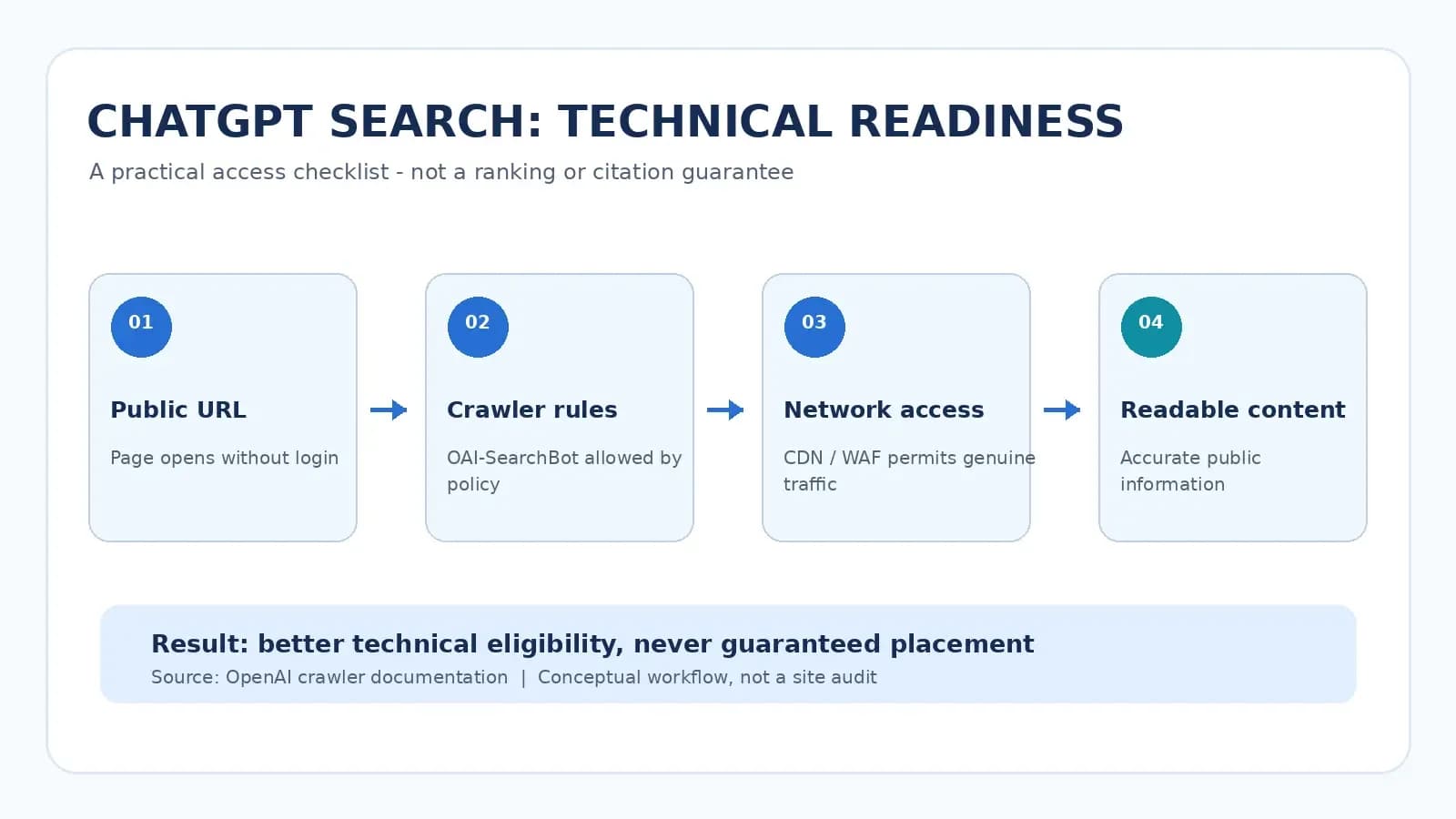
Quick answer: To help make a public website eligible for discovery in ChatGPT Search, allow OpenAI’s OAI-SearchBot to access the pages you want found, check your production robots.txt, and make sure your hosting provider, CDN, and firewall do not block legitimate requests from OpenAI’s published searchbot IP ranges. Confirm that the pages work publicly and expose accurate, readable information. Technical access is not a guarantee of a ChatGPT search result, source citation, recommendation, or referral visit.
A website can look perfect to a customer and still return a challenge, blocked response, or incomplete content to an automated client. For site owners, agencies, SaaS teams, and sellers of website templates, checking those barriers is a useful task even if the site is never cited in a ChatGPT answer.
This guide is deliberately narrow: it explains how to diagnose search-crawler access, with specific checks a site owner can send to a developer or hosting provider. It does not attempt to calculate AI citation rates or compare AI visibility software. For those separate questions, see What Is AI Search Visibility and How Do You Track It?.
A Quick ChatGPT Search Access Checklist
Before changing any settings, use this short checklist to identify what needs attention.
| Check | What to establish | Evidence to keep |
|---|---|---|
| Public URL | The intended page opens without sign-in or a challenge. | Full URL, response, and date |
| Search crawler policy | The production robots.txt rules permit the desired OAI-SearchBot access. | Relevant crawler directives |
| Network security | Legitimate requests from published searchbot IP ranges are not unintentionally blocked. | CDN/WAF and server events |
| Page response | The URL returns the intended page, not an error, endless redirect, or interstitial. | Status and redirect chain |
| Useful page text | Important public facts can be read without an account or special interaction. | Page-content inspection |
| Validation | The relevant settings and actual requests were checked, if logs are available. | Before-and-after audit notes |
Completing these checks removes potential obstacles. It does not prove that OpenAI has crawled the page or that ChatGPT will use it in an answer.
How ChatGPT Search Discovers Websites
ChatGPT can search the web and provide links to sources. OpenAI says that search placement depends on multiple factors and is not guaranteed. To help make a website eligible, its ChatGPT Search guidance recommends allowing OAI-SearchBot to crawl the site and allowing the searchbot’s published IP addresses through the host or CDN.
This is not a registration program. There is no documented submission payment or one-click action that guarantees a website will appear for a particular query. An accessible page might still be omitted from a response because relevance, freshness, available sources, or the user’s question differ.
OAI-SearchBot, GPTBot, and ChatGPT-User are not the same
| User agent | Documented role | What the difference means |
|---|---|---|
| OAI-SearchBot | Search-related crawling for ChatGPT search experiences | The relevant automated crawler to review for search discoverability. |
| GPTBot | Crawling content that may be used for training OpenAI foundation models | Training-related crawling is controlled separately from search-related crawling. |
| ChatGPT-User | Some visits initiated by a ChatGPT user or connected action | Not the automatic search crawler and not the control for search inclusion. |
OpenAI explicitly documents independent controls for OAI-SearchBot and GPTBot. You can choose to permit search-related crawling while expressing a different preference for training-related crawling. Its crawler documentation also explains that ChatGPT-User requests are user initiated and may not follow the same robots.txt rules.
Step 1: Identify the Public Pages You Actually Want Found
Do not begin by changing crawler settings across the entire site. First select a small, representative group of public URLs: the homepage, one important service or category page, one product detail page, and a genuinely useful help article. If you manage a marketplace, check whether a product page actually states the framework, included files, documentation, support terms, and any setup that is not included.
For each URL, answer three questions: Can an anonymous person open it? Does it show the correct content? Does navigation lead to the same stable destination? Do not make private account pages or internal staging pages public merely to attract crawlers.
A developer can inspect a public URL’s response with a normal request:
curl -sS -L -o /dev/null -w 'HTTP %{http_code}\nFinal URL %{url_effective}\n' \
https://example.com/important-page/
Replace the sample domain with a page you control. A 200 response is a useful signal, but it is not sufficient on its own: a soft error page, cookie wall, or login form can also be served with HTTP 200. Open the response body and check its actual content.
Step 2: Inspect the Production robots.txt File
The crawler policy normally lives at https://example.com/robots.txt. Open that URL for your production host, then inspect all relevant user-agent groups and path rules. A common mistake is to check staging while the live domain has different rules.
If you intentionally want to allow search-related crawling, this is a minimal illustrative directive:
User-agent: OAI-SearchBot
Allow: /
This snippet is not a complete replacement for an existing robots.txt. Many sites already allow a crawler because they have no applicable disallow rule. Do not overwrite valid sitemap declarations, deliberate path restrictions, or rules for other crawlers. A site owner should review the complete configuration with their developer before publishing changes.
The site may separately choose to disallow training-related crawling:
User-agent: GPTBot
Disallow: /
These two groups reflect different policy choices. Blocking GPTBot does not, by itself, mean the publisher must block OAI-SearchBot. For sensitive material, rely on authentication and access controls: robots.txt is not a confidentiality mechanism.
To read the live file without changing it:
curl -sS -L https://example.com/robots.txt
OpenAI says it can take approximately 24 hours after a robots-file update for the change to be reflected in its systems. This is a crawler-policy processing estimate, not a promise that a page will be crawled, listed, or cited within one day. Source: OpenAI crawler documentation.
Step 3: Check Your Hosting, CDN, and WAF for Unintended Blocks
A permissive robots file will not fix a server that sends OpenAI’s crawler a CAPTCHA, a challenge page, an HTTP 403, or repeated rate-limit responses. The hosting layer, reverse proxy, security plugin, and CDN can each make independent decisions.
OpenAI publishes an official, maintained feed of OAI-SearchBot IP ranges. Ask your infrastructure team to compare its bot-blocking policy and relevant event logs with that source. Do not hard-code a copied list from a dated blog article and assume it will remain current.
A simple simulated request can help reveal obvious user-agent-specific behavior:
curl -sS -L -A 'OAI-SearchBot' -o /dev/null \
-w 'HTTP %{http_code}\nFinal URL %{url_effective}\n' \
https://example.com/important-page/
Important: This command changes the request’s declared user agent. It does not make the request originate from OpenAI or prove what OpenAI’s actual crawler can access. A firewall may treat a real request differently based on its source IP or other signals.
For stronger evidence, ask the server or CDN administrator to review logs for relevant requests and check source addresses against OpenAI’s published searchbot ranges. A matching user-agent text string on its own can be spoofed. Where possible, document the time, path, returned status, security-rule decision, and whether the request reached the origin.
If a security system is blocking traffic, modify only the relevant rule after assessing its security implications. Do not disable website-wide protection or bypass authentication for private resources just to pass an SEO test.
Step 4: Confirm the Page Returns the Intended Content
A successful status code does not necessarily mean a crawler receives the information users need. Common problems include a page that serves an empty application shell, a language-selection wall, content displayed only after sign-in, or specifications embedded solely in an image.
For a public template or SaaS product page, inspect whether the actual response or accessible page content explains the product type, supported technology, included deliverables, prerequisites, and documentation accurately. If essential content is injected later by JavaScript, check what an anonymous automated request can retrieve rather than assuming that the crawler executes every browser interaction.
For example, a screenshot of a checkout interface is not proof that an HTML template includes a working payment backend. Describing the difference in readable text helps a buyer make a correct decision regardless of whether an AI system ever references the page.
The goal here is functional access to useful public information, not a universal rule that every site must use server-side rendering or duplicate all text in hidden SEO blocks. Avoid cloaking, hidden keyword stuffing, and creating thin pages only for bots.
Step 5: Inspect Status Codes, Redirects, and Access Boundaries
Check whether the URLs on your shortlist return the intended content and follow a sensible redirect path. Pay particular attention to preview hosts, expired campaign URLs, login redirects, soft-404 templates, and links that point at removed or renamed products.
| Observed result | What it can mean | Next action |
|---|---|---|
| HTTP 200 with expected public content | The URL is reachable in that test. | Continue with robots, CDN, and log checks. |
| HTTP 301/302 to an unrelated or login page | The crawler may not reach the intended resource. | Inspect redirect configuration and access requirements. |
| HTTP 403 or a challenge page | An access policy or security filter may be denying the request. | Review WAF, host, or application logs. |
| HTTP 404/410 | The requested resource is absent or intentionally removed. | Restore the correct page if needed; repair incoming links. |
| HTTP 429 or 5xx | Rate limiting, server problems, or temporary infrastructure failures may interfere. | Review capacity, bot controls, and error logs. |
| HTTP 200 showing a not-found or login message | A soft error can masquerade as a successful response. | Inspect returned content and fix application behavior. |
Google Search Console’s URL Inspection tool is a Google Search diagnostic, not proof of an OAI-SearchBot crawl or a ChatGPT Search listing. Similarly, an XML sitemap submitted to a traditional search engine is not a documented guarantee of inclusion in ChatGPT. Maintain sound technical SEO for its own value without treating a Google signal as a ChatGPT verification result.
Step 6: Document an Actual Before-and-After Access Test
A site owner cannot responsibly call a ChatGPT Search technical audit “passed” solely because someone added one line to robots.txt. Keep an auditable record of the issue, evidence, change, and follow-up.
| Audit item | Before-change evidence | After-change evidence |
|---|---|---|
| Public URL and response | URL, redirect chain, content returned | Recheck the same production URL |
| Robots policy | Relevant OAI-SearchBot rules | Final published rules and date |
| CDN/WAF controls | Block or challenge event, if observed | Updated rule and follow-up events |
| Searchbot verification | Real log record plus IP verification, if available | New verified requests, if observed |
| Page readability | Actual missing or gated information | Updated, publicly readable page content |
How to interpret the outcome: If you confirm that a specific security rule blocked a legitimate searchbot request and later logs show a correctly allowed request, you have evidence that that access barrier was addressed. If no real searchbot request is available, your result is a configuration review and simulated access test—not proof of a successful crawl.
Do not report a “ChatGPT ranking improvement” based only on this checklist. Tracking actual brand mentions, citations, sources, and attributable referrals is a separate measurement task covered in WebbyTemplate’s AI Search Visibility guide.
Practical Example: A Downloadable Website Template Page
Consider a hypothetical template marketplace listing that shows a polished Next.js preview. In a normal browser the page looks usable, but an edge-security rule challenges some automated requests. Its product description also omits whether the download contains an integrated backend or only frontend components.
The developer first checks the production URL and verifies the returned content. Next, they read the full robots policy and review CDN security logs for legitimate OAI-SearchBot requests. If a relevant rule is blocking the published searchbot IP ranges, they evaluate and correct only that rule. The editor then makes the product deliverables, framework, dependencies, and exclusions explicit in the visible page text.
The useful result is a better public product page and a more transparent crawler configuration. It does not establish that ChatGPT has indexed, cited, or recommended the product. This is an illustrative workflow; no live WebbyTemplate server audit or controlled crawler test was performed for this example.
Common ChatGPT Search Technical Problems
| Symptom | Likely area to investigate | Evidence needed |
|---|---|---|
| Page works in a browser but the crawler is blocked | Bot rules, CDN challenges, WAF policy | Production robots file and security event logs |
| OAI-SearchBot is allowed in robots.txt but still denied | Source IP restrictions, rate limits, login requirements | Host/CDN logs and official searchbot IP source |
| A page appears blank to an anonymous client | JavaScript rendering or gated content | Returned HTML and accessible rendered text |
| Bot requests reach an unexpected URL | Redirects, incorrect canonical navigation, host configuration | Redirect chain and destination response |
| The site is reachable but absent from ChatGPT results | Inclusion is not guaranteed | Distinguish access audit from answer-selection behavior |
| A vendor promises guaranteed placement for a fee | Unsupported submission or ranking claims | Demand verifiable official documentation |
FAQs
Q1.
How can I make my website eligible for ChatGPT Search?
Q2.
Does blocking GPTBot stop my website from appearing in ChatGPT Search?
Q3.
Can I test OAI-SearchBot by changing curl’s user-agent header?
Q4.
If robots.txt is fixed, how long until my page appears?
Q5.
Is a Google Search Console indexing report proof that ChatGPT crawled my page?
Q6.
Is an llms.txt file required to appear in ChatGPT Search?
Q7.
Does allowing the crawler guarantee that ChatGPT recommends my products?
Final Takeaway
To investigate why a website may be inaccessible to ChatGPT Search, start with one real public URL. Check the response, review OAI-SearchBot policy in robots.txt, inspect CDN and firewall controls against OpenAI’s maintained IP source, and confirm that the page delivers readable, accurate information. Document what you observed before and after any change.
This technical checklist helps identify and resolve access problems. It is not a shortcut to an AI ranking, and it does not replace the separate work of measuring citations or understanding what people actually need from the website.