On this page
AI SaaS Starter Kit: What to Check Before Building With Next.js

WebbyCrown Solutions-
September 10, 2026-18 min read
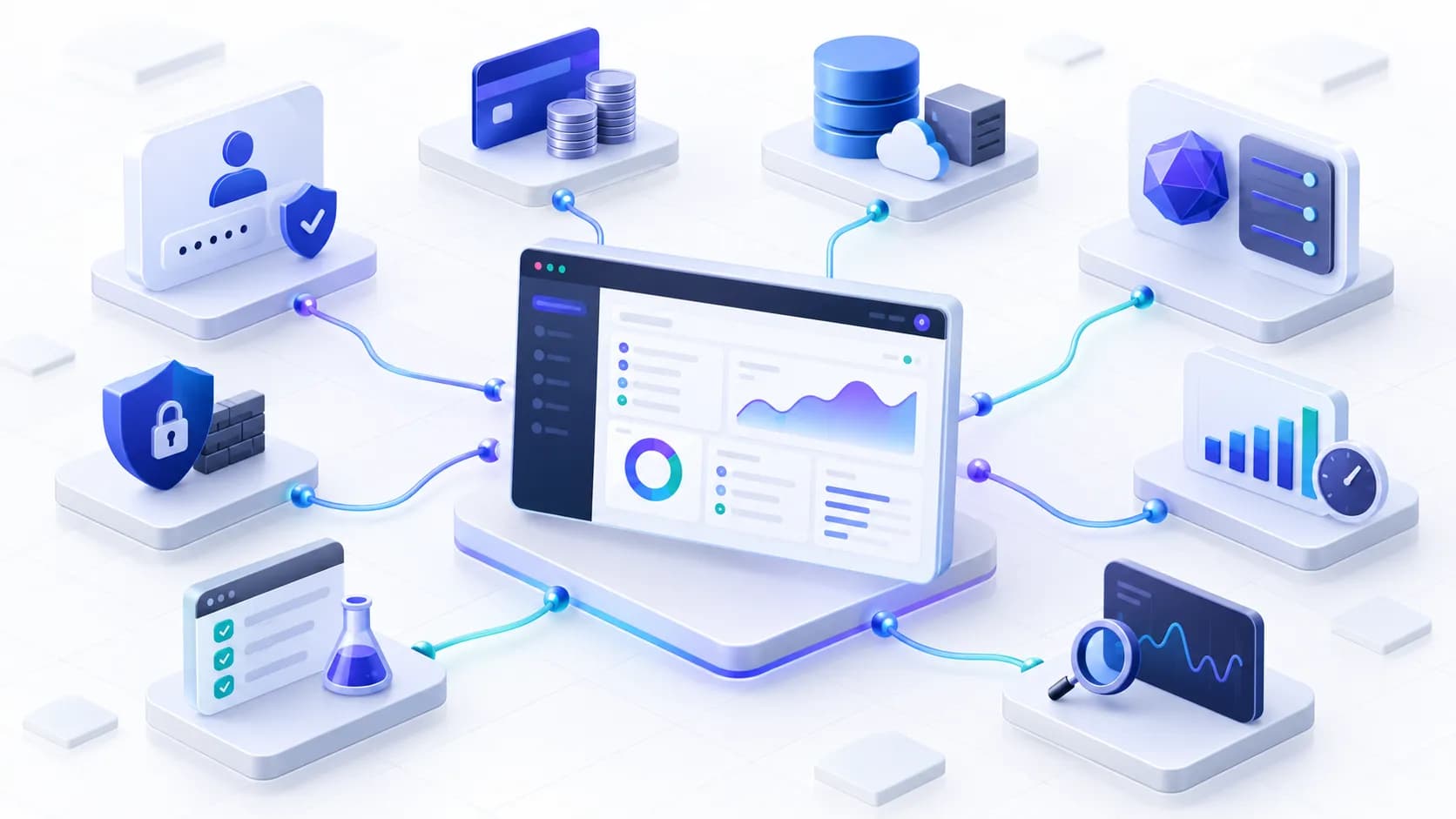
credible AI SaaS starter kit combines the product experience with working SaaS infrastructure, an AI runtime and production operations.
An AI SaaS starter kit can remove repetitive setup from a Next.js project, but the label alone proves very little. Some kits provide a working application foundation with authentication, subscriptions, data storage and model calls. Others are polished landing pages or dashboards with AI-themed graphics and placeholder interactions.
Before buying, verify the code behind the demo. A login screen is not the same as authentication, a pricing page is not subscription billing, and a chat interface is not automatically a secure, persistent or cost-controlled AI product. The right kit should reduce the work your specific application actually needs without hiding important technical debt.
Editorial disclosure: WebbyTemplate operates the marketplace categories linked in this guide. This article does not rank paid starter kits and does not treat a visual demo as proof of an implemented feature. Technical statements are based on current official documentation and the evaluation method described below.
Choose evidence, not screenshots. A useful Next.js AI SaaS starter kit should include working full-stack source code for the SaaS layer - authentication, authorization, data, billing and entitlements - plus the AI layer, such as server-side provider calls, streaming, persistence and usage controls. Run the project, inspect its integrations, test two separate tenants, simulate billing and AI failures, and price the missing work before you buy.
Key Takeaways
- An AI-themed website template, a SaaS boilerplate and an AI SaaS starter kit are different product types; confirm which one the download actually provides.
- Next.js can support a full-stack AI application, but the framework does not automatically supply authentication, billing, tenant isolation, AI safeguards or production monitoring.
- Verify real workflows behind login, pricing, dashboard, team, credit and AI-chat screens rather than inferring functionality from the interface.
- Keep model credentials on the server and review every environment variable that can be exposed to browser code.
- AI usage needs metering, rate limits, failure handling and spend controls because cost and latency vary by model, input size and workload.
- Multi-tenant products need authorization and data isolation at the application and database layers, not only a team switcher in the UI.
- A starter kit accelerates development; it does not remove the need for security review, testing, deployment work, privacy decisions and ongoing dependency updates.
What Is an AI SaaS Starter Kit?
An AI SaaS starter kit is reusable application source code intended to accelerate the development of a hosted or subscription-based AI product. A credible kit combines common SaaS infrastructure with one or more working AI workflows. Depending on the product, that may include chat, text or image generation, document retrieval, structured output, tool use or a specialized industry workflow.
The WebbyTemplate AI SaaS Starter Kits category correctly treats these products as reusable foundations rather than finished businesses. Buyers may still need model-provider accounts, API usage, business logic, security configuration, testing, hosting and operational monitoring.
AI Website Template vs SaaS Boilerplate vs AI SaaS Starter Kit
| Product type | What it normally provides | What it does not prove | Best fit |
|---|---|---|---|
| AI website or landing-page template | Marketing pages, sections, responsive styling and brand-ready visuals | A working model integration, users, billing, database or application backend | Launching the public website for an AI company or product |
| AI UI kit or dashboard | Design files, screens, components or a front-end application shell | Authentication, live data, subscriptions, secure model calls or tenant isolation | Design and front-end acceleration |
| SaaS boilerplate | Reusable SaaS plumbing such as users, database, billing or teams | AI features unless the model and workflow integration is documented | A general subscription application |
| AI SaaS starter kit | SaaS plumbing plus a working AI runtime or implemented AI use case | Production readiness for every business, risk level or scale | A paid AI application with custom product logic |
| RAG or chatbot starter kit | Chat UI and/or retrieval, ingestion, embeddings, citations or conversation logic | Complete SaaS billing, multi-tenancy or general-purpose product infrastructure | Knowledge assistants, document Q&A and support chat |
Classification rule: If the download mainly supplies marketing pages, it is an AI website template. If it supplies working users, data, billing/entitlements and a server-side AI workflow, it can reasonably be evaluated as an AI SaaS starter kit.
Why Next.js Is Common in AI SaaS Starter Kits
Next.js is a React framework for building full-stack web applications. It can combine the public marketing site, authenticated product interface and server-side application logic in one codebase. This makes it a practical option for founders and teams that already work in the React and TypeScript ecosystem.
For AI-specific interfaces, the Vercel AI SDK provides a TypeScript toolkit for AI applications across Next.js and other frameworks. Its documentation covers provider integrations, streaming interfaces and tool calling. These building blocks can shorten implementation time, but the starter kit still needs its own data model, permissions, billing rules, error handling and product-specific safeguards.
Strengths to Look For
- A current App Router architecture with clear server/client boundaries.
- Reusable TypeScript components and a documented data-access layer.
- Server-side route handlers or actions for protected AI and business operations.
- Streaming support for responsive chat or generation experiences where appropriate.
- A deployment model that matches the database, file storage, queues and runtime requirements.
Trade-Offs to Check
A single Next.js repository can become tightly coupled to one hosting, authentication, database or payment provider. Background jobs, long-running AI tasks, regional data requirements and large file workloads may also require services outside the web application. Review adapters, interfaces and deployment documentation so you know which components can be replaced and which are deeply embedded.
The Architecture a Real AI SaaS Starter Kit Should Cover
A production-shaped starter kit connects four working layers. The marketing experience attracts and onboards the user; the SaaS core manages identity, organizations and paid access; the AI runtime handles model interactions; and the operations layer keeps data, jobs, logs and deployment reliable. Security, tenant isolation and cost control must cross all four layers.
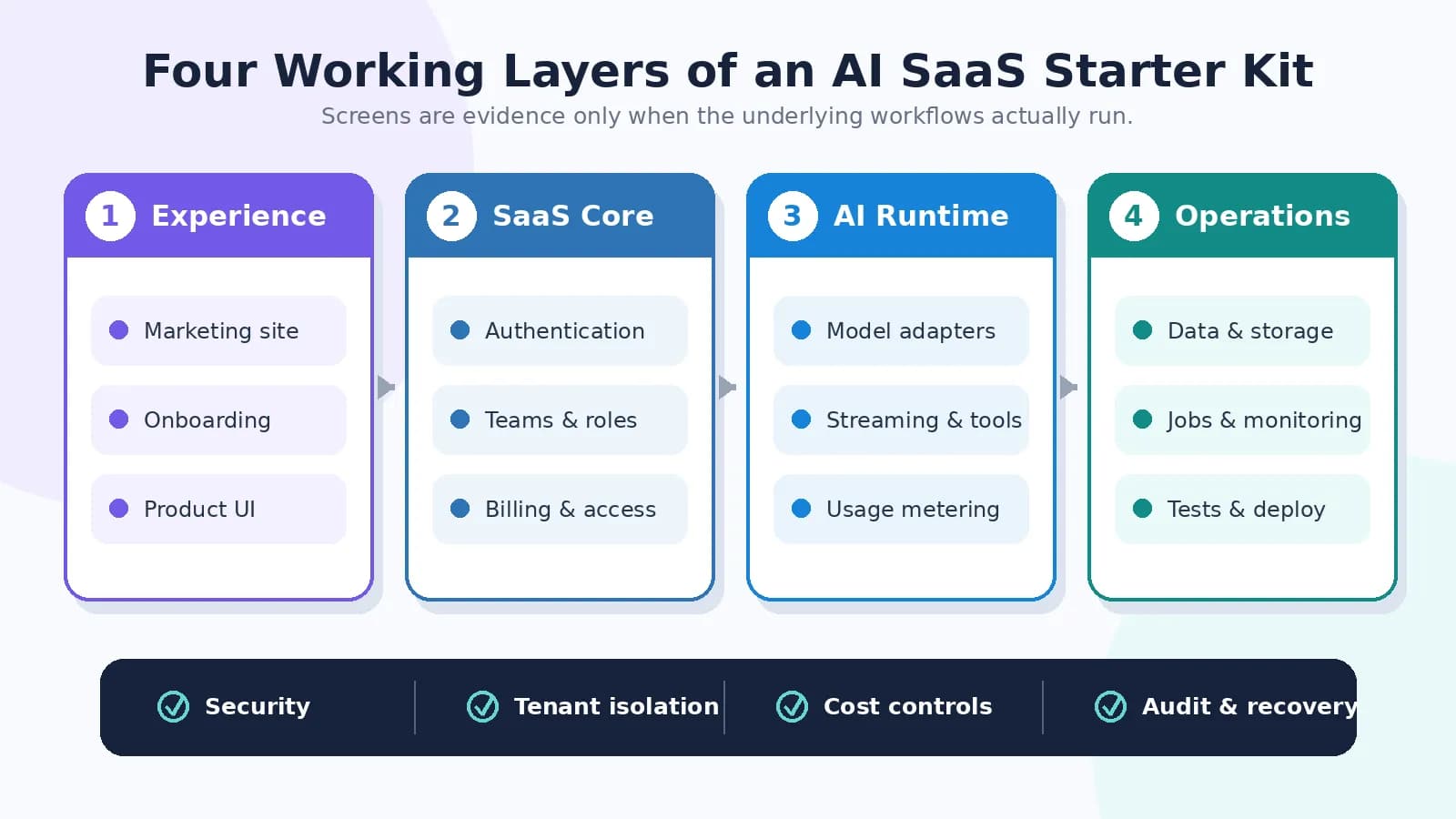
The four layers are connected: a weakness in identity, billing, AI execution or operations can undermine the entire product.
1. Application Foundation
Start with the ordinary SaaS foundations because AI does not replace them. Authentication should create and validate real sessions. Authorization should decide which user can access which record or action. The database schema should support migrations and recovery, while account settings, transactional email and administrative workflows should be more than placeholder screens.
- Authentication with documented session and account-recovery behavior.
- Authorization checks on server-side reads, writes and administrative operations.
- Organizations or workspaces when the product serves teams.
- Database schema, migrations, seed data and backup expectations.
- Account deletion, data export and retention behavior appropriate to the product.
2. Billing, Plans and Entitlements
Subscription billing is a lifecycle, not a checkout button. Stripe's subscription documentation describes states from creation through renewal, payment failure and cancellation. A starter kit should map those states to product access and process verified webhook events rather than trusting the browser after checkout.
- Products and prices connected to actual plans.
- Checkout or payment flow plus customer self-service where required.
- Verified webhook handling for activation, renewal, failed payment, plan change and cancellation.
- Idempotent processing so a repeated event does not duplicate credits or access.
- Server-side entitlements that control features, seats, quotas and usage.
3. Working AI Runtime
A real AI integration calls a model or gateway from trusted server-side code and returns a handled result to the user. Look for provider adapters, request validation, model configuration, streaming or job handling, persistence and error states. If the kit claims structured output, tools, RAG or agents, each feature should have working code, configuration and a testable example.
- Provider credentials remain in server-side secrets rather than client bundles.
- Model selection and parameters are configurable without scattering provider code across the application.
- Streaming, cancellation, timeouts, retries and partial failures have defined behavior.
- Conversation or generation history is persisted only when the product needs it.
- Tool arguments and model-produced structured data are validated before use.
- RAG, file upload or agent functionality is included only when the application actually requires it.
4. Usage Metering and Cost Controls
AI-provider limits and costs make usage control part of the product architecture. OpenAI's rate-limit guidance explains that request and token limits restrict access over time, while its production guidance recommends secure key storage. Regardless of provider, buyers should verify how the starter kit counts usage and responds when a limit is reached.
- Per-user or per-organization request, token, image or credit accounting.
- Plan-based limits enforced on the server.
- Rate limits and concurrency protection against abuse and accidental spikes.
- Timeouts, retry policies and provider-failure fallbacks where appropriate.
- Usage dashboards and logs that help reconcile customer access with provider spend.
5. Production Operations
The starter should explain how to build, test and deploy the full system, including everything outside the Next.js process. Confirm whether AI requests finish within the selected runtime limits or require a queue and worker. Review database and storage backups, logs, error reporting, health checks, rollback and dependency updates.
The official Next.js deployment guide distinguishes Node.js server, Docker, static export and adapter-based deployment, with different feature support. A full AI SaaS application normally needs server execution; a static export alone cannot provide protected model calls, dynamic subscriptions and database-backed user workflows.
Turn Every Marketing Claim Into a Verification Test
| Claim in the demo | Evidence to verify | Risk when it is only visual |
|---|---|---|
| Login and account pages | Real session creation, protected routes, recovery flow and server-side authorization | Users may reach screens without secure identity or object-level access control |
| Pricing page | Payment integration, verified webhooks, subscription states and server-side entitlements | Payment may complete without correct access, renewal or cancellation behavior |
| Team switcher | Organization membership, role checks and tenant-scoped database queries | One customer may access another customer's data |
| AI chat or generator | Server-side model request, streaming/error states, persistence and provider configuration | The interface may be a hard-coded demo or expose credentials |
| Credits or usage meter | Atomic usage records, plan enforcement, reconciliation and insufficient-credit handling | Costs can exceed revenue or balances can become inconsistent |
| File upload or RAG | Validated uploads, ingestion, retrieval, permissions, deletion and source handling | Files may be stored but never indexed, isolated or safely retrieved |
| Admin dashboard | Role-restricted operations, audit logs and safe customer-support actions | An ordinary user may reach sensitive controls |
| One-click deploy | Complete environment list, migrations, external services, job setup and rollback instructions | The web page may deploy while critical workflows remain broken |
AI Website Template or AI SaaS Starter Kit?
Choose an AI website template when the immediate need is a credible public website for an AI startup, agency or product. The deliverable may include a hero, feature sections, pricing layout, testimonials, FAQs, documentation pages and polished responsive styling. It does not need to contain a working AI backend to be valuable, provided the product is described honestly.
Choose an AI SaaS starter kit when users must sign in, pay, consume model-powered features and store application data. That product should be evaluated as software infrastructure, not only as design. A Next.js landing-page pack and a Next.js AI SaaS starter solve different problems; neither label should be stretched to claim the other.
Buyer shortcut: If you only need to market an AI product, buy the front-end template that best fits your brand. If you need to operate the product, require evidence for identity, data, billing, AI execution and production operations.
How to Evaluate a Next.js AI SaaS Starter Kit Before Buying
1. Define one primary workflow. Specify whether the product generates text or media, answers questions, retrieves knowledge, uses tools or runs a specialized business process.
2. Create a must-have matrix. Separate launch requirements from later features so a large feature list does not distract from the critical path.
3. Confirm the deliverable. Verify whether you receive full source code, design files, documentation, sample data and the license needed for your intended projects.
4. Review the stack and maintenance status. Check the Next.js and React architecture, major dependencies, recent updates, migration notes and whether security fixes are part of the update policy.
5. Inspect real integrations. Ask for working evidence behind authentication, billing, database, email, storage, AI providers, queues and analytics.
6. Test isolation with two accounts. Create users in separate organizations and attempt to access each other's records, files, generation history and administrative actions.
7. Test the subscription lifecycle. In a payment sandbox, verify activation, upgrade, downgrade, failed payment, cancellation, webhook replay and access removal.
8. Test AI failure and cost behavior. Try long prompts, parallel requests, invalid files, unavailable models, timeouts, exhausted credits and provider rate limits.
9. Build and deploy a clean copy. Follow only the supplied documentation, run migrations and tests, and record every missing environment variable or undocumented manual step.
10. Estimate the gap to your production requirements. Price security review, branding, core product logic, compliance, monitoring, support and future upgrades before comparing the kit's true value.
Security and Privacy Checklist
Next.js recommends deliberate server/client data boundaries and server-side authorization in its data-security guide. For AI-specific risks, the OWASP Top 10 for LLM and GenAI Applications highlights issues such as prompt injection and sensitive-information disclosure. The exact safeguards depend on the product, but a buyer review should cover the following controls.
- Store model, database, payment and email credentials in server-side environment variables or a secrets manager; never ship secret values to browser code.
- Authorize every protected read, write, file and tool operation on the server, even when the UI hides the control.
- Scope every query by tenant or organization and test direct object access across accounts.
- Treat user prompts, retrieved content, uploaded documents and tool results as untrusted input.
- Validate structured model output and tool arguments before they reach databases, payments, email or external APIs.
- Apply rate limits, quotas, file restrictions and spend controls appropriate to the workload.
- Add moderation or human review where the use case, audience or impact requires it. OpenAI's safety guidance recommends adversarial testing and human oversight where possible.
- Verify payment-webhook signatures and make event processing safe to retry.
- Define retention, deletion and export for prompts, files, outputs, logs and account data.
- Avoid logging secrets or unnecessary sensitive prompt content; restrict and retain operational logs deliberately.
What Does an AI SaaS Starter Kit Really Cost?
The purchase price is only the cost of acquiring the code. Total cost of ownership includes external services, product-specific development and maintenance. Compare kits using the same expected user volume and workload rather than the sticker price alone.
| Cost area | What to identify | Why it matters |
|---|---|---|
| License | Projects, end products, client work, redistribution and update rights | A low price may not permit the intended commercial use |
| AI models | Provider, model mix, tokens, images, audio, embeddings and reranking | Usage can scale faster than subscription revenue |
| Data services | Database, vector store, object storage, backups and egress | AI features often store large inputs, outputs or files |
| SaaS services | Authentication, email, analytics, monitoring and payment processing | Free tiers may not match production volume or required features |
| Infrastructure | Web runtime, background workers, queues, cron jobs and regions | Long-running work may need more than a standard web deployment |
| Engineering | Core product logic, security, testing, migration and upgrades | The remaining work determines whether the kit saves money |
| Operations | Support, incident response, moderation, privacy requests and evaluation | A live AI product needs ongoing ownership after launch |
Which WebbyTemplate Category Fits Your Project?
| Your primary requirement | Best category starting point | Reason |
|---|---|---|
| Launch a subscription AI application | AI SaaS Starter Kits | Look for working SaaS infrastructure plus an implemented AI workflow |
| Build document Q&A, knowledge search or support chat | RAG & AI Chatbot Starter Kits | Retrieval, ingestion, chat, citations and conversation behavior are the main architecture |
| Build a tool-using, multi-step AI system | AI Agent Starter Kits | Tools, state, approvals, traces and agent evaluation become central |
| Add AI to an existing platform | AI Plugins & Integrations | A plugin or connector can extend the system without starting a new SaaS product |
| Connect an AI client to external business tools | MCP Servers & Connectors | The protocol and governed tool surface are the primary deliverable |
| Design an AI product interface | AI UI Kits & Dashboards | Use design or front-end assets when application functionality is not required |
Start with the broader AI & Automation marketplace when the product type is not yet clear. Developers who have already selected the framework can also browse the Next.js templates and starter kits category. For narrower architectures, review RAG & AI Chatbot Starter Kits or AI Agent Starter Kits before deciding that a general AI SaaS kit is the best fit.
Common Red Flags
- The sales page says 'production-ready' but provides no architecture, documentation, test or deployment evidence.
- Provider logos are shown, but the code contains only one hard-coded API request or a simulated response.
- API keys are requested in browser code or stored in a public configuration variable.
- Login, team and admin screens exist, but protected server operations do not enforce role or tenant checks.
- Pricing and credit screens exist without subscription webhooks, entitlements or reliable usage accounting.
- The kit advertises RAG without explaining ingestion, chunking, embeddings, retrieval, synchronization and document permissions.
- Long-running AI tasks have no timeout, cancellation, queue or recovery strategy.
- The repository depends on outdated packages and provides no update or migration policy.
- The license does not clearly cover commercial products, client projects or the number of end products you need.
- The feature list is broad, but the documentation cannot show how to configure and test the claimed workflows.
Methodology and Limitations
This guide was prepared from a September 2026 review of current search results for AI SaaS starter-kit and Next.js AI-template queries, the live WebbyTemplate taxonomy, and official Next.js, Vercel AI SDK, Stripe, OpenAI and OWASP documentation. The research confirms active commercial and developer interest, but exact United States monthly keyword volume is not stated because a verified Google Keyword Planner, Search Console or paid keyword-tool export was not available for this document.
The article provides an evaluation framework, not a hands-on ranking of individual commercial products. Feature availability, pricing, framework versions and third-party services can change. Buyers should inspect the current product page, source package, documentation, license and provider terms before purchase or production deployment.
FAQs
Q1.
What is an AI SaaS starter kit?
Q2.
Is an AI SaaS starter kit the same as a Next.js template?
Q3.
Does every AI SaaS starter kit include working AI functionality?
Q4.
What should a Next.js AI SaaS starter kit include?
Q5.
Are AI model and infrastructure costs included in the template price?
Q6.
Do login and pricing pages prove that authentication and billing work?
Q7.
Where should AI API keys be stored in a Next.js application?
Q8.
Why is multi-tenant isolation important for AI SaaS?
Q9.
Can an AI SaaS starter kit include RAG or AI agents?
Q10.
Is an AI SaaS starter kit production-ready immediately after download?
Final Takeaway
The best AI SaaS starter kit is not the one with the longest feature list. It is the one whose implemented architecture most closely matches your product, whose claims you can verify, and whose missing work is visible before development begins. Use Next.js when it fits your team's skills and deployment model, then evaluate the SaaS core, AI runtime, security, cost controls and operations as one connected system.
Explore AI SaaS Starter Kits for category guidance and qualifying marketplace products as inventory becomes available, or compare other architectures in AI & Automation before choosing your starting point.
Sources and Further Reading
- Next.js Documentation - official framework overview and application documentation
- Next.js Production Checklist - official performance, security and production guidance
- Next.js Data Security - official server/client boundaries, data access and authorization guidance
- Next.js Deployment - official deployment modes and feature-support distinctions
- Vercel AI SDK - official TypeScript toolkit overview for AI applications
- AI SDK Tool Calling - official documentation for defining and invoking tools
- AI SDK Message Persistence - official guidance for storing and loading chat messages
- Stripe Subscription Lifecycle - official subscription states and payment lifecycle
- Stripe Subscription Webhooks - official webhook events and signature-verification guidance
- OpenAI Production Best Practices - official API-key and production deployment guidance
- OpenAI Safety Best Practices - official moderation, adversarial testing and human-oversight guidance
- OWASP Top 10 for LLM and GenAI - AI application risk and security reference