On this page
Why PayPal Pay in 4 Is Not Showing at Checkout

WebbyCrown Solutions-
April 21, 2026-8 min read
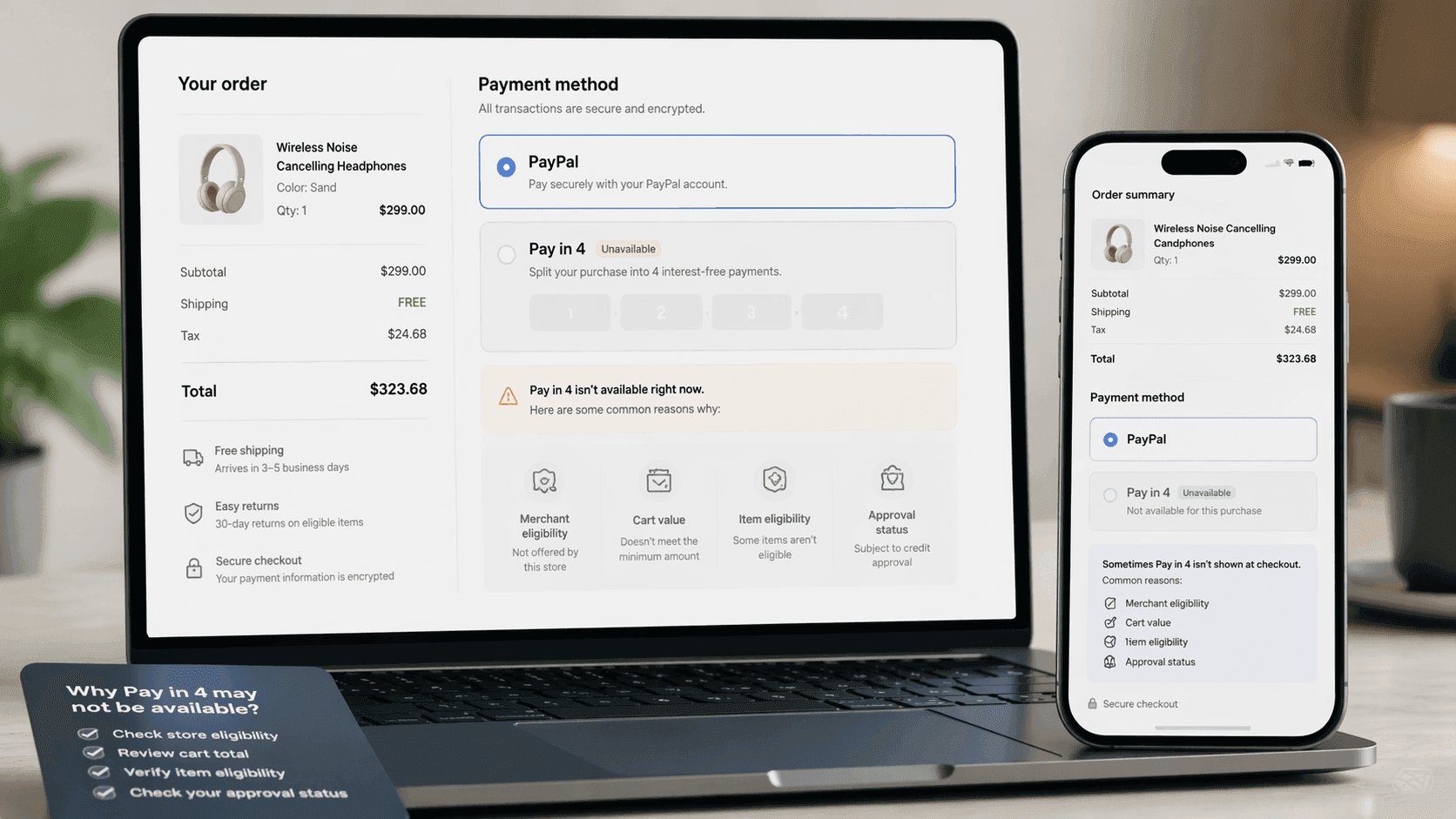
PayPal Pay in 4 does not appear at every checkout, even when a store accepts PayPal. PayPal says the option is shown in PayPal checkout only when it is available for the specific merchant, transaction amount, and transaction type. It also says not all goods and services are eligible.
If you want the short answer, here it is: PayPal Pay in 4 may be missing because the merchant does not offer it for that checkout flow, the purchase amount does not fall within the eligible range of $30 to $1,500, the items are not eligible, the purchase is recurring or subscription-based, you have too many open loans, further verification of your account details is needed, or the application is not approved for that transaction. PayPal's automated system evaluates your eligibility for each transaction based on your credit and repayment history.
Pay in 4 allows users to split their purchase into 4 interest-free payments, with the first payment due at the time of purchase and the remaining three payments due automatically every two weeks, making it a buy now, pay later option that spreads purchases over six weeks.
If you are unfamiliar with the details, you can review how PayPal Pay in 4 works, including payments, approval, limits, and fees.
Quick Answer: Why Is PayPal Pay in 4 Not Showing at Checkout?
PayPal says Pay in 4 eligibility varies by merchant and individual shopping experience. The option appears only when it is available for the specific merchant, transaction amount, and transaction type, and not all goods and services qualify.
That means a store can accept PayPal without showing Pay in 4 for every order. The decision is tied to the exact checkout session, not just to the store name.
The Merchant May Not Offer Pay in 4 for That Checkout
One of the most common reasons is simple: the merchant may support PayPal without offering the relevant Pay Later option for that order. While millions of merchants accept PayPal, not all provide the Pay in 4 option at checkout, and availability depends on which stores accept PayPal Pay in 4 and how you use it at checkout. PayPal says Pay in 4 is displayed only if the option is available for the specific merchant.
This is why shoppers sometimes assume something is broken when it is really a merchant-level availability issue. A checkout can support PayPal generally while still not presenting Pay in 4.
The Order Amount May Be Outside the Eligible Range
PayPal says Pay in 4 is available for eligible purchases from $30 to $1,500. If your order falls below that range or above it, the option may not appear.
Even when the order amount is inside that range, PayPal still says approval is required during checkout, so the correct price range alone does not guarantee that Pay in 4 will show.
The Items in Your Cart May Not Be Eligible
PayPal’s help page says not all goods and services are eligible for Pay in 4. It also says that if the items in your cart are not eligible, the offer will not be available.
This means the issue may not be the store or your account. It may be the specific products in the cart. The subject of your transaction—meaning the specific items or services—can determine whether Pay in 4 is available, and some store categories and types of purchases are more likely to support PayPal Pay in 4. Two orders at the same merchant can produce different results if one cart contains eligible items and the other does not.
The Purchase May Be Recurring or Subscription-Based
PayPal says offer availability may not apply to certain recurring or subscription services. If your checkout is tied to a subscription-style transaction, Pay in 4 may not appear even if the merchant accepts PayPal and even if the amount looks eligible.
This is one of the most overlooked reasons for Pay in 4 being unavailable. Some shoppers focus only on the merchant and amount, but the transaction type matters too.
Approval May Vary by Transaction
PayPal says not every application will be approved. It also says Pay in 4 applications are evaluated using information provided in the application, usage and history with PayPal, and in some cases external bureau data.
That means Pay in 4 can appear for one order and not for another. Approval is transaction-specific, so previous use of Pay in 4 does not guarantee approval on the next purchase. PayPal's automated system evaluates each application based on your credit and repayment history, determining eligibility for Pay in 4 at checkout.
Spending Power Does Not Guarantee Approval
Some shoppers see a Pay in 4 spending power estimate and assume that means the option should always be available. PayPal says spending power is only an estimate, does not guarantee approval, and is not a credit line. You must still apply and be approved during checkout.
PayPal also says the spending power amount may change or disappear because it is based on factors such as account status, repayment history, and other factors. Pay in 4 is a flexible payment option for those who prefer to pay over time.
Your Shopping Session May Have Been Interrupted
PayPal says a Pay in 4 approval is valid for the specific shopping session in which it was granted. If you change the payment method and do not switch back to Pay in 4, or if there is an internet glitch or session timeout, the approval may become invalid and you may need to apply again. If your session was interrupted, try again from a fresh checkout session—you may also need to log back into your PayPal account before proceeding.
This is important because sometimes the option did appear, but the checkout session changed before the purchase was completed. In that situation, Pay in 4 may disappear even though nothing else about the order seems different.
Account Status and Repayment History Can Affect Availability
PayPal says Pay in 4 spending power and future eligibility can be affected by factors such as account status, repayment history, and other factors. It also says application decisions take into account your usage and history with PayPal.
That means prior repayment behavior, overall account standing, and other risk-related signals may influence whether Pay in 4 appears or whether an application is approved for a specific checkout. Users should ensure their PayPal account is fully verified, with a valid debit or credit card linked, and avoid leaving large amounts of funds in their PayPal account to reduce the risk of issues or policy violations.
Does a Soft Credit Check Affect Whether Pay in 4 Shows?
PayPal says a soft credit check may be needed when applying for Pay Later offers and that it does not affect your credit score. A soft credit check alone is not the full reason the option appears or disappears, but it is part of the broader checkout decision process.
For shoppers, the key point is simple: Pay in 4 is not just a static account setting. It is a live checkout decision based on the order, merchant, account, and application.
What to Do If PayPal Pay in 4 Is Missing
Start by checking whether the order is within the normal Pay in 4 purchase range of $30 to $1,500. Then confirm that the purchase is not recurring or subscription-based, and remember that not all items are eligible. If Pay in 4 appeared earlier but disappeared, try again from a fresh checkout session because PayPal says session changes or timeouts can invalidate a prior approval. Users have reported that the Pay in 4 option can become unavailable for weeks or longer without clear explanation from PayPal.
If your application is declined, PayPal says it will send a message to your PayPal Message Center explaining that the application was not approved. It also says customer service cannot review loan applications or see the specific decline explanation reasons. If you need further help, you can try contacting PayPal support through their official channels, including reaching out via Facebook or by phone, as some users find these methods more effective.
Final Thoughts
PayPal Pay in 4 is best understood as a checkout-dependent option, not a guaranteed feature at every PayPal-supported store. PayPal says it appears only when it is available for the specific merchant, amount, and transaction type, and when the items and application meet the eligibility rules for that purchase. Pay in 4 and other Pay Later options are available for online purchases and can help shoppers save cash by spreading payments over time.
For most shoppers, the simplest answer is this: if PayPal Pay in 4 is not showing at checkout, the reason is usually tied to the merchant setup, the order amount, item eligibility, subscription status, session changes, or approval for that exact transaction. Availability may also be subject to regional restrictions, with some states like Missouri and Nevada being ineligible.
FAQs
Q1.
Why is PayPal Pay in 4 not showing at checkout?
Q2.
Can a store accept PayPal but not Pay in 4?
Q3.
Does spending power guarantee PayPal Pay in 4 approval?
Q4.
Why was my PayPal Pay in 4 application declined?
Q5.
Do subscriptions qualify for PayPal Pay in 4?
Q6.