On this page
Best Non-Functional Testing Tools for QA Teams in 2026

WebbyCrown
March 27, 2026 • 4 min read

Non-functional testing ensures that software performs reliably under real-world conditions. It covers performance, security, scalability, and user experience — all the factors that define how a system behaves beyond core functionality.
As applications grow, QA teams need tools that not only execute tests but also provide visibility across different testing processes.
"Non functional testing means a thorough examination of the solution’s key aspects, such as performance, usability, security, reliability, and overall user experience." — Mykhailo Poliarush, CEO Testomat.io
To understand the fundamentals, you can explore this comprehensive guide on what is non functional testing.
Automated non-functional testing tools help QA teams evaluate performance, security, and usability by combining specialized testing solutions with centralized reporting and analytics.
Categorized Overview of Non-Functional Testing Tools
Below is a breakdown of the leading tools used to handle various non-functional requirements in modern software development.
These tools become more effective when they are aligned with the right modern web development technologies and delivery workflows.
1. Test Management and Automation:Testomat.io
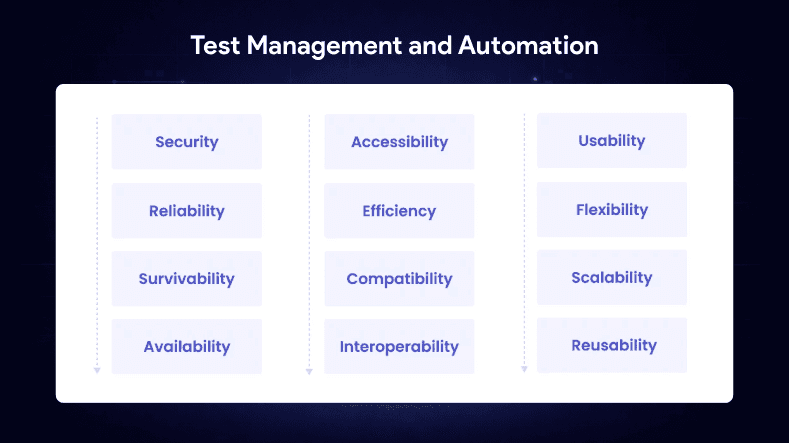
Testomat.io is a centralized platform designed to manage both automated and non-functional testing processes at scale. Instead of replacing specialized testing tools, it connects them into a unified ecosystem.
Testomat.io allows QA teams to aggregate results from various tools (such as JMeter for performance or OWASP ZAP for security) into a single dashboard. This provides a "single source of truth" for software quality.
- Key Advantages: Centralized visibility, seamless integration with CI/CD pipelines (GitHub, GitLab, Jenkins), and advanced real-time analytics.
- Strategic Value: For teams implementing non functional testing, this approach simplifies scaling and improves overall control over quality.
2. Security Testing Tools: OWASP ZAP
OWASP ZAP (ZED Attack Proxy) is a popular open-source tool for identifying security vulnerabilities in web applications. It is essential for detecting issues such as SQL injection, XSS, and server misconfigurations.
- Key Advantages: Automated vulnerability scanning, support for both active and passive security testing, and regular community updates.
- Limitations: Requires initial setup and fine-tuning to minimize false positives in complex environments.
3. Performance Testing Tools: Apache JMeter
JMeter is one of the most widely used open-source tools for load and stress testing. It helps teams evaluate how applications behave under high traffic and identify critical performance bottlenecks.
- Key Advantages: Robust load and stress testing capabilities, detailed performance metrics analysis, and high extensibility.
- Limitations: Requires significant experience to configure properly and offers limited built-in reporting compared to modern SaaS solutions.
4. UI and Usability Testing: Selenium and Cypress
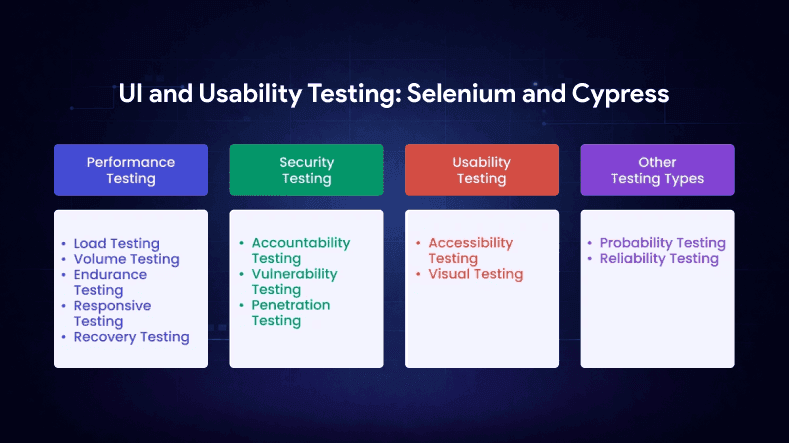
While Selenium and Cypress are primarily known for functional testing, they are increasingly used for non-functional tasks such as usability audits and front-end performance checks. They help simulate real user behavior to identify issues that impact the final user experience.
- Key Advantages: Precise simulation of user scenarios, cross-browser testing support, and fast execution (especially with Cypress).
- Limitations: They are not standalone non-functional solutions and require integration with other libraries to provide deep performance or security insights.
How to Choose the Right Tools
When selecting your non-functional testing stack, focus on these three factors:
1.Scalability: Can the tool handle the growth of your application and user base?
Long-term software quality also depends on scalability and maintenance, especially as applications grow in complexity and traffic.
3.Integration: Does it fit into your existing CI/CD pipeline?
4.Visibility: Does it provide clear, actionable reports for both developers and stakeholders?
The most effective approach is to combine specialized solutions for performance and security while managing the entire lifecycle through a centralized test management platform.
Final Thoughts
Non-functional testing is no longer optional; it is essential for delivering stable software. Performance, security, and usability all play a vital role in a product's success.
Solutions like Testomat.io help unify these fragmented processes, giving QA teams clear insights and making it easier to scale quality assurance even in the most complex projects. For a deeper dive into methodology, refer to the full guide on non functional testing.

WebbyCrown's Insight
No headings found in this content.