On this page
Google Lens vs TinEye vs Yandex: Which Reverse Image Search Is Best?

WebbyCrown Solutions-
May 19, 2026- 12 min read
Quick Answer
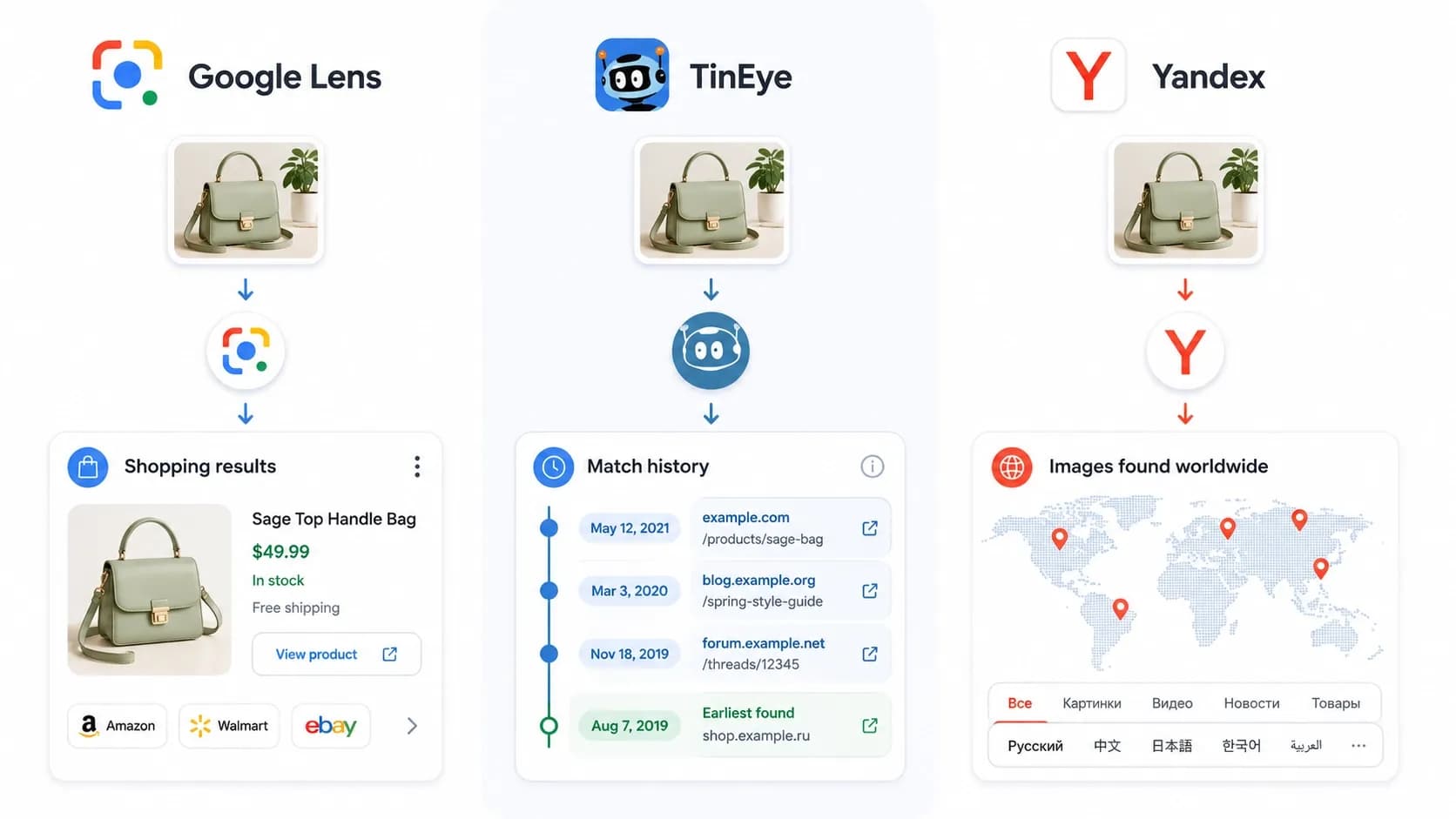
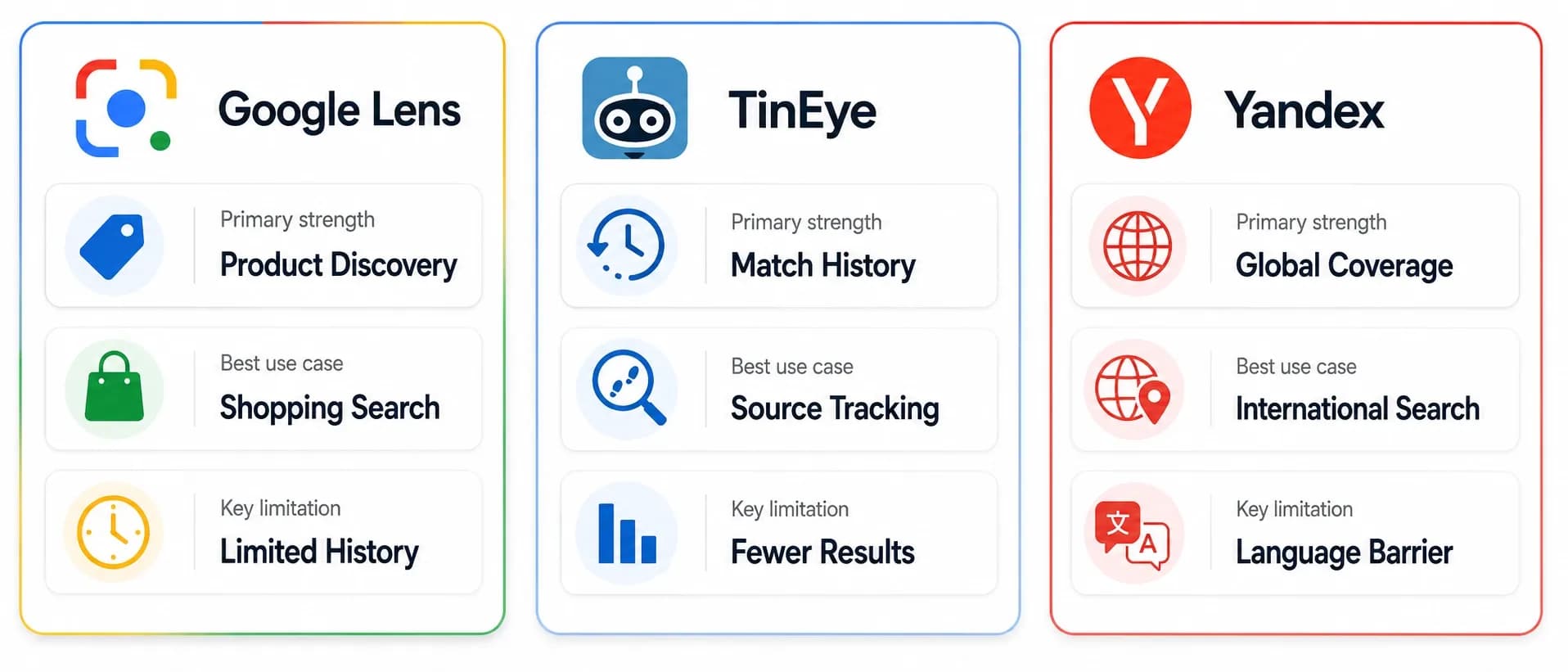
Google Lens, TinEye, and Yandex are the three most widely used reverse image search engines, and each is genuinely best at a different task. Google Lens is the strongest general-purpose tool, with the largest index and the best AI-driven visual recognition for products, objects, and shopping. TinEye is the specialist for source tracing — finding the original or earliest known version of an image, including cropped, recolored, or watermarked copies. Yandex is the most powerful engine for face matching and for finding sources on Russian, Eastern European, and Asian websites that Google and TinEye under-index. The most reliable approach is not picking one — it is using two or three of them in sequence, because each catches what the others miss.
In Short
- Google Lens = broad index + strongest AI recognition; best for general use, shopping, and object identification.
- TinEye = date-sorted index of exact and modified copies; best for finding original sources.
- Yandex = strong face matching + deep coverage of Eastern European and Asian web; best when Google and TinEye fail.
- No single engine wins on accuracy — each engine's index covers a different slice of the web.
- Pros use all three in sequence, not one alone.
- For consumers, Google Lens is the right starting point; advanced users add TinEye and Yandex for tasks Google cannot handle.
How the Three Engines Compare at a Glance
The three engines differ in almost every important dimension — index size, primary strength, regional coverage, and the type of result they prioritize.
| Feature | Google Lens | TinEye | Yandex Images |
|---|---|---|---|
| Best For | General use, shopping, object ID | Source tracing, modified copies | Face matching, hard-to-find sources |
| Index Size | Largest of the three | Smaller, specialized | Mid-sized, regionally strong |
| Primary Strength | AI-driven visual recognition | Date-sorted exact matching | Coverage of underserved regions |
| Regional Coverage | Strong globally, weakest in CIS/parts of Asia | Strong in Western web | Strongest in Russia, Eastern Europe, parts of Asia |
| Face Matching | Deliberately not supported | Not supported | Supported |
| Shopping Integration | Strong | None | Limited |
| Date Sorting | Limited | Yes (key feature) | Limited |
| Mobile Experience | Excellent (built-in) | Browser-based | Browser-based |
| Cost | Free | Free (paid tier exists) | Free |
| Best Cross-Browser Use | Chrome, Edge | Chrome, Firefox, Edge, Safari (via extension) | Any browser |
Google Lens: Strengths and Limitations
Google Lens is the consumer image search product most users encounter first. It is built on Google's deep learning models and indexes a substantial portion of the public web's image content. According to Google's official Lens documentation, the system combines object detection, classification, optical character recognition, and translation in a single product.
Strengths
Largest general index. Google indexes far more of the web than TinEye or Yandex, which gives Lens the highest base probability of returning a useful match for a randomly chosen image.
Strongest AI recognition. Lens identifies products, plants, animals, landmarks, and text in images with industry-leading accuracy. For a practical object-identification workflow, see how to image search an object For the question "what is this thing?", Lens is the default choice.
Shopping integration. Lens links visual matches directly to retailer listings, making it the strongest tool for finding where to buy a product seen in a photo.
Built into devices. On Android, Lens is integrated into the camera, Google Photos, and the Google app. On Chrome and Edge desktop, right-click reverse search is available on any image without leaving the browser.
Real-time camera mode. Pointing a phone camera at an object and identifying it in real time is unique to Lens among the three.
Limitations
Returns visually similar, not always exact matches. Lens often surfaces pictures that look like the query rather than the exact image. For source tracing — where the question is "where did this exact image originate?" — Lens is less precise than TinEye.
No date sorting. Google does not expose a "sort by oldest" option for image results, which makes Lens weaker for tracing an image to its first appearance online.
No general face identification. Lens deliberately does not identify individual faces. Google has stated publicly that this is a privacy-driven design choice, not a technical limitation. Users searching for a specific person will not find them through Lens.
Weaker on Russian, Eastern European, and parts of the Asian web. Lens's index is comparatively shallow in these regions, where Yandex routinely finds matches that Google misses.
Full step-by-step instructions for using Google Lens are in the reverse image search techniques guide.
TinEye: Strengths and Limitations
TinEye, operated by Idée Inc., is the specialist tool in this comparison. It is built around one core capability: finding the same image (and modified versions of it) elsewhere on the web. As TinEye explains on its official about page, the system creates a digital fingerprint of every image it indexes and matches new queries against those fingerprints.
Strengths
Best at finding exact and near-exact matches. When the question is "where else does this specific image appear?", TinEye is more precise than Google or Yandex. The system is purpose-built for this task.
Date sorting — the killer feature. TinEye results can be sorted by "Oldest" to find the earliest indexed appearance of an image, which is the standard journalist and fact-checker technique for source tracing.
Excellent on modified images. TinEye finds cropped, recolored, watermarked, and otherwise edited copies of an original image better than any other major engine.
No ads and no personalization. TinEye returns straightforward results without ad units, recommendation feeds, or personalization. For investigative use, this is genuinely useful.
Cross-browser extensions. Official TinEye extensions for Chrome, Firefox, Edge, and Safari enable right-click reverse search across all major browsers.
Limitations
Smaller index than Google. TinEye covers far less of the web than Google Lens. Many images return zero results in TinEye that return dozens in Google — particularly for product photos, stock images, and content from smaller sites.
No visual recognition. TinEye does not identify objects, products, plants, or landmarks. It finds matching images, not information about what is in them.
No shopping integration. For "where can I buy this?" queries, TinEye is the wrong tool.
No mobile app. TinEye runs entirely through its website and browser extensions. There is no native iOS or Android app.
Step-by-step TinEye instructions, including how to use the date-sort feature for source tracing, are in the reverse image search techniques guide.
Yandex Image Search: Strengths and Limitations
Yandex is the Russian-developed search engine widely regarded as the most powerful reverse image search engine for two specific use cases: face matching, and finding sources that Western engines miss.Strengths
Strongest face-matching capability among consumer search engines. When a photo of a face is uploaded, Yandex routinely returns visually similar faces from across its index, including from sources that Google and Bing under-cover. This capability raises important legal and ethical questions — covered in the Privacy section below.
Deepest coverage of Russian, Eastern European, and parts of the Asian web. Yandex indexes regions where Google's coverage is comparatively shallow. An image that returns nothing in Google or TinEye often returns results in Yandex.
Strong visual similarity matching overall. Beyond face matching, Yandex's general reverse search frequently surfaces images and pages that other engines miss.
Dedicated "Sites containing this image" section. Yandex's results page includes a prominent panel listing every site that hosts the queried image, which is particularly useful for source-tracing.
Free, no account required. All Yandex Image Search features are available without registration.
Limitations
Russian-language default for some users. Yandex's interface defaults to Russian in some regions; the language switch is in the top-right menu.
No mobile app. Like TinEye, Yandex runs through its website. There is no dedicated iOS or Android app for image search.
Privacy and geopolitical considerations. Yandex is a Russian company, and some organizations restrict employee use of Russian-operated services for business or operational reasons. Users in sensitive industries should confirm their organization's policy before relying on Yandex.
Face matching carries legal exposure. Using face matching to identify strangers may violate privacy laws including the GDPR in Europe and BIPA in Illinois, and may violate platform terms of service.
Head-to-Head: Which Engine Wins Each Task?
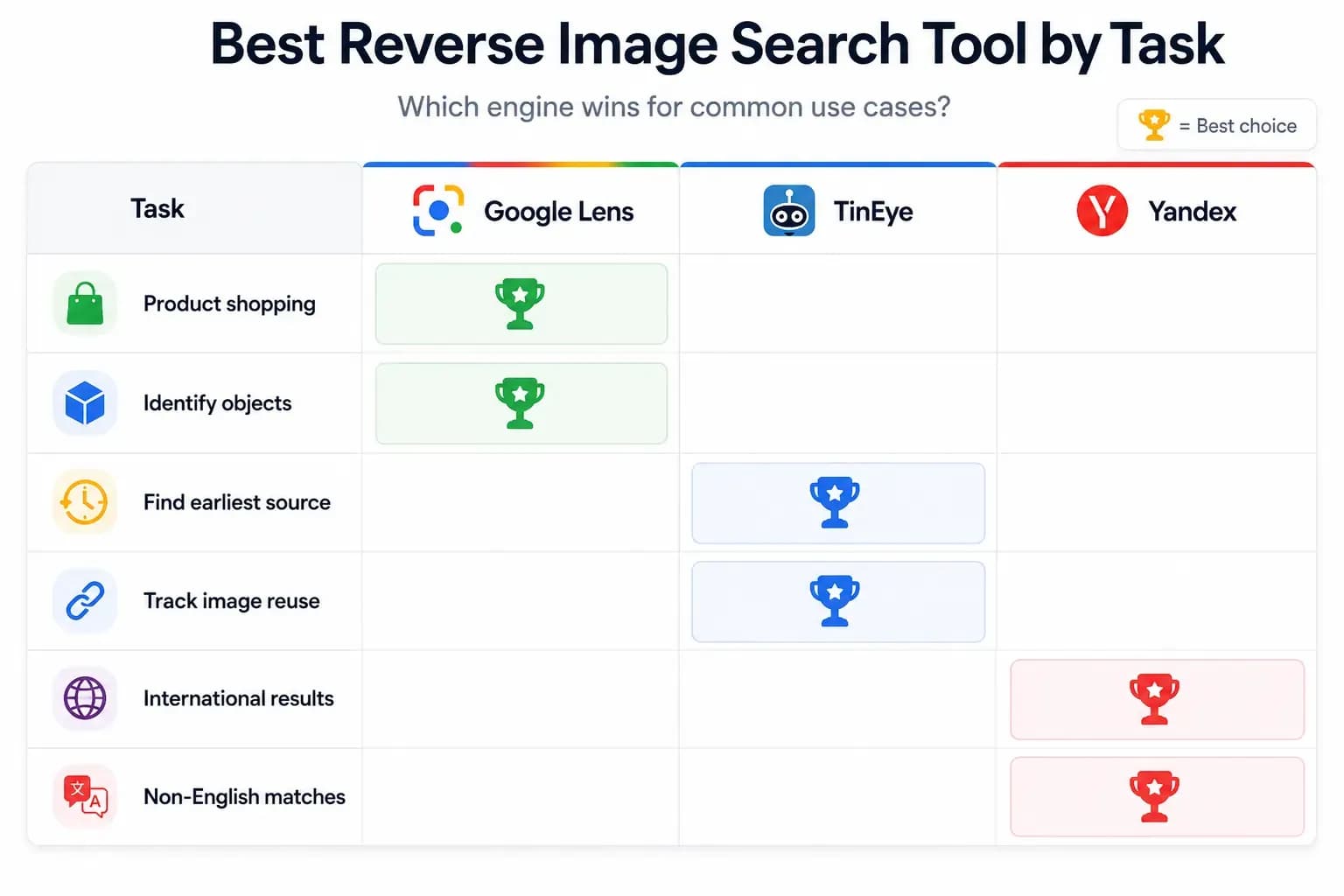
The three engines do not compete on a single dimension — they each win at different tasks. Below is a head-to-head breakdown by use case.
| Task | Winner | Why |
|---|---|---|
| Identifying a product to buy | Google Lens | Largest index, strongest shopping integration |
| Finding the original source of a known image | TinEye | Date-sorted index, finds modified copies |
| Identifying a stranger from a photo | Yandex (with caveats) | Only engine with strong face matching — but heavily regulated |
| Identifying an object, plant, or landmark | Google Lens | Strongest visual recognition AI |
| Finding cropped or recolored copies of an image | TinEye | Purpose-built for this |
| Verifying a viral news photo | TinEye → Google Lens → Yandex | Source-tracing first, then breadth checks |
| Detecting a stolen profile photo (catfish) | All three, in sequence | Each catches what the others miss |
| Finding sources on Russian or Eastern European sites | Yandex | Deepest regional coverage |
| Translating text in an image | Google Lens | Only one with real-time translation |
| Real-time identification through phone camera | Google Lens | Only one with built-in camera mode |
| Right-click reverse search in any browser | Google Lens + TinEye | Lens for Chrome/Edge, TinEye works across all major browsers |
| Investigating an image privately | TinEye | No ads, no personalization, no profile-building |
Accuracy and Index Coverage Compared
Accuracy in reverse image search is not a single metric. The three engines differ in both what they consider a match and how much of the web they have indexed.
Index coverage. Google's general web index is far larger than TinEye's image-specific index, and Yandex's index is somewhere in between with strong regional weighting toward Russia and Eastern Europe. None of the three publishes a definitive index size for direct comparison.
Matching accuracy by task.
For finding the exact same image elsewhere, TinEye has the highest precision. Its fingerprinting approach is designed for this.
For finding visually similar images, Google Lens has the strongest AI model and the most useful results.
For finding images on regional sites Western engines miss, Yandex wins outright.
Why running multiple engines is the standard practice. Because each engine indexes a different slice of the web, an image that returns no results in one frequently returns several results in another. Professional users — journalists, photographers, brand monitoring teams, security researchers — routinely run the same image through all three engines as a standard workflow. This is not redundancy; it is the only way to achieve reasonable coverage.
Privacy, Ethics, and Legal Considerations
The three engines differ significantly in how they handle user data and what they allow users to search for.
Google Lens. Bound by Google's broader privacy policies. The query image is processed on Google's servers, and search activity may be associated with the user's Google account if signed in. Google deliberately withholds general face identification as a privacy-protective design choice.
TinEye. Operates with a lighter privacy footprint. TinEye does not personalize results, does not display ads, and does not require an account. According to TinEye's published privacy policy, query images are processed but not used to build user profiles in the way ad-supported engines may.
Yandex. A Russian company subject to Russian law. Privacy considerations include both the company's data handling and the geopolitical context of using a Russian service. Some organizations restrict use of Russian-operated services for business or security reasons; users in sensitive industries should review their organization's policy. Yandex's strong face-matching capability also raises legal questions under privacy laws including the GDPR in Europe and BIPA in Illinois, both of which restrict the use of facial recognition without consent.
Face matching specifically. Only Yandex among the three offers meaningful face-matching capability, and using it to identify strangers may violate the privacy laws cited above. The legitimate use cases for face search — searching for one's own photos online, detecting catfish profiles, or verifying public figures — are covered in detail in how to find someone using image search.
Which Should You Use? A Quick Decision Guide
The right choice depends on what is being searched for and why.
Start with Google Lens if the goal is to identify what is in an image (product, plant, landmark, animal), find where to buy a product, translate text in a photo, or perform any general "what is this and what does it match" query. Lens is the default consumer tool for a reason: it handles the largest share of common needs better than the alternatives.
Add TinEye if the goal is to find the original source of an image, find cropped or recolored copies, verify a photo's authenticity for journalism or fact-checking, or run a privacy-conscious search without ad personalization. TinEye is the specialist tool every professional image researcher uses.
Add Yandex if Google Lens and TinEye both fail to return useful results — particularly when the image is likely to be hosted on Russian, Eastern European, or East Asian websites. Yandex is also the only consumer engine with meaningful face-matching capability, though that capability comes with significant legal responsibilities.
Use all three in sequence if the search is genuinely important — a stolen photo, a missing person via official channels, a journalism verification, or a brand-protection investigation. Each engine catches what the others miss, and 5 minutes spent running an image through all three is the standard professional approach.
For complete step-by-step instructions on each engine, see the reverse image search techniques guide. For the broader context of how reverse image search fits within the field of image search overall, see the pillar guide on image search techniques.
FAQs
Q1.
Which is the best reverse image search engine?
There is no single best engine — each is genuinely best at a different task. Google Lens is the strongest general-purpose tool, with the largest index and best AI-driven visual recognition. TinEye is the best for finding the original source of an image and for catching modified copies. Yandex is the best for face matching and for finding sources on Russian, Eastern European, and parts of the Asian web. The most reliable approach is using two or three of them in sequence, because each catches what the others miss.
Q2.
Is Google Lens better than TinEye?
Q3.
Why is Yandex better than Google for reverse image search in some cases?
Q4.
Can I use Google Lens for reverse image search on desktop?
Q5.
Does TinEye find faces?
Q6.
Is Yandex safe to use?
Q7.
Which engine has the most accurate face matching?
Q8.
Can I use all three engines from my phone?
Q9.
Are these tools free?
No headings found in this content.